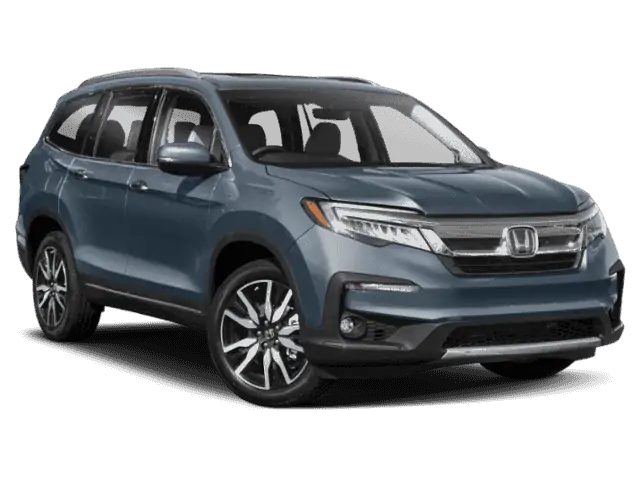
July 28, 2020 NHTSA CAMPAIGN NUMBER: 20V440000
Delayed or Inoperative Rearview Camera/FMVSS 111
A delayed or inoperative rearview camera display can reduce the driver’s view of what is behind the vehicle, increasing the risk of a crash.
NHTSA Campaign Number: 20V440
Manufacturer Honda (American Honda Motor Co.)
Components ELECTRICAL SYSTEM, BACK OVER PREVENTION
Potential Number of Units Affected 499,342
Summary
Honda (American Honda Motor Co.) is recalling certain 2019-2021 Pilot, 2019-2020 Odyssey and 2019-2020 Passport vehicles. Incorrect central network software programming may cause several errors to occur that can delay or prevent the rearview camera image from displaying. As such, these vehicles fail to comply with the requirements of Federal Motor Vehicle Safety Standard (FMVSS) number 111, “Rearview Mirrors.”
Remedy
Honda will notify owners that updated software is available. Owners have the option to either follow the mailed instructions to download and update the software for free, or visit a dealer to have the software update performed, free of charge. The recall began September 23, 2020. Owners may contact Honda customer service at 1-888-234-2138. Honda’s number for this recall is Y7Y.
Notes
Owners may also contact the National Highway Traffic Safety Administration Vehicle Safety Hotline at 1-888-327-4236 (TTY 1-800-424-9153), or go to www.safercar.gov.
Check if your Honda has a Recall
Service Bulletin
A20-051
May 11, 2021
Version 2
Noncompliance Recall: Front Control Box OTA Software Update
Supersedes 20-051, dated July 29, 2020, to revise the information highlighted in yellow.
AFFECTED VEHICLES
| Year | Model | Trim Level | VIN Range |
| 2019-20 | Odyssey | ALL Except LX | Check the iN VIN status for eligibility. |
| 2019-20 | Passport | ALL Except Sport | Check the iN VIN status for eligibility. |
| 2019-21 | Pilot | ALL Except LX | Check the iN VIN status for eligibility. |
REVISION SUMMARY
Under REPAIR PROCEDURE – USB FLASH DRIVE, a note and image were added under step 13.
BACKGROUND
The Display Audio and rearview camera stay off during a quick ignition cycle. In addition, on Passport and Pilots, the rearview camera may not display when shifting to Reverse.
NOTE
Check if the vehicle was repaired by service bulletin 20-047, Noncompliance Recall: Gauge Control Module Software Update. If it was not, complete that repair before starting this bulletin.
CUSTOMER NOTIFICATION
Owners of affected vehicles will be sent a notification of this campaign.
Do an iN VIN status inquiry to make sure the vehicle is shown as eligible.
Some vehicles affected by this campaign may be in your used vehicle inventory.
Failure to repair a vehicle subject to a recall or campaign may subject your dealership to claims or lawsuits from the customer or anyone else harmed as a result of such failure. Always conduct a VIN status inquiry before selling a vehicle in inventory.
CORRECTIVE ACTION
Update the audio unit software.
WARRANTY CLAIM INFORMATION
| Operation Number | Description | Flat Rate Time | Defect Code | Symptom Code | Template ID | Failed Part Number |
| 0105B3 | Update the audio unit software. (OTA) | 0.3 | 6HR00 | Y7Y00 | A20051A | 39540-THR-A51 |
| 0105B4 | Update the audio unit software. (USB Flash
Drive) | 0.3 | 6HR00 | Y7Y00 | A20051B | 39540-THR-A51 |
Skill Level: Repair Technician
REPAIR PROCEDURE – OVER THE AIR (OTA) UPDATE
NOTES
- If you are not able to connect to the Wi-Fi, go to page 6 to update using a USB flash drive.
- For trim levels with navigation, after updating to software version B.1.3.4, the Home Address, Saved, and Recent destinations will be erased.
- Make sure the vehicle is located in range of the dealership’s Wi-Fi network with the engine running.
- Park the vehicle outside in a well-ventilated area, or attach an exhaust hose to it.
- From the Home screen, select Settings, Connections, then Wi-Fi. Make sure the vehicle is connected to AHMOTA. If AHMOTA is not listed, contact your IT Administrator. See Over the Air (OTA) Resources, located in the Service Bay on the iN.
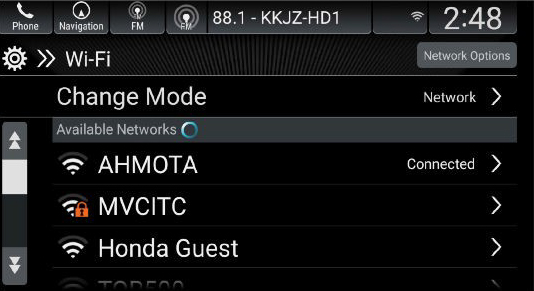
- Confirm the current software. Select Settings, System, About, and confirm the Honda SW Version.
- If the Honda SW Version reads B.1.3.4, this bulletin is completed.
- If the Honda SW Version reads less than B.1.3.4, go to step 5.
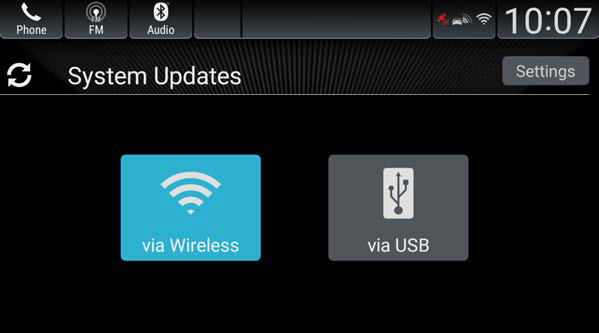
- Once you have confirmed the vehicle is connected to AHMOTA, and the Honda SW Version reads lower than 1.3.4, return to the Home screen. From there, select System Updates, then via Wireless.
NOTES
- In some instances, you might not see the following screens on the display.
- If you see Code 6382, make sure your dealer AHMOTA network is properly set up.
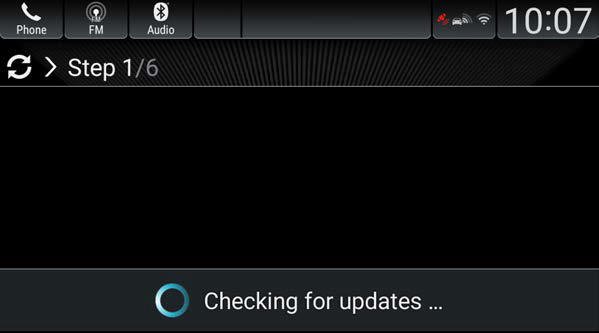
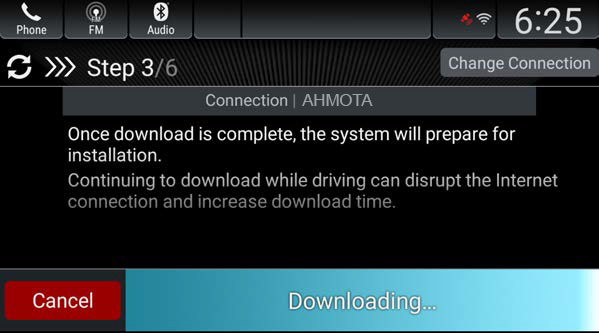
NOTES
- The download will only complete with the ignition turned to ON. If you turn the ignition to OFF before it is complete, or the Wi-Fi connection is lost, the download will resume once you turn the ignition to ON and the Wi-Fi connection is restored within 2 weeks. If it takes longer than 2 weeks, you must start the process again and it will reset to 0% complete.
- If the download completes, go to step 6.
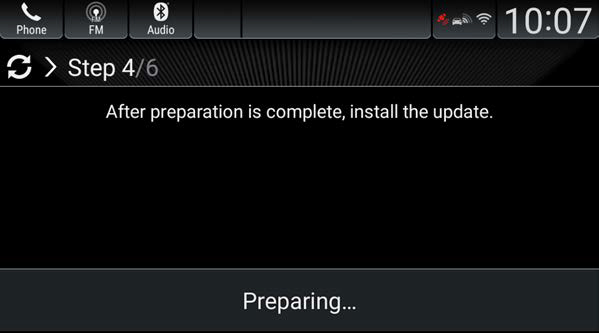
- If the download does not complete after several attempts, and you see an error message, call Tech Line.
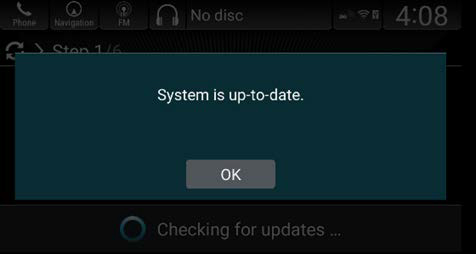
- If the download does not complete, and you see the message below, go to REPAIR PROCEDURE – USB FLASH DRIVE.
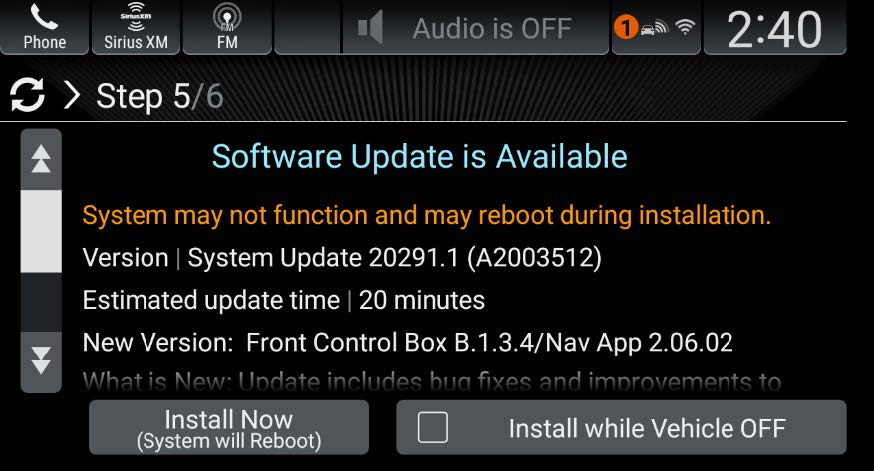
- When you see this screen, select Install Now.
NOTES
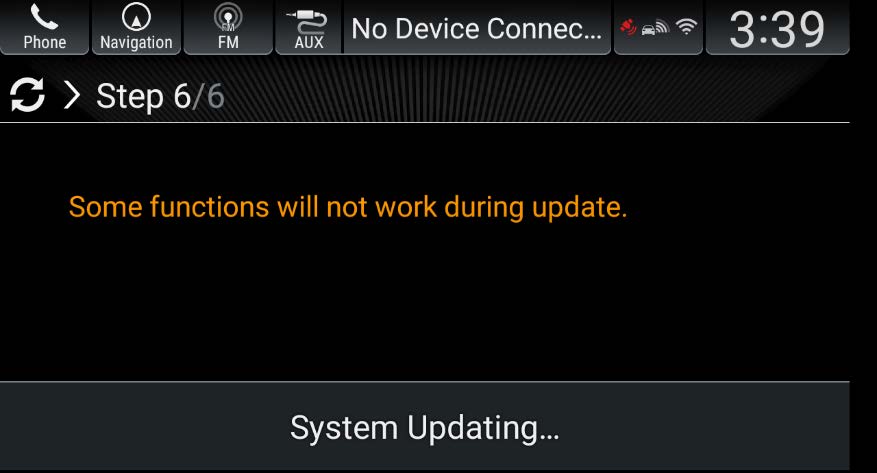
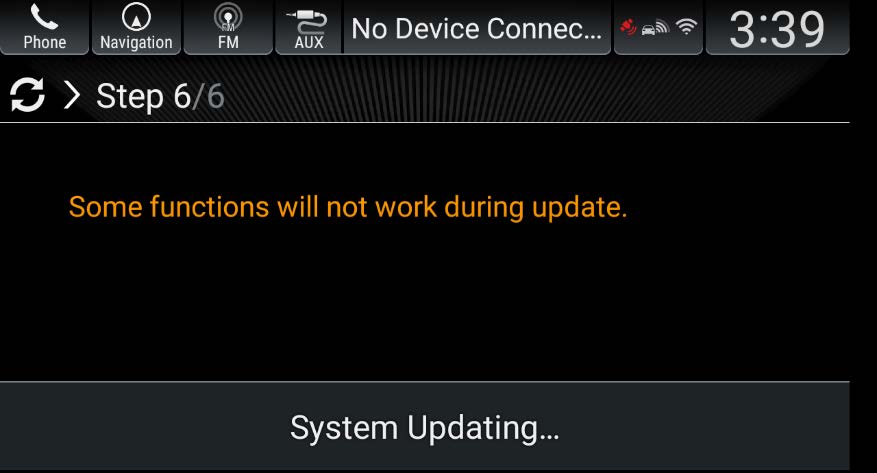
- The system will reboot several times during the installation.
- You may see this screen twice if the vehicle has navigation.
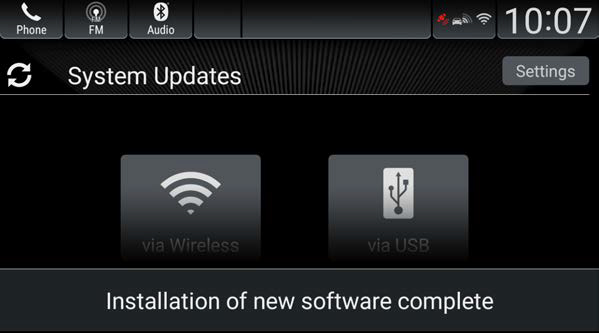
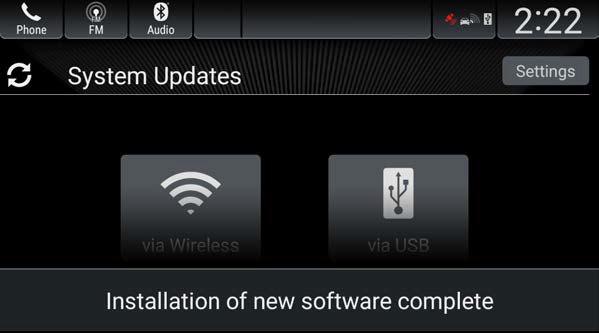
- Once the installation is complete, you will see this screen. Keep in mind the message Installation of new software complete will appear for only 5 seconds.
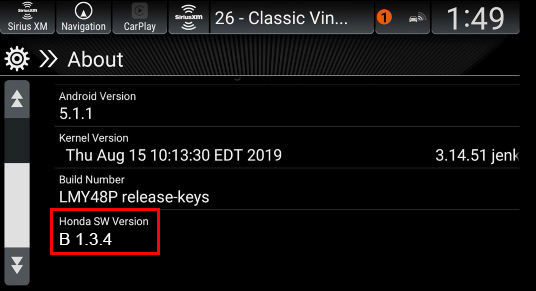
- Go to the Home screen select Settings, System, About, and make sure the Honda SW Version reads B.1.3.4. If it does, this repair is complete.
REPAIR PROCEDURE – USB FLASH DRIVE
NOTE:
- You will need a blank USB flash drive with a minimum of 8GB storage space, and formatted to FAT 32.
- NTFS format will not work.
- Do not remove the flash drive or turn the ignition to OFF during these steps.
- For trim levels with navigation, after updating to software version B.1.3.4, the Home Address, Saved, and Recent destinations will be erased.
1. On the display screen, select Settings, System, About, and check the Honda SW Version.
- If the Honda SW version reads B.1.3.4, this bulletin is completed.
- If the Honda SW version reads lower than B.1.3.4, go to step 2.
2. Log on to the Interactive Network (iN), select Service > Service Bay > Over the Air (OTA) Resources, then OTA Update via USB.
3. Select Download via model and trim.
4. Use the drop down menu to select the year and model you are trying to update.
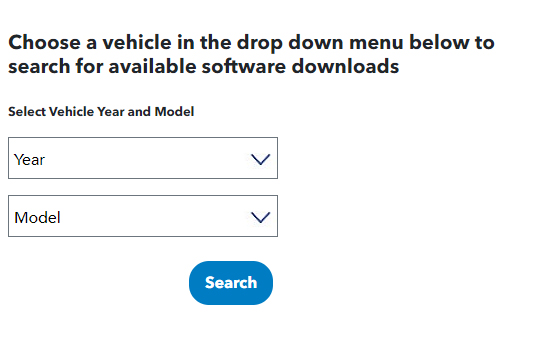
- Download the correct package.
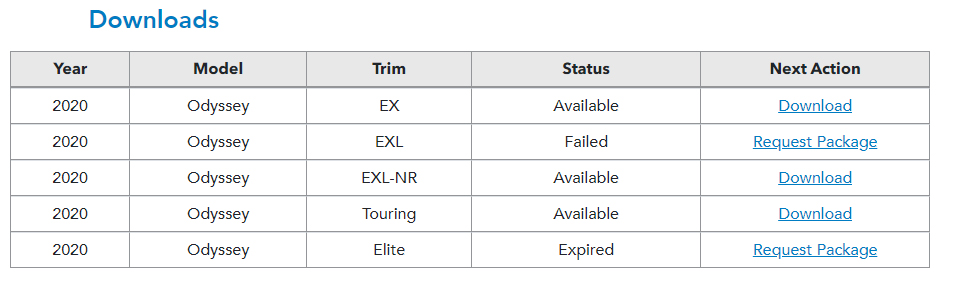
NOTE: The package for EXL-NR is the correct one for EXL-RES.
6. If a package is available, select Download.
7. Select Save As so it will save to your download folder on your computer.
8. If a package is not currently ready to download, you must request a package. Wait for about 5 to 10 minutes, and select Search until the status changes from Request Package to Download.
9. Create a folder on the flash drive, and name it rb.
NOTE: The flash drive should already be formatted to FAT 32.
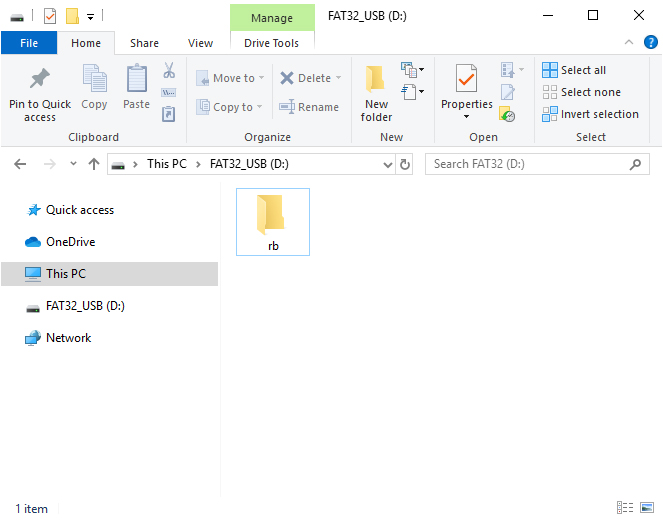
10. Copy the downloaded ZIP file that is saved in your download folder to the rb folder on the flash drive.
NOTE
Do not unzip or decompress the file; the vehicle only recognizes a zip file. If you unzip or decompress the file, it will cause an error in the vehicle.
11. Once the file is on the flash drive, return to the vehicle. From the Home screen, select System Updates, then via USB.
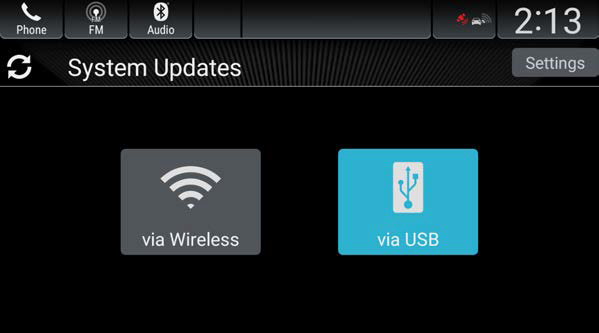
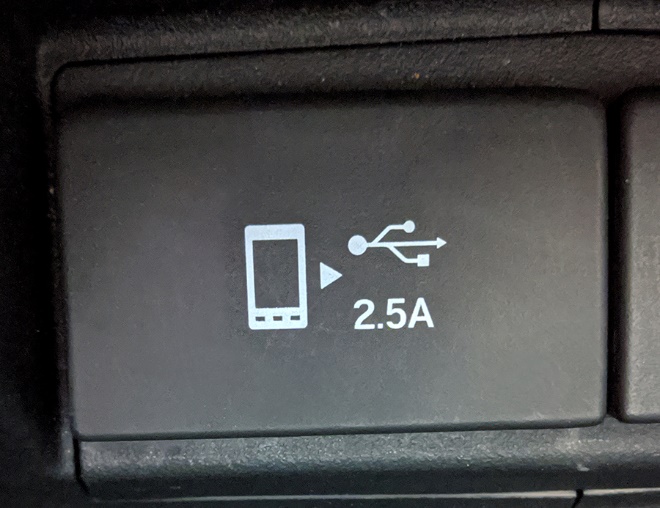
12. Plug the flash drive into the vehicle’s USB Data port identified with this symbol.
NOTE:
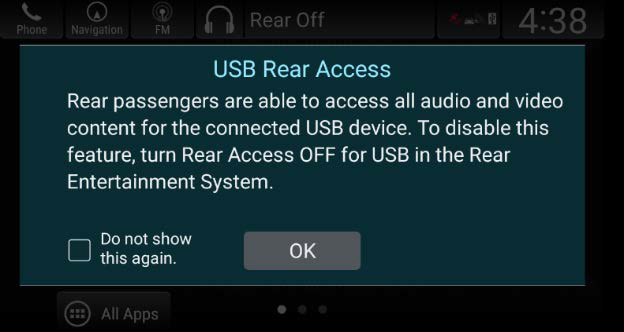
- If the vehicle has an RES, you may see this screen. If you do, select OK and continue.
- You will then see this screen telling you the system is automatically copying and preparing the update files. Keep in mind this may take some time depending on the file sizes.
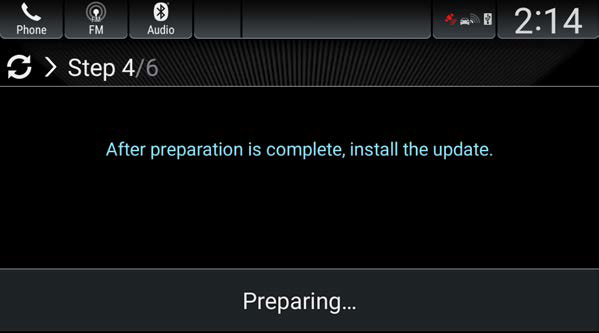
NOTE:
- If the preparation fails to complete, you will see this screen. If you do, try preparing the files again. For support, contact Tech Line.
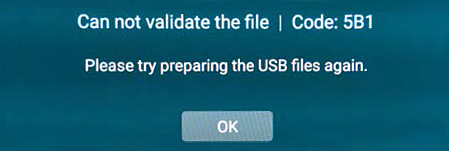
- You may also see other messages like Cannot validate the file. Please try preparing the USB files again. If so, check the USB flash drive or try a different one. Go back to step 6.
13. Once the software has been prepared, select Install Now. The system will reboot several times during the installation.
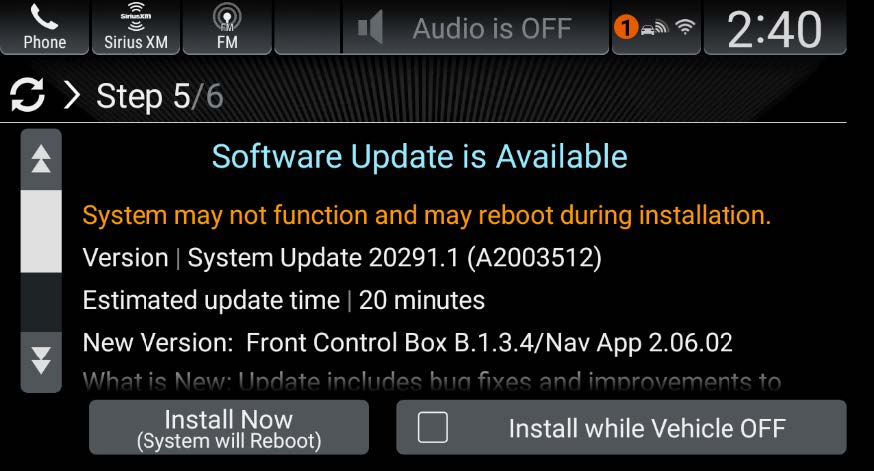
NOTES
- The system will reboot several times during the installation.
- You may see this screen twice if the vehicle has navigation.
Once the installation is complete, you will see this screen.
NOTE:
- If the System Update Complete screen is displayed, you will need to manually report the status of the update. Return to your PC and insert the USB drive into your computer. Go to https://usb.honda.com. Select Report Upload. Navigate to the RB folder on your USB drive and choose the XXXXXREPORT.JSON file.
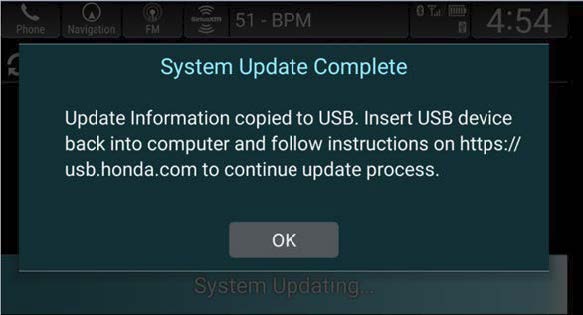
- If you encounter a message Unable to Update | Code: 1 after seeing the image above, press OK and cycle the ignition.
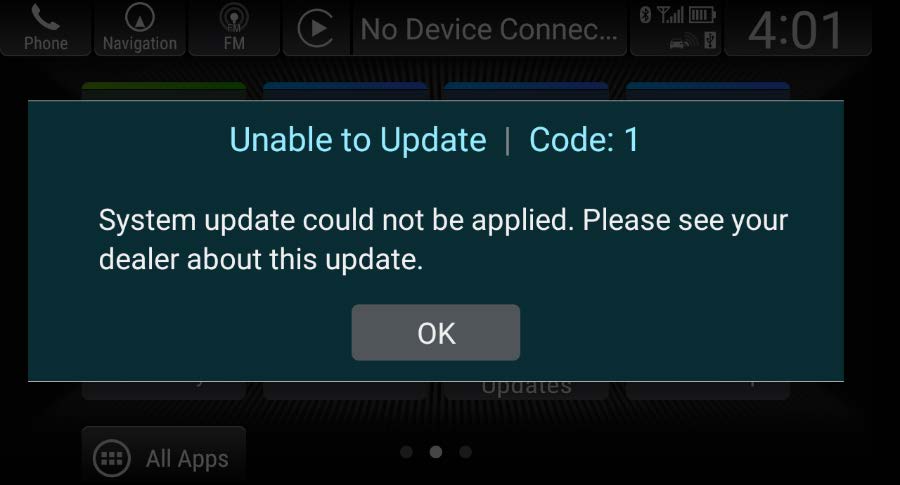
14. Make sure the Honda SW Version reads B.1.3.4.
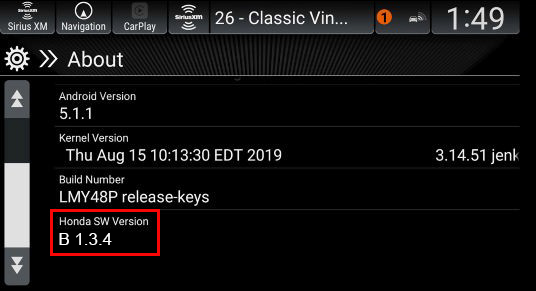
END
Statement by American Honda Regarding Four Automobile Recalls
- Approximately 608,000 total vehicles are affected in the United States
- Free recall repairs, varying by specific vehicle, include two software updates, replacement of rear view cameras and replacement of sliding door outer handle cables
- No reported crashes or injuries related to these actions
TORRANCE, Calif. – Aug. 4, 2020 – American Honda will voluntarily recall approximately 608,000 model-year 2018-2020 Honda Odyssey, 2019-2020 Passport and 2019-2021 Pilot vehicles in the United States to complete one or more of four recall repairs, for free. There have been no reports of crashes or injuries related to these actions.
Honda is announcing these recalls to encourage each owner of an affected vehicle to take it to an authorized dealer as soon as they receive notification from Honda. Mailed notification to owners will begin in late-September 2020. Owners of these models can also determine if their specific vehicles are included in the recall by visiting www.recalls.honda.com or by calling (888) 234-2138.
Recall Summaries:
Gauge Control Module Software Recall:
Software that controls the speedometer display will be updated, for free, to prevent potential malfunctions, including temporary shutdown of the display. If the speedometer does not display properly, a driver may unknowingly exceed safe speeds, increasing the risk of a crash.
Front Control Box Software Recall:
Software that controls display of the rear view camera image will be updated, for free, to prevent potential malfunctions including delayed display of the rear view and display failure under certain circumstances when the reverse gear is selected. A delayed or absent rear view display may increase the risk of a crash.
Rear View Camera Replacement Recall:
Rear view camera assemblies will be replaced with updated units, for free, to resolve durability issues that may distort the image or prevent display of the rear view when the reverse gear is selected. An absent rear view display may increase the risk of a crash.
Sliding Door Outer Handle Cable Recall: 2018-2020 Honda Odyssey
Updated sliding door outer handle cables will be installed in affected vehicles, for free. Water may enter the outer handles of the sliding doors and drip onto the cables connected to the door latch mechanisms. In freezing temperatures, ice may form on the cable, hindering proper cable movement and potentially preventing the door from latching. An unlatched sliding door could open while the vehicle is in motion, increasing the chance of injury to passengers.
SEOCONTENT-START
39540-TG7-AA1 39540-THR-A11 39540-TGS-AB1
39540-TG7-AA2 39540-THR-A12 39540-TGS-AB2
39540-TG7-AB1 39540-THR-A13 39540-TGS-AC1
39540-TG7-AB2 39540-THR-A14 39540-TGS-AC2
39540-TG7-AD1 39540-THR-A31 39540-TGS-AD1
39540-TG7-AD2 39540-THR-A32 39540-TGS-AD2
39540-TG7-AE1 39540-THR-A33
39540-TG7-AE2 39540-THR-A34
39540-TG7-AF1 39540-THR-A52
39540-TG7-AF2 39540-THR-A53
39540-TG7-AG1 39540-THR-A54
39540-TG7-AG2 39540-THR-A55
39540-TG7-AH2 39540-THR-A72
39540-TG7-AK1 39540-THR-A73
39540-TG7-AL1 39540-THR-A75
39540-TG7-AN1 39540-THR-A82
39540-TG7-AP1 39540-THR-A83
39540-TG7-AQ1 39540-THR-A84
39540-TG7-AR1 39540-THR-A85
39540-TG7-AS1
Passport
Pilot
Odyssey
********************************************
July 28, 2020
Mr. Jeffrey Giuseppe
Associate Administrator for Enforcement
National Highway Traffic Safety Administration
Attn: Recall Management Division (NVS-215)
1200 New Jersey Avenue, SE
Washington, D.C. 20590
Re: Part 573, Noncompliance Information Report
2019 – 2020 Model Year Honda Odyssey, 2019 – 2020 Model Year Honda Passport, and 2019 – 2021 Model Year Honda Pilot
Display Audio
Dear Mr. Giuseppe:
In accordance with the National Traffic and Motor Vehicle Safety Act and 49 CFR Part 573 Defect and Noncompliance and Responsibility Reports, Honda is submitting the enclosed Noncompliance Information Report regarding a safety recall of 2019 – 2020 model year Honda Odyssey, 2019 – 2020 model year Honda Passport, and 2019 – 2021 model year Honda Pilot vehicles to address a noncompliance with FMVSS 111; Rear visibility.
If you have any questions about this report, please feel free to contact me.
Sincerely,
AMERICAN HONDA MOTOR CO., INC.
Jeff Chang
Senior Manager
Product Regulatory Office
American Honda Motor Co., Inc.
1919 Torrance Boulevard
Torrance, CA 90501-2746
Phone (310) 783-2000
Noncompliance Information Report
573.6(c)(1)
Name of manufacturer: Honda of America Mfg., Inc.
Manufacturer’s agent: Jeff Chang
American Honda Motor Co., Inc.
1919 Torrance Blvd.
Torrance, CA 90501-2746
573.6(c)(2)
Identification of potentially affected vehicles:
Description of the basis for the determination of the recall population:
The recall population was determined based on manufacturing records. The manufacturing range reflects all possible vehicles that could potentially experience the problem.
Description of how the vehicles being recalled differ from similar vehicles not included in the recall:
1) 2018MY Honda Odyssey vehicles equipped with the affected component are not included in the recall as these vehicles were not subject to the phase-in period requirements nor final requirements of FMVSS No. 111; Rear Visibility. Honda did not certify these vehicles for phase-in compliance, nor were they built on or after the date of May 1, 2018, when all FMVSS No. 111 requirements applied to all vehicles. Therefore, Honda will conduct a Product Update Campaign to notify owners of 2018MY Odyssey vehicles of the same free remedy as provided under this recall.
2) Similar vehicles built on or after July 20, 2020 are not included in the recall, as these vehicles were equipped with reprogrammed display audio systems compliant with the requirements of FMVSS No. 111 as of that date. Similar vehicles built before July 20, 2020 that were within American Honda’s control were remedied prior to dealer delivery.
3) The base model trims (LX or Sport) of similar vehicles are not included in the recall, as the affected component is not equipped on these vehicles.
Identification of affected component:
Component: Unit Assy, Infotainment Control
Part No.:
See attached document
Country of Origin: USA
Manufacturer: DENSO International America, Inc.
Make/Model
Model Year
Dates of Manufacture
Number of Vehicles
Honda Odyssey
2019
04/12/2018 to 08/13/2019
131,729
Honda Odyssey
2020
09/11/2018 to 07/16/2020
70,860
Honda Passport
2019
11/06/2017 to 10/23/2019
33,920
Honda Passport
2020
06/20/2019 to 07/16/2020
19,409
Honda Pilot
2019
09/18/2017 to 07/31/2019
137,996
Honda Pilot
2020
06/18/2019 to 06/22/2020
96,427
Honda Pilot
2021
10/15/2019 to 07/16/2020
9,001
573.6(c)(3)
Total number of potentially affected vehicles: 499,342
573.6(c)(4)
Percentage of affected vehicles that contain the noncompliance: 100%
573.6(c)(5)
Noncompliance description:
Many in-cabin system interfaces are linked to a central network, including the instrument panel, display audio, and rearview camera display. Due to inappropriate software programming, several errors in the central network may occur that either delay or prevent the rearview camera image from displaying. A delayed or inoperative rearview camera display does not comply with requirements of FMVSS No. 111, and can reduce the driver’s view of what is behind the vehicle, increasing the risk of a crash.
573.6(c)(7)
Determination of noncompliance:
July 2018
Honda received internal reports of a frozen display audio screen found during vehicle testing validation, which were caused by two separate issues.
September 2018
Honda received an internal report of delayed rearview camera display found during vehicle testing validation.
November 2018
Honda received the first market claim of a frozen display audio screen, which was unrelated to the two issues identified in July 2018.
January 2019
Honda received an internal report of a frozen display audio screen found during vehicle testing validation, which was unrelated to the issues previously identified in July and November 2018.
March 2020
Honda found another, unrelated issue of a frozen display audio screen during software validation testing.
July 21, 2020
Honda determined that FMVSS noncompliance existed and decided to conduct a
noncompliance recall.
573.6(c)(8)(i)
Program for remedying the noncompliance:
Registered owners of all affected vehicles will be mailed instructions on how to download and install the software programming updates for free. Registered owners may also visit an authorized Honda dealer, and the dealer will update the software programming for free. Because the new vehicle limited warranty on all affected vehicles would have provided a free repair for the problem addressed by this recall, without any payment by the owner, reimbursement for pre-notification repairs will not be offered.
573.6(c)(8)(ii)
The estimated date to start notification to dealers: July 29, 2020
The estimated date to start notifications to owners: September 23, 2020
573.6(c)(10)
Representative copies of all notices, bulletins and other communications:
A copy of the dealer service bulletin, the final owner notification letter and other dealer communication will be submitted to your office as soon as possible.
A draft of the owner notification letter will be submitted to your office as soon as possible.
573.6(c)(11)
Manufacturer’s campaign number: Y7Y
***********************************************************************************************
August 28, 2020
Mr. Jeffrey Giuseppe
Associate Administrator for Enforcement
National Highway Traffic Safety Administration
Attn: Recall Management Division (NVS-215)
1200 New Jersey Avenue, SE
Washington, D.C. 20590
Re: NHTSA Recall No. 20V-440
Part 573, Amended Noncompliance Information Report
2019 – 2020 Model Year Honda Odyssey, 2019 – 2020 Model Year Honda Passport, and 2019 – 2021 Model Year Honda Pilot
Display Audio
Dear Mr. Giuseppe:
In accordance with the National Traffic and Motor Vehicle Safety Act and 49 CFR Part 573 Defect and Noncompliance and Responsibility Reports, Honda is submitting the enclosed amended Noncompliance Information Report regarding NHTSA recall number 20V-440 originally submitted on July 28, 2020. The amendment adds two MY2020 Honda Odyssey and one MY2021 Honda Pilot vehicles to the affected vehicle population. In addition, one non-U.S. market MY2021 Honda Pilot is being removed from the affected vehicle population, so that there is no change in the number of affected Honda Pilot vehicles. The following reporting categories are being amended:
1. Identification of potentially affected vehicles; and
2. Total number of potentially affected vehicles.
If you have any questions about this report, please feel free to contact me.
Sincerely,
AMERICAN HONDA MOTOR CO., INC.
Jeff Chang
Senior Manager
Product Regulatory Office
JC:wvt
American Honda Motor Co., Inc.
1919 Torrance Boulevard
Torrance, CA 90501-2746
Phone (310) 783-2000
Amended Noncompliance Information Report
573.6(c)(2)
Identification of potentially affected vehicles:
Initial Report
Amended Report (updates in bold)
Description of the basis for the determination of the recall population:
The recall population was determined based on manufacturing records. The manufacturing range reflects all possible vehicles that could potentially experience the problem.
Description of how the vehicles being recalled differ from similar vehicles not included in the recall:
1) 2018MY Honda Odyssey vehicles equipped with the affected component are not included in the recall as these vehicles were not subject to the phase-in period requirements nor final requirements of FMVSS No. 111; Rear Visibility. Honda did not certify these vehicles for phase-in compliance, nor were they built on or after the date of May 1, 2018, when all FMVSS No. 111 requirements applied to all vehicles. Therefore, Honda will conduct a Product Update Campaign to notify owners of 2018MY Odyssey vehicles of the same free remedy as provided under this recall.
2) Similar vehicles built on or after July 20, 2020 are not included in the recall, as these vehicles were equipped with reprogrammed display audio systems compliant with the requirements of FMVSS No. 111 as of that date. Similar vehicles built before July 20, 2020 that were within American Honda’s control were remedied prior to dealer delivery.
3) The base model trims (LX or Sport) of similar vehicles are not included in the recall, as the affected component is not equipped on these vehicles.
Make/Model
Model Year
Dates of Manufacture
Number of Vehicles
Honda Odyssey
2019
04/12/2018 to 08/13/2019
131,729
Honda Odyssey
2020
09/11/2018 to 07/16/2020
70,860
Honda Passport
2019
11/06/2017 to 10/23/2019
33,920
Honda Passport
2020
06/20/2019 to 07/16/2020
19,409
Honda Pilot
2019
09/18/2017 to 07/31/2019
137,996
Honda Pilot
2020
06/18/2019 to 06/22/2020
96,427
Honda Pilot
2021
10/15/2019 to 07/16/2020
9,001
Make/Model
Model Year
Dates of Manufacture
Number of Vehicles
Honda Odyssey
2019
04/12/2018 to 08/13/2019
131,729
Honda Odyssey
2020
09/11/2018 to 07/21/2020
70,862
Honda Passport
2019
11/06/2017 to 10/23/2019
33,920
Honda Passport
2020
06/20/2019 to 07/16/2020
19,409
Honda Pilot
2019
09/18/2017 to 07/31/2019
137,996
Honda Pilot
2020
06/18/2019 to 06/22/2020
96,427
Honda Pilot
2021
10/15/2019 to 07/16/2020
9,001
8/28/2020 Amendment
Two MY2020 Honda Odyssey vehicles with a manufacture date of July 21, 2020 are being added to the recall. Although these vehicles completed final assembly after the date the countermeasure was applied to mass production, they were initially assembled with the recalled component prior to being taken off-line for unrelated repairs. Once repaired, vehicle assembly completed on July 21, 2020, and the vehicles were distributed into commerce. Review of manufacturing records later identified the recalled component that necessitated inclusion into the recall.
Discrepancies affecting recall eligibility for two MY2021 Honda Pilot vehicles were also identified during manufacturing records review. One vehicle, in a similar scenario reflected above, was taken off-line for repairs and excluded from the recall, is now being included. The other vehicle was confirmed to be a non-U.S. market vehicle (Canadian-spec), and is being removed from the recall. This results in no net changes to the MY2021 Honda Pilot vehicle population or manufacturing date range.
573.6(c)(3)
Total number of potentially affected vehicles: 499,342 (original population)
+ 2 (population expansion)
499,344 (amended population)
*********************************************************************************************************
NHTSA Recall Number: 20V-440
Honda Campaign Number: Y7Y
Service Bulletin Number: 20-051
Why my vehicle is under recall: Due to software programming errors, the rearview image may take longer to display or may not
display at all. A rearview image that is delayed or does not display can reduce the driver’s view of
objects behind the vehicle, increasing the risk of a crash.
What we need you to do:
• Check recall information for your vehicle by accessing the Honda Recall Lookup tool at
www.recalls.honda.com and entering your Vehicle Identification Number (VIN).
• If you have questions or concerns, we encourage you to:
o call American Honda’s Customer Support & Campaign Center at 1-888-234-2138
Monday through Friday, 6:00 a.m. to 5:00 p.m., Pacific Time; or
o contact your local Honda automobile dealer; or
o email or chat by going to www.owners.honda.com/help/customer-relations; or
o visit Twitter @HondaCustSvc; or
o visit www.recalls.honda.com to use “Ask Dave”, our 24/7 virtual agent.
What Honda will do: If you prefer, your Honda dealer can update the software programming for FREE. Honda estimates
that the update will take approximately 30 minutes to complete. However, your dealer can provide
you with a better estimate of the overall time for this service visit, as it may be necessary to make
your vehicle available for a longer period of time
If you paid out of pocket to have these specific recall repairs performed on your vehicle, you may be eligible for reimbursement; please contact
American Honda’s Customer Support & Campaign Center at 1-888-234-2138 to determine potential eligibility and for instructions on how to
request reimbursement.
If you no longer own this vehicle or if any of the information is not correct, please complete and return the enclosed prepaid Information Change
Card as soon as possible. If you are a lessor of this vehicle, federal regulations require you to forward this notice to your lessee within ten days.
If you believe that American Honda or the dealer has failed or is unable to remedy the defect in your vehicle, without charge and within a
reasonable period of time (60 days from the date you first contact the dealer for a repair appointment), you may submit a complaint to the
Administrator, National Highway Traffic Safety Administration (NHTSA), 1200 New Jersey Ave., SE, Washington, DC 20590. Alternatively, you
may call the NHTSA toll-free Vehicle Safety Hotline at 1-888-327-4236 (TTY 1-800-424-9153), or go to https://www.safercar.gov.
We sincerely apologize for any inconvenience this recall may cause, but please be assured that your safety is our first concern.
Sincerely,
American Honda Motor Co., Inc.
IMPORTANT SAFETY RECALL
Your vehicle is equipped with an Over the Air (OTA) update feature that lets you receive
updates wirelessly without the need for a dealer visit. Please follow the enclosed instructions
on how to download and install the software programming updates for FREE. If you do not
have access to Wi-Fi, are not comfortable performing the update yourself, and/or are having
problems completing the update please call any authorized Honda dealer and schedule an
appointment to have your vehicle’s software updated for FREE.
If you are not the only driver of this vehicle, please advise all other drivers and passengers of
this important information.
Dear FIRSTNAME LASTNAME,
This notice is sent to you in accordance with the National Traffic and Motor Vehicle Safety Act. Honda has decided that 2019 – 2020 model
year Odyssey, 2019 – 2020 model year Passport, and 2019 – 2021 model year Pilot vehicles fail to conform to the requirements of Federal
Motor Vehicle Safety Standard No. 111, “Rear Visibility.”
AUTOMOBILE DIVISION
American Honda Motor Co., Inc.
1919 Torrance Blvd., P.O. Box 2215
Torrance, CA 90509-9870
September 2020
This notice applies to your vehicle: XXXXXXXXXXXXXXXXX
Número de campaña de seguridad NHTSA: 20V-440
Número de campaña de Honda: Y7Y
Número de boletín de servicio: 20-051
¿Por qué mi vehículo está bajo esta campaña de seguridad?:
Debido a errores de programación, la imagen para ver hacia atrás puede tomar más tiempo para
mostrarse o puede que no se muestre para nada. Una imagen para ver hacia atrás que está demorada o
que no se muestra puede reducir la vista del conductor de los objetos que están detrás del vehículo,
aumentando el riesgo de una colisión.
¿Qué necesitamos que usted haga?:
• Verifique la información de la campaña de seguridad de su vehículo ingresando en la
herramienta Honda Recall Lookup en www.recalls.honda.com e ingresando su Número de
identificación del vehículo (VIN).
• Si usted tiene preguntas o inquietudes, le recomendamos que:
o llame al Centro de Apoyo al Cliente y Campañas de American Honda al 1-888-234-2138
de lunes a viernes, 6:00 a.m. a 5:00 p.m., hora del Pacífico; o
o comuníquese con su concesionario de automóviles Honda local; o
o envíe un correo electrónico o chat por medio de www.owners.honda.com/help/customerrelations;
o
o visite Twitter @HondaCustSvc; o
o visite www.recalls.honda.com
¿Qué hará Honda?” Si usted lo prefiere, su concesionario Honda puede actualizar la programación de forma GRATUITA.
Honda estima que la actualización tomará aproximadamente 30 minutos para completar. No obstante, su
concesionario le puede ofrecer un mejor estimado del tiempo total de esta visita de servicio, ya que
pudiera ser necesario que su vehículo esté disponible por un periodo más largo.
Si usted ha pagado por realizar las reparaciones de la campaña de seguridad específica en su vehículo, usted puede ser elegible para el reembolso,
por favor comuníquese con el Centro de Apoyo al Cliente y Campañas de American Honda al 1-888-234-2138 para determinar la elegibilidad potencial
y para las instrucciones sobre cómo solicitar el reembolso.
Si ya no es el propietario de este vehículo o si alguna información no está correcta, por favor complete, firme y devuelva lo más pronto posible la
Tarjeta de Cambio de Información anexa, con el porte pagado. Si usted es el arrendador de este vehículo, las regulaciones federales requieren que
usted envié una copia de esta notificación a su arrendatario en un lapso de diez días.
Si usted cree que American Honda o el concesionario ha fallado o no le es posible reparar el defecto en su vehículo, sin cobro alguno y dentro de un
período de tiempo razonable (60 días desde la fecha en que usted contactó por primera vez el concesionario para la cita de la reparación), usted
puede enviar una queja a: Administrator, National Highway Traffic Safety Administration (NHTSA), 1200 New Jersey Ave., SE, Washington, DC 20590.
Alternativamente, usted también puede comunicarse con el número de llamada sin costo (Toll-free) Vehicle Safety Hotline de NHTSA al 1-888-327-
4236 (TTY 1-800-424-9153), o visitar la página https://www.safercar.gov.
Sinceramente le pedimos disculpas por cualquier inconveniente que pueda haberle causado esta campaña de seguridad, pero por favor tenga por
seguro que su seguridad es nuestra primera preocupación.
Atentamente,
American Honda Motor Co., Inc.
Su vehículo está equipado con una función de actualización en el aire “Over the Air” (OTA)
que le permite recibir actualizaciones de manera inalámbrica, sin necesidad de visitar un
concesionario. Por favor siga las instrucciones adjuntas sobre cómo descargar e instalar las
actualizaciones de programación de forma GRATUITA. Si no tiene acceso a Wi-Fi, no se
siente cómodo realizando la actualización usted mismo, y/o tienes problemas completando la
actualización, por favor llame a cualquier concesionario Honda autorizado y programe una cita
para la actualización del programa de su vehículo de forma GRATUITA.
Si usted no es el único conductor de este vehículo, por favor informe a todos los conductores
y pasajeros sobre esta información importante.
DIVISIÓN AUTOMOTRIZ
American Honda Motor Co., Inc.
1919 Torrance Blvd., P.O. Box 2215
Torrance, CA 90509-9870
Estimado FIRSTNAME LASTNAME,
Esta notificación ha sido enviada a usted de acuerdo con el decreto de la oficina de Administración Nacional de Seguridad del Tráfico en las
Carreteras (National Highway Traffic Safety Administration o NHTSA por sus siglas en inglés). Honda ha determinado que los vehículos Odyssey año
modelo 2019 – 2020, Passport año modelo 2019 – 2020 y Pilot año modelo 2019 – 2021 fallaron con el cumplimiento de la Norma Federal de
Seguridad para Vehículos de Motor No. 111, “Rear Visibility” (Visibilidad trasera).
CAMPAÑA DE SEGURIDAD IMPORTANTE
Esta notificación aplica a su vehículo: XXXXXXXXXXXXXXXXX
Septiembre del 2020
1
Installation Time
• The total software download time will vary depending on the data
transfer rate. A weak signal strength could result in an error
message.
• Once the download is complete, the software installation time will
take about 30 minutes.
Wi-Fi Method (All Models)
The Wi-Fi method can be used on all trim levels. However, Touring and
Elite trim levels are equipped with a built-in telematics control unit
(TCU). Go to page 9 for the TCU update instructions.
Follow these steps to set up the vehicle to connect to a Wi-Fi
network.
1. Make sure your vehicle is located in range of a Wi-Fi network
with the engine running, outside in a well-ventilated area.
2. Select Settings.
Odyssey: Over the Air Audio Software
Update Instructions
2
3. Select Connections.
4. Select Wi-Fi.
3
5. Select a Wi-Fi network, and enter the password if the network is
secured.
6. Once you are connected to the Wi-Fi network, select the Home
icon.
4
7. Select System Updates.
8. Select via Wireless. The system will check for updates and
begin to download (if available).
5
If you get a System is up-to-date message, go to step 10.
The progress bar along the bottom of the screen indicates
how much of the download has been completed.
6
9. Once the download is complete, select Install Now or Install
while Vehicle OFF.
• If you select Install Now, the engine needs to remain
running to complete the update. Keep the vehicle outside in
a well-ventilated area during this step.
• If you select Install while Vehicle OFF, once the vehicle is
turned off, it will begin to install the update.
7
10. Once the installation is complete or the system states it is up-to date,
select the Home icon.
11. Select Settings.
12. Select System.
8
13. Select About, and confirm the Honda SW Version shows
B.1.3.4.
• If you see B.1.3.4 or higher, the update was successfully
completed.
• If you do not see B.1.3.4 or higher, contact an authorized
Honda dealer for assistance.
9
Built-in Telematics Control Unit
(Touring and Elite Trim Levels
Only)
For Touring and Elite trim levels, a unit built into the vehicle called
a Telematics Control Unit (TCU) or embedded in-vehicle cellular
connection. When receiving good cellular coverage, the vehicle will
download the software update automatically. Once the software
download is complete, you will see a ! icon over the System
Update icon indicating that an update is available to install. Keep in
mind, your personal cell phone is not used for software updates
and all updates are free of charge.
• If you do not see the ! icon, your vehicle’s cellular reception
may not be strong enough to download the update. Refer to
the Wi-Fi method on page 1 to complete the update.
• The software installation time will take about 30 minutes.
1. Start the engine outside in a well-ventilated area.
NOTE
10
2. When you see the ! icon, select the Home icon.
3. Select System Updates.
4. Select Install Now or Install while Vehicle OFF.
• If you select Install Now, the engine will need to remain
running to complete the update. Keep the vehicle in a well
ventilated area outside during this step.
11
• If you select Install while Vehicle OFF, once the vehicle
is turned off, it will begin to install the update.
5. Once the installation is complete, select the Home icon.
12
6. Select Settings.
7. Select System.
13
8. Select About, and confirm the Honda SW Version shows
B.1.3.4.
• If you see B.1.3.4 or higher, the update was successfully
completed.
• If you do not see B.1.3.4 or higher, contact an authorized
Honda dealer for assistance.
14
Issues During the Update
If you receive an Unable to Update error message at any point, move
the vehicle to a new location if using the embedded cellular connection
(Touring and Elite trim levels only). If you continue to see this
message, please visit your local Honda dealer or call American Honda’s
Customer Service In-Car Technology Support at 1-888-528-7876.
You may have already downloaded and installed the latest update prior to
receiving this letter. If so, when checking for an update, you will see a
System is up-to-date message.
15
Tiempo de instalación
• El tiempo total para descargar el programa va a variar dependiendo
de la velocidad de transferencia de los datos. La baja intensidad de
la señal podría ocasionar un mensaje de error.
• Una vez que se termine la descarga, el tiempo de instalación del
programa tardará aproximadamente 30 minutos.
Método por Wi-Fi (Todos los modelos)
El método por Wi-Fi puede ser utilizado en todos los niveles de
equipamiento. No obstante, los niveles de equipamiento Touring y Elite
están equipados con una unidad de control de componentes telemáticos
(TCU) integrada. Vaya a la página 9 para las instrucciones de
actualización de la TCU.
Siga estos pasos para configurar el vehículo y conectarlo a una red de
Wi-Fi.
1. Asegúrese que su vehículo está ubicado en un rango de una
red Wi-Fi con el motor en funcionamiento, afuera, en una zona
bien ventilada.
2. Seleccione “Settings” (Configuraciones).
Odyssey: Instrucciones de actualización del
programa de audio con la función de
actualización en el aire “O ver the Air”
(OTA)
16
3. Seleccione “Connections” (Conexiones).
4. Seleccione “Wi-Fi”.
17
5. Seleccione una red de “Wi-Fi” e ingrese la contraseña si la red es
segura.
6. Una vez que esté conectado con la red Wi-Fi, seleccione el icono
“Home” (Inicio).
18
7. Seleccione “System Updates” (Actualizaciones del sistema).
8. Seleccione “via Wireless”. (Mediante red alámbrica). El
sistema comprobará si hay actualizaciones y comenzará la
descarga (si está disponible).
19
Si recibe un mensaje “System is up-to-date” (El Sistema
está actualizado), vaya al paso 10.
La barra de avance a lo largo de la parte inferior de la pantalla
indicará cuánto se ha completado de la descarga.
20
9. Una vez que se complete la descarga, seleccione “Install
Now” o “Install while Vehicle OFF” (Instalar ahora o
Instalar con el vehículo apagado).
• Si selecciona “Install Now”, el motor necesita permanecer
en funcionamiento para completar la actualización. Durante
este paso, mantenga el vehículo afuera en un área bien
ventilada.
• Si selecciona “Install while Vehicle OFF”, una vez que
apague el vehículo comenzará a instalar la actualización.
21
10. Una vez que la instalación está completa o el sistema le indica
que está actualizado, seleccione el ícono “Home” (Inicio).
11. Seleccione “Settings” (Configuración).
12. Seleccione “System” (Sistema).
22
13. Seleccione “About” (Acerca de) y confirme que la versión
“Honda SW Version” muestra B.1.3.4.
• Si usted ve B.1.3.4 o una versión superior, la actualización
fue completada exitosamente.
• Si usted no ve B.1.3.4 o una versión superior, comuníquese
con un concesionario Honda autorizado para recibir
asistencia.
23
Unidad de control de componentes telemáticos
integrada (Solamente en los niveles de equipamiento
Touring y Elite)
Para los niveles de equipamiento Touring y Elite, una unidad
integrada en el vehículo llamada Unidad de control de
componentes telemáticos (TCU) o una conexión celular integrada
en el vehículo. Cuando se reciba una buena cobertura de celular,
el vehículo descargará el programa de manera automática. Una
vez que la descarga del programa este completada, usted verá un
icono ! sobre el icono de “System Update” (Actualización del
programa) que una actualización está disponible para instalarla.
Tenga presente, su celular personal no se utiliza para las
actualizaciones del programa y todas las actualizaciones son
gratuitas.
• Si usted no ve el ícono ! la señal de recepción celular puede
que no sea lo suficientemente fuerte para descargar la
actualización. Consulte el método por Wi-Fi en la página 1 para
completar la actualización.
• El tiempo de instalación del programa tardará aproximadamente
30 minutos.
1. Arranque el motor afuera, en una zona bien ventilada.
NOTA
24
2. Cuando uste ve el icono ! Seleccione el icono “Home” (Inicio).
3. Seleccione “System Updates” (Actualizaciones del sistema).
4. Seleccione “Install Now” (Instalar ahora) o “Install while
Vehicle OFF” (Instalar cuando el vehículo este en OFF –
Apagado).
• Si selecciona “Install Now”, será necesario que el motor
se mantenga funcionando para completar la actualización.
Durante este paso, mantenga el vehículo afuera en un área
bien ventilada.
25
• Si selecciona “Install while Vehicle OFF”, una vez que
apague el vehículo comenzará a instalar la actualización.
5. Una vez que la instalación está completada, seleccione el ícono
“Home” (Inicio).
26
6. Seleccione “Settings” (Configuraciones).
7. Seleccione “System” (Sistema).
27
8. Seleccione “About” (Acerca de) y confirme que la versión “Honda
SW Version” muestra B.1.3.4.
• Si usted ve B.1.3.4 o una versión superior, la actualización fue
completada exitosamente.
• Si usted no ve B.1.3.4 o una versión superior, comuníquese
con un concesionario Honda autorizado para recibir
asistencia.
28
Problemas durante la actualización
Si en algún momento recibe un mensaje de error “Unable to Update”
(No se puede actualizar), mueva el vehículo a otro lugar si utiliza la
conexión para celular integrada (solamente los niveles de equipamiento
Touring y Elite). Si continúa viendo este mensaje, visite a su
concesionario Honda local o llame al departamento de Apoyo
tecnológico en el auto de Servicio al Cliente de Honda al
1-888-528-7876.
Es posible que antes de recibir esta carta ya haya descargado e
instalado la actualización más reciente. Si es así, cuando verifique si hay
actualizaciones, usted verá un mensaje de que el sistema está
actualizado “System is up-to-date”.
29
This page is intentionally left blank
Está página se dejó en blanco intencionalmente.
30
This page is intentionally left blank
Está página se dejó en blanco intencionalmente.
1
Installation Time
• The total software download time will vary depending on the data
transfer rate. A weak signal strength could result in an error
message.
• Once the download is complete, the software installation time will
take about 30 minutes.
Wi-Fi Method (All Models)
The Wi-Fi method can be used on all trim levels. However, Touring and
Elite trim levels are equipped with a built-in telematics control unit
(TCU). Go to page 9 for the TCU update instructions.
Follow these steps to set up the vehicle to connect to a Wi-Fi
network.
1. Make sure your vehicle is located in range of a Wi-Fi network
with the engine running, outside in a well-ventilated area.
2. Select Settings.
Passport: Over the Air Audio Software
Update Instructions
2
3. Select Connections.
4. Select Wi-Fi.
3
5. Select a Wi-Fi network, and enter the password if the network is
secured.
6. Once you are connected to the Wi-Fi network, select the Home
icon.
4
7. Select System Updates.
8. Select via Wireless. The system will check for updates and
begin to download (if available).
5
If you get a System is up-to-date message, go to step 10.
The progress bar along the bottom of the screen indicates
how much of the download has been completed.
6
9. Once the download is complete, select Install Now or Install
while Vehicle OFF.
• If you select Install Now, the engine needs to remain
running to complete the update. Keep the vehicle outside in
a well-ventilated area during this step.
• If you select Install while Vehicle OFF, once the vehicle is
turned off, it will begin to install the update.
7
10. Once the installation is complete or the system states it is up-to date,
select the Home icon.
11. Select Settings.
12. Select System.
8
13. Select About, and confirm the Honda SW Version shows
B.1.3.4.
• If you see B.1.3.4 or higher, the update was successfully
completed.
• If you do not see B.1.3.4 or higher, contact an authorized
Honda dealer for assistance.
9
Built-in Telematics Control Unit
(Touring and Elite Trim Levels Only)
For Touring and Elite trim levels, a unit built into the vehicle called a
Telematics Control Unit (TCU) or embedded in-vehicle cellular connection.
When receiving good cellular coverage, the vehicle will download the
software update automatically. Once the software download is complete,
you will see a ! icon over the System Update icon indicating that an update
is available to install. Keep in mind, your personal cell phone is not used
for software updates and all updates are free of charge.
• If you do not see the ! icon, your vehicle’s cellular reception
may not be strong enough to download the update. Refer to
the Wi-Fi method on page 1 to complete the update.
• The software installation time will take about 30 minutes.
1. Start the engine outside in a well-ventilated area.
NOTE
10
2. When you see the ! icon, select the Home icon.
3. Select System Updates.
4. Select Install Now or Install while Vehicle OFF.
• If you select Install Now, the engine will need to remain
running to complete the update. Keep the vehicle in a well
ventilated area outside during this step.
11
• If you select Install while Vehicle OFF, once the vehicle
is turned off, it will begin to install the update.
5. Once the installation is complete, select the Home icon.
12
6. Select Settings.
7. Select System.
13
8. Select About, and confirm the Honda SW Version shows
B.1.3.4.
• If you see B.1.3.4 or higher, the update was successfully
completed.
• If you do not see B.1.3.4 or higher, contact an authorized
Honda dealer for assistance.
14
Issues During the Update
If you receive an Unable to Update error message at any point, move
the vehicle to a new location if using the embedded cellular connection
(Touring and Elite trim levels only). If you continue to see this
message, please visit your local Honda dealer or call American Honda’s
Customer Service In-Car Technology Support at 1-888-528-7876.
You may have already downloaded and installed the latest update prior
to receiving this letter. If so, when checking for an update, you will see a
System is up-to-date message.
15
Tiempo de instalación
• El tiempo total para descargar el programa va a variar dependiendo
de la velocidad de transferencia de los datos. La baja intensidad de
la señal podría ocasionar un mensaje de error.
• Una vez que se termine la descarga, el tiempo de instalación del
programa tardará aproximadamente 30 minutos.
Método por Wi-Fi (Todos los modelos)
El método por Wi-Fi puede ser utilizado en todos los niveles de
equipamiento. No obstante, los niveles de equipamiento Touring y Elite
están equipados con una unidad de control de componentes telemáticos
(TCU) integrada. Vaya a la página 9 para las instrucciones de
actualización de la TCU.
Siga estos pasos para configurar el vehículo y conectarlo a una red de
Wi-Fi.
1. Asegúrese que su vehículo está ubicado en un rango de una
red Wi-Fi con el motor en funcionamiento, afuera, en una zona
bien ventilada.
2. Seleccione “Settings” (Configuraciones).
Passport: Instrucciones de actualización
del programa de audio con la función de
actualización en el aire “Over the Air”
(OTA)
16
3. Seleccione “Connections” (Conexiones).
4. Seleccione “Wi-Fi”.
17
5. Seleccione una red de “Wi-Fi” e ingrese la contraseña si la red es
segura.
6. Una vez que esté conectado con la red Wi-Fi, seleccione el icono
“Home” (Inicio).
18
7. Seleccione “System Updates” (Actualizaciones del sistema).
8. Seleccione “via Wireless”. (Mediante red alámbrica). El
sistema comprobará si hay actualizaciones y comenzará la
descarga (si está disponible).
19
Si recibe un mensaje “System is up-to-date” (El Sistema
está actualizado), vaya al paso 10.
La barra de avance a lo largo de la parte inferior de la pantalla
indicará cuánto se ha completado de la descarga.
20
9. Una vez que se complete la descarga, seleccione “Install
Now” o “Install while Vehicle OFF” (Instalar ahora o
Instalar con el vehículo apagado).
• Si selecciona “Install Now”, el motor necesita permanecer
en funcionamiento para completar la actualización. Durante
este paso, mantenga el vehículo afuera en un área bien
ventilada.
• Si selecciona “Install while Vehicle OFF”, una vez que
apague el vehículo comenzará a instalar la actualización.
21
10. Una vez que la instalación está completa o el sistema le indica
que está actualizado, seleccione el ícono “Home” (Inicio).
11. Seleccione “Settings” (Configuración).
12. Seleccione “System” (Sistema).
22
13. Seleccione “About” (Acerca de) y confirme que la versión
“Honda SW Version” muestra B.1.3.4.
• Si usted ve B.1.3.4 o una versión superior, la actualización
fue completada exitosamente.
• Si usted no ve B.1.3.4 o una versión superior, comuníquese
con un concesionario Honda autorizado para recibir
asistencia.
23
Unidad de control de componentes telemáticos
integrada (Solamente en los niveles de equipamiento
Touring y Elite)
Para los niveles de equipamiento Touring y Elite, una unidad
integrada en el vehículo llamada Unidad de control de
componentes telemáticos (TCU) o una conexión celular integrada
en el vehículo. Cuando se reciba una buena cobertura de celular,
el vehículo descargará el programa de manera automática. Una
vez que la descarga del programa este completada, usted verá un
icono ! sobre el icono de “System Update” (Actualización del
programa) que una actualización está disponible para instalarla.
Tenga presente, su celular personal no se utiliza para las
actualizaciones del programa y todas las actualizaciones son
gratuitas.
• Si usted no ve el ícono ! la señal de recepción celular puede
que no sea lo suficientemente fuerte para descargar la
actualización. Consulte el método por Wi-Fi en la página 1 para
completar la actualización.
• El tiempo de instalación del programa tardará aproximadamente
30 minutos.
1. Arranque el motor afuera, en una zona bien ventilada.
NOTA
24
2. Cuando uste ve el icono ! Seleccione el icono “Home” (Inicio).
3. Seleccione “System Updates” (Actualizaciones del sistema).
4. Seleccione “Install Now” (Instalar ahora) o “Install while
Vehicle OFF” (Instalar cuando el vehículo este en OFF –
Apagado).
• Si selecciona “Install Now”, será necesario que el motor
se mantenga funcionando para completar la actualización.
Durante este paso, mantenga el vehículo afuera en un área
bien ventilada.
25
• Si selecciona “Install while Vehicle OFF”, una vez que
apague el vehículo comenzará a instalar la actualización.
5. Una vez que la instalación está completada, seleccione el ícono
“Home” (Inicio).
26
6. Seleccione “Settings” (Configuraciones).
7. Seleccione “System” (Sistema).
27
8. Seleccione “About” (Acerca de) y confirme que la versión “Honda
SW Version” muestra B.1.3.4.
• Si usted ve B.1.3.4 o una versión superior, la actualización fue
completada exitosamente.
• Si usted no ve B.1.3.4 o una versión superior, comuníquese
con un concesionario Honda autorizado para recibir
asistencia.
28
Problemas durante la actualización
Si en algún momento recibe un mensaje de error “Unable to Update”
(No se puede actualizar), mueva el vehículo a otro lugar si utiliza la
conexión para celular integrada (solamente los niveles de equipamiento
Touring y Elite). Si continúa viendo este mensaje, visite a su
concesionario Honda local o llame al departamento de Apoyo
tecnológico en el auto de Servicio al Cliente de Honda al
1-888-528-7876.
Es posible que antes de recibir esta carta ya haya descargado e
instalado la actualización más reciente. Si es así, cuando verifique si hay
actualizaciones, usted verá un mensaje de que el sistema está
actualizado “System is up-to-date”.
29
This page is intentionally left blank
Está página se dejó en blanco intencionalmente.
30
This page is intentionally left blank
Está página se dejó en blanco intencionalmente.
1
Installation Time
• The total software download time will vary depending on the data
transfer rate. A weak signal strength could result in an error
message.
• Once the download is complete, the software installation time will
take about 30 minutes.
Wi-Fi Method (All Models)
The Wi-Fi method can be used on all trim levels. However, Touring and
Elite trim levels are equipped with a built-in telematics control unit
(TCU). Go to page 9 for the TCU update instructions.
Follow these steps to set up the vehicle to connect to a Wi-Fi
network.
1. Make sure your vehicle is located in range of a Wi-Fi network
with the engine running, outside in a well-ventilated area.
2. Select Settings.
Pilot: Over the Air Audio Software
Update Instructions
2
3. Select Connections.
4. Select Wi-Fi.
3
5. Select a Wi-Fi network, and enter the password if the network is
secured.
6. Once you are connected to the Wi-Fi network, select the Home
icon.
4
7. Select System Updates.
8. Select via Wireless. The system will check for updates and
begin to download (if available).
5
If you get a System is up-to-date message, go to step 10.
The progress bar along the bottom of the screen indicates
how much of the download has been completed.
6
9. Once the download is complete, select Install Now or Install
while Vehicle OFF.
• If you select Install Now, the engine needs to remain
running to complete the update. Keep the vehicle outside in
a well-ventilated area during this step.
• If you select Install while Vehicle OFF, once the vehicle is
turned off, it will begin to install the update.
7
10. Once the installation is complete or the system states it is up-to date,
select the Home icon.
11. Select Settings.
12. Select System.
8
13. Select About, and confirm the Honda SW Version shows
B.1.3.4.
• If you see B.1.3.4 or higher, the update was successfully
completed.
• If you do not see B.1.3.4 or higher, contact an authorized
Honda dealer for assistance.
9
Built-in Telematics Control Unit
(Touring, Elite, and Black Edition
Trim Levels Only)
For Touring, Elite, and Black Edition trim levels, a unit built into the
vehicle called a Telematics Control Unit (TCU) or embedded in vehicle
cellular connection. When receiving good cellular coverage,
the vehicle will download the software update automatically. Once
the software download is complete, you will see a ! icon over the
System Update icon indicating that an update is available to install.
Keep in mind, your personal cell phone is not used for software
updates and all updates are free of charge.
• If you do not see the ! icon, your vehicle’s cellular reception
may not be strong enough to download the update. Refer to
the Wi-Fi method on page 1 to complete the update.
• The software installation time will take about 30 minutes.
1. Start the engine outside in a well-ventilated area.
NOTE
10
2. When you see the ! icon, select the Home icon.
3. Select System Updates.
4. Select Install Now or Install while Vehicle OFF.
• If you select Install Now, the engine will need to remain
running to complete the update. Keep the vehicle in a well
ventilated área outside during this step.
11
• If you select Install while Vehicle OFF, once the vehicle
is turned off, it will begin to install the update.
5. Once the installation is complete, select the Home icon.
12
6. Select Settings.
7. Select System.
13
8. Select About, and confirm the Honda SW Version shows
B.1.3.4.
• If you see B.1.3.4 or higher, the update was successfully
completed.
• If you do not see B.1.3.4 or higher, contact an authorized
Honda dealer for assistance.
14
Issues During the Update
If you receive an Unable to Update error message at any point, move
the vehicle to a new location if using the embedded cellular connection
(Touring and Elite trim levels only). If you continue to see this message,
please visit your local Honda dealer or call American Honda’s Customer
Service In-Car Technology Support at 1-888-528-7876.
You may have already downloaded and installed the latest update prior
to receiving this letter. If so, when checking for an update, you will see a
System is up-to-date message.
15
Tiempo de instalación
• El tiempo total para descargar el programa va a variar dependiendo
de la velocidad de transferencia de los datos. La baja intensidad de
la señal podría ocasionar un mensaje de error.
• Una vez que se termine la descarga, el tiempo de instalación del
programa tardará aproximadamente 30 minutos.
Método por Wi-Fi (Todos los modelos)
El método por Wi-Fi puede ser utilizado en todos los niveles de
equipamiento. No obstante, los niveles de equipamiento Touring y Elite
están equipados con una unidad de control de componentes telemáticos
(TCU) integrada. Vaya a la página 9 para las instrucciones de
actualización de la TCU.
Siga estos pasos para configurar el vehículo y conectarlo a una red de
Wi-Fi.
1. Asegúrese que su vehículo está ubicado en un rango de una
red Wi-Fi con el motor en funcionamiento, al aire libre, en una
zona bien ventilada.
2. Seleccione “Settings” (Configuraciones).
Pilot: Instrucciones de actualización del
programa de audio con la función de
actualización en el aire “Ov er the Air”
(OTA)
16
3. Seleccione “Connections” (Conexiones).
4. Seleccione “Wi-Fi”.
17
5. Seleccione una red de “Wi-Fi” e ingrese la contraseña si la red es
segura.
6. Una vez que esté conectado con la red Wi-Fi, seleccione el icono
“Home” (Inicio).
18
7. Seleccione “System Updates” (Actualizaciones del sistema).
8. Seleccione “via Wireless”. (Mediante red alámbrica). El
sistema comprobará si hay actualizaciones y comenzará la
descarga (si está disponible).
19
Si recibe un mensaje “System is up-to-date” (El Sistema
está actualizado), vaya al paso 10.
La barra de avance a lo largo de la parte inferior de la pantalla
indicará cuánto se ha completado de la descarga.
20
9. Una vez que se complete la descarga, seleccione “Install
Now” o “Install while Vehicle OFF” (Instalar ahora o
Instalar con el vehículo apagado).
• Si selecciona “Install Now”, el motor necesita permanecer
en funcionamiento para completar la actualización. Durante
este paso, mantenga el vehículo afuera en un área bien
ventilada.
• Si selecciona “Install while Vehicle OFF”, una vez que
apague el vehículo comenzará a instalar la actualización.
21
10. Una vez que la instalación está completa o el sistema le indica
que está actualizado, seleccione el ícono “Home” (Inicio).
11. Seleccione “Settings” (Configuración).
12. Seleccione “System” (Sistema).
22
13. Seleccione “About” (Acerca de) y confirme que la versión
“Honda SW Version” muestra B.1.3.4.
• Si usted ve B.1.3.4 o una versión superior, la actualización
fue completada exitosamente.
• Si usted no ve B.1.3.4 o una versión superior, comuníquese
con un concesionario Honda autorizado para recibir
asistencia.
23
Unidad de control de componentes telemáticos
integrada (Solamente en los niveles de equipamiento
Touring, Elite y Black Edition)
Para los niveles de equipamiento Touring , Elite y Black Edition,
una unidad integrada en el vehículo llamada Unidad de control de
componentes telemáticos (TCU) o una conexión celular integrada
en el vehículo. Cuando se reciba una buena cobertura de celular,
el vehículo descargará el programa de manera automática. Una
vez que la descarga del programa este completada, usted verá un
icono ! sobre el icono de “System Update” (Actualización del
programa) que una actualización está disponible para instalarla.
Tenga presente, su celular personal no se utiliza para las
actualizaciones del programa y todas las actualizaciones son
gratuitas.
• Si usted no ve el ícono ! la señal de recepción celular puede
que no sea lo suficientemente fuerte para descargar la
actualización. Consulte el método por Wi-Fi en la página 1 para
completar la actualización.
• El tiempo de instalación del programa tardará aproximadamente
30 minutos.
1. Arranque el motor afuera, en una zona bien ventilada.
NOTA
24
2. Cuando uste ve el icono ! Seleccione el icono “Home”
(Inicio).
3. Seleccione “System Updates” (Actualizaciones del sistema).
4. Seleccione “Install Now” (Instalar ahora) o “Install while
Vehicle OFF” (Instalar cuando el vehículo este en OFF –
Apagado).
• Si selecciona “Install Now”, será necesario que el motor
se mantenga funcionando para completar la actualización.
Durante este paso, mantenga el vehículo afuera en un área
bien ventilada.
25
• Si selecciona “Install while Vehicle OFF”, una vez que
apague el vehículo comenzará a instalar la actualización.
5. Una vez que la instalación está completada, seleccione el ícono
“Home” (Inicio).
26
6. Seleccione “Settings” (Configuraciones).
7. Seleccione “System” (Sistema).
27
8. Seleccione “About” (Acerca de) y confirme que la versión “Honda
SW Version” muestra B.1.3.4.
• Si usted ve B.1.3.4 o una versión superior, la actualización fue
completada exitosamente.
• Si usted no ve B.1.3.4 o una versión superior, comuníquese
con un concesionario Honda autorizado para recibir
asistencia.
28
Problemas durante la actualización
Si en algún momento recibe un mensaje de error “Unable to Update”
(No se puede actualizar), mueva el vehículo a otro lugar si utiliza la
conexión para celular integrada (solamente los niveles de equipamiento
Touring y Elite). Si continúa viendo este mensaje, visite a su
concesionario Honda local o llame al departamento de Apoyo
tecnológico en el auto de Servicio al Cliente de Honda al
1-888-528-7876.
Es posible que antes de recibir esta carta ya haya descargado e
instalado la actualización más reciente. Si es así, cuando verifique si hay
actualizaciones, usted verá un mensaje de que el sistema está
actualizado “System is up-to-date”.
29
This page is intentionally left blank
Está página se dejó en blanco intencionalmente.
30
This page is intentionally left blank
Está página se dejó en blanco intencionalmente.
*************************************************************************************************
Next Unread Message View Message
The North American OTA system will be down for scheduled maintenance during the following date and time:
4-17-2021 at 10:00 PM Pacific Time to 4-18-2021 at 2:00 AM Pacific Time.
During that time OTA updates may not be available via Wireless (Wi-Fi/Cellular) and via USB methods.
Sent on 04 16 2021 Expires on 04 19 2021
From Special Tools
Subject OTA System Down for Maintenance
INTERACTIVE NETWORK
American Honda Motor Co., Inc. Page 1 of 1
********************************************************************************************************
Next Unread Message View Message
Re: Vehicle System Updates
This message is to inform you that users may get an error when using the ‘System Updates’ on OTA equipped
vehicles and/or when using the OTA website https://usb.honda.com
This is not a vehicle-side issue, and Infotainment Control Units or Audio units should not be replaced.
This issue affects all Honda brand vehicles that support System Updates. We are working as quickly as possible to
resolve this server-side issue. A detailed announcement will be made once the issue has been resolved.
If you have questions, please call the American Honda Special Tools Hotline at 1-800-346-6327
Thank you for your support.
Sent on 03 23 2021 Expires on 03 24 2021
From Special Tools, Electronic Service Systems
Subject OTA Service Unavailable
INTERACTIVE NETWORK
American Honda Motor Co., Inc. Page 1 of 1
***********************************************************************************************************
Next Unread Message View Message
DATE: July 29, 2020
TO: All Honda Sales, Service, & Parts Managers, and Personnel
FROM: Brad Ortloff, Manager of Auto Campaigns and Recalls
Re: Stop Sale/Safety/Noncompliance Recalls; Product Update: 2018-2021 Multiple Campaigns
On July 28, 2020, American Honda notified NHTSA of the following four Stop Sale and Safety/Noncompliance
Recall campaigns, which contain overlapping vehicle populations.:
20-024, Safety Recall: 2018-20 Odyssey Sliding Door Outer Handle Cables
Affected Population: Certain 2018-2020 Odyssey
Background: Due to an improper manufacturing process, water can enter
the sliding door outer handle cable assembly due to insufficient
sealing. In freezing conditions, the water can freeze leading to
increased friction, potentially prohibiting the door latch from
opening or closing completely. An incompletely latched sliding
door may open during vehicle operation, increasing the risk of
injury to vehicle occupants.
Repair: Replace the le and right sliding door exterior door handle cables
and bushing joints.
Parts: Parts will be available for normal ordering
Tools: There are no special tools needed for this repair.
20-047, Noncompliance Recall: Gauge Control Module Software Update
Affected Population: Certain 2018-2020 Odyssey, 2019-2020 Passport, and 2019-2021 Pilot
Background: Due to programming issues, the Media Oriented System Transport
(MOST) unit in the gauge control module may cause the gauge display
to go blank or randomly reboot. This is noncompliant with Federal
Motor Vehicle Safety Standards.
Repair: Update the gauge control module software that is available at the
time of this message.
Parts: No parts required for this update.
Tools: A reflash jig has been shipped to all Honda dealers and is expected
to arrive by July 29, 2020.
20-050, Noncompliance Recall: 2019-20 Odyssey Rearview Camera
Sent on 07 29 2020 Expires on 09 16 2020
From Brad Ortloff, Manager of Auto Campaigns and Recalls
Subject Stop Sale/Safety/Noncompliance Recall; Product Update: 2018-2021 Multiple Camp.
INTERACTIVE NETWORK
American Honda Motor Co., Inc. Page 1 of 3
Affected Population: Certain 2019-2020 Odyssey
Background: Due to improper manufacturing, the rearview camera display
may be cloudy, the rearview camera may not work or the “Rear
Camera Not Available” message is displayed. This is
noncompliant with Federal Motor Vehicle Safety Standards.
Repair: Replace the rearview camera.
Parts: Parts are currently not available for dealer ordering. American
Honda will auto allocate parts to dealers based on sales data.
Additional weekly auto allocations will be made as inventory is
received. Allocations are expected to continue into Fall 2020.
Dealers will be notified when auto allocations will cease and
parts will be available for open ordering.
Tools: There are no special tools needed for this repair.
20-051, Noncompliance Recall: Front Control Box OTA Software Update
Affected Population: Certain 2019-2020 Odyssey, 2019-2020 Passport, and 2019-2021
Pilot
Background: Due to multiple programming issues in the front control box, the
display audio and rearview camera may remain off after a quick
ignition cycle. In addition, on Passport and Pilot models, the
rearview camera may not display when shifting to Reverse. This
is noncompliant with Federal Motor Vehicle Safety Standards.
Repair: Update the audio unit soware via the Over the Air (OTA)
system. The soware is available at the time of this message
and may be performed by dealerships or by the customer via
their vehicle’s OTA update function.
Parts: No parts are required for this update.
Tools: There are no special tools needed for this repair.
In addition, American Honda is announcing a Product Update for the following market action:
20-059, Product Update: 2018 Odyssey Front Control Box OTA Software Update
Affected Population: Certain 2018 Odyssey
Background: Due to multiple programming issues in the front control box, the
display audio and rearview camera may remain off after a quick
ignition cycle.
Repair: Update the audio unit soware via the Over the Air (OTA)
system. The soware is available at the time of this message
and may be performed by dealerships or by the customer via
their vehicle’s OTA update function.
Parts: No parts are required for this update.
Tools: There are no special tools needed for this repair.
Refer to your eResponsibility report or do an iN VIN status inquiry to determine which units in your inventory are
affected.
Failure to repair a vehicle as necessary prior to sale may subject your dealership to claims or lawsuits.
INTERACTIVE NETWORK
American Honda Motor Co., Inc. Page 2 of 3
SERVICE BULLETIN
All of the above-mentioned services bulletins have been posted to the Service Information System (SIS)
as of Wednesday, July 29, 2020. They include applicable parts, soware, repair, and warranty
information related to these campaigns.
CUSTOMER NOTIFICATION
American Honda expects to complete customer notification by end of September 2020.
As always, be sure to do an iN VIN status inquiry for all vehicles passing through your dealership to
determine eligibility for any open campaigns.
INTERACTIVE NETWORK
American Honda Motor Co., Inc. Page 3 of 3
***
Next Unread Message View Message
Re: Fully Restored OTA Service to Vehicle System Updates
On March 22nd, we notified you that OTA (Over The Air) software update service was not available.
This message is to inform you that the OTA service for ‘System Updates’ on OTA equipped vehicles and the OTA
website https://usb.honda.com has been fully restored.
If you have any questions, please call the American Honda Special Tools Hotline at 1-800-346-6327
Thank you for your support.
Sent on 03 25 2021 Expires on 03 26 2021
From Special Tools, Electronic Service Systems
Subject Over The Air (OTA) Service Back Online
INTERACTIVE NETWORK
American Honda Motor Co., Inc. Page 1 of 1
7 Affected Products
Vehicles
| MAKE | MODEL | YEAR |
| HONDA | ODYSSEY | 2019-2020 |
| HONDA | PASSPORT | 2019-2020 |
| HONDA | PILOT | 2019-2021 |
18 Associated Documents
Miscellaneous Document – Part 573 Noncompliance Information Report
RMISC-20V440-9006.pdf 233.652KB
Recall Acknowledgement
RCAK-20V440-3616.pdf 244.948KB
Miscellaneous Document – Unit Assy, Infotainment Control Part Numbers
RMISC-20V440-5909.pdf 387.776KB
Non Compliance Notice 573 Report
RCLRPT-20V440-4719.PDF 230.185KB
Remedy Instructions and TSB
RCRIT-20V440-4759.pdf 1830.269KB
Manufacturer Notices(to Dealers,etc) – Stop Sale/Safety/Noncompliance Recalls; Product Update: 2018-2021 Multiple Campaigns
RCMN-20V440-0897.pdf 212.213KB
Recall Quarterly Report #1, 2020-3
RCLQRT-20V440-6990.PDF 211.165KB
Remedy Instructions and TSB
RCRIT-20V440-3398.pdf 905.132KB
Miscellaneous Document – Media Statement
RMISC-20V440-6391.pdf 78.463KB
ISSUED Owner Notification Letter(Part 577)
RCONL-20V440-4371.pdf 2537.763KB
Recall Quarterly Report #3, 2021-1
RCLQRT-20V440-4275.PDF 211.366KB
Manufacturer Notices(to Dealers,etc)- OTA System Down for Maintenance
Manufacturer Notices(to Dealers,etc)- Re: Fully Restored OTA Service to Vehicle System Updates
RCMN-20V440-0817.pdf 251.464KB
Manufacturer Notices(to Dealers,etc)- OTA Service Unavailable
RCMN-20V440-4722.pdf 252.505KB
Recall Quarterly Report #2, 2020-4
RCLQRT-20V440-5295.PDF 211.274KB
Recall 573 Report – AMENDMENT 1
RCLRPT-20V440-9638.PDF 230.685KB
Miscellaneous Document – NHTSA Recall No. 20V-440 Part 573, Amended Noncompliance Information Report
RMISC-20V440-3716.pdf 265.144KB
Recall Quarterly Report #4, 2021-2
RCLQRT-20V440-1726.PDF 211.478KB
Latest Recalls Documents

- 【Applicable Car Models】This radio is compatible with the original factory-style car radio for Honda Accord 2008-2013. Before purchasing, please verify the year, dimensions, and shape of your vehicle's center console. If you are unsure about compatibility, feel free to contact us with a message or picture for further assistance.
- 【Powerful Functions】This infotainment system for Honda Accord features a 10.2-inch IPS touchscreen with a Linux operating system, delivering a smooth and responsive user experience. The unit is designed for plug-and-play installation with no extra accessories required, ensuring a straightforward upgrade to your vehicle’s infotainment system.
- 【Wired/Wireless CarPlay & Android Auto】This radio for Honda Accord supports both wired and wireless CarPlay & Android Auto, enabling seamless integration with your smartphone. You can easily use voice control to operate apps, make calls, send messages, cast navigation from your phone via CarPlay or Android Auto, and control music playback—all for a safer, hands-free driving experience.
- 【1280*720 HD Display】This car stereo for Honda Accord features a high-definition display with 1280*720 resolution. Compared with standard screens, it delivers sharper, smoother visuals and more vibrant colors, providing an exceptional viewing experience.
- 【AHD 1080P Backup Camera】This car stereo for Honda Accord comes with an IP69 waterproof AHD 1080P rear camera. It features a 170° wide-angle optical glass lens for crystal-clear rear vision. The large aperture and wide-angle design enhance image clarity, while the AHD signal ensures sharp 1080P display for safer reversing and parking.
- 【Applicable Car Models】This radio is compatible with factory-style head units for Honda Accord 2008 to 2012 models. Before purchasing, please verify the year, dimensions, and shape of your vehicle’s center console. If you are unsure, contact us with a message or photo for assistance.
- 【Powerful Functions】This Android infotainment system features a 10.2-inch IPS touchscreen with 2GB RAM and 32GB ROM, providing smooth, responsive performance for Honda Accord vehicles. The unit supports plug-and-play installation with no additional parts required, making it simple to upgrade your car’s infotainment system.
- 【Wired/Wireless CarPlay & Android Auto】This car radio supports both wired and wireless CarPlay & Android Auto for seamless smartphone connectivity. You can use voice control to access GPS navigation, phone calls, messages, and music, helping you stay focused on the road. FCC and CE certified for safe and reliable use.
- 【1280*720 QLED HD Display】This car stereo for Honda Accord is equipped with a 1280x720 high-resolution QLED screen, which presents clearer images, more natural transitions and richer colors for an improved in-car viewing experience.
- 【AHD 1080P Rear Camera】The IP69 waterproof AHD1080P rear camera features a 170° wide-angle optical glass lens for high-definition viewing. Its large aperture and fisheye design enhance image clarity and technology aesthetic. This aftermarket camera supports AHD signal output for 1080P display.
![[2G+64G] for Honda Civic 2006-2011 Wireless Carplay Android 15.0 Car Stereo](https://m.media-amazon.com/images/I/41uEvl6hnfL._SL160_.jpg "Noncompliance Recall: Front Control Box OTA Software Update - 2019-2020 Honda 29")
- Car Radio for Honda Civic Upgrade: 10.1 inch touchscreen car stereo fits for Honda Civic 2006 2007 2008 2009 2010 2011. No need additional frame, it includes a Plug and Play wiring harness for a effortless installation experience. PLEASE NOTE: For vehicles equipped with a factory passenger airbag switch, the installation frame may cause obstruction. Minor trimming of the frame is required to ensure the switch remains fully accessible.
- Wireless Carplay / Android Auto: This car audio for Honda Civic supports Wireless CarPlay and Android Auto which allows you to access map navigation, phone contacts, email, music and more. Meanwhile, the intelligent voice control assistant helps you focus on the road and have fun along the way
- GPS Navigation / 5GHz-WiFi: The latest Android 15.0 system with 4 Core 2GB RAM and 64GB storage this head unit, equipped with GPS for direct use of offline and online maps. It also supports WiFi/hotspot for app installation, video streaming, and online navigation from the Play Store
- HiFi Audio: The car play radio for Honda Civic equipped with high fidelity HiFi technology and EQ options, which aims to capturing the nuances and details of the original recording with exceptional clarity and accuracy, providing an immersive and authentic listening experience
- More Functions: Full HD rear view camera; Bluetooth hands-free call and music; Steering Wheel Control; Mirroring link; FM RDS radio; EQ Settings; GPS; WiFi; Subwoofer output; Dual USB ports; Customize UI interface; 1280*720P high resolution IPS Touchscreen; Split screen
![[2G+64G] Android 15 Car Stereo for Honda CRV 2007-2011](https://m.media-amazon.com/images/I/41H7ZVccrhL._SL160_.jpg "Noncompliance Recall: Front Control Box OTA Software Update - 2019-2020 Honda 30")
- Applicable Car Models: This car head unit is compatible with Honda CRV 2007 2008 2009 2010
- Android 15.0 Car Stereo: The latest Android System, Quad-core CPU, 2G Ram and 64G Rom for more APPs installed, ensures smooth operation and faster response
- GPS Navigation & WiFi: Built-in offline map app, allowing free download of worldwide offline map data. Online maps are also supported, once connected to Wi-Fi or hotspot, you can use GPS navigation anywhere. This android car radio allows you to install or delete Android apps from the Application Store, just like a smartphone
- Wireless Carplay / Android Auto: The car play radio for Honda CRV supports wireless Carplay and Android Auto, allowing easy access to your phone's apps, such as real-time online map, music, call, and enabling voice control, enhancing your driving safety and comfort
- HiFi Audio: The car audio receiver equipped with high fidelity HiFi technology and EQ options, which aims to capturing the nuances and details of the original recording with exceptional clarity and accuracy, providing an immersive and authentic listening experience

- ✅ 【Compatible Vehicle Models & Years】 Car radio suitable for Honda Civic radio:2016 2017 2018 2019 2020 2021 providing Used Car Owners with a practical replacement choice when upgrading outdated factory stereos. Designed for drivers looking to refresh their vehicle interior, this upgrade offers a simpler way to replace older audio systems with a more suitable solution for daily driving needs.
- ✅ 【Wireless CarPlay & Android Auto】 Daily commutes can be frustrating for No CarPlay Drivers who still need to plug in their phones before accessing maps, music, or calls. The wireless honda civic apple carplay offers easier phone integration during morning traffic and busy drives, while compatible honda civic accessories help maintain a cleaner and more convenient cabin setup.
- ✅ 【Upgrade Android 15 & Quad-Core CPU 64GB ROM System】 Slow loading and delayed responses are common frustrations for Slow System Users relying on older factory screens during everyday driving. The upgraded honda civic stereo improves performance when switching between navigation, entertainment, and apps, while honda civic car accessories help bring a more updated and practical dashboard experience.
- ✅ 【Faster 5GWiFi & Bluetooth Connectivity】 Staying connected throughout multiple stops is important for Delivery Drivers who depend on hands-free calls, navigation, and online features during work routes. The faster connection of the honda civic radio helps maintain reliable Bluetooth and wireless functions, while compatible pantalla para honda civic support a more organized in-car technology setup.
- ✅ 【Online/Offline GPS Navigation & HD Rearview Camera】 Family outings and weekend drives can be challenging for Parents with Kids when they need quick directions and better visibility in busy parking areas. The civic android car radio combines online and offline GPS navigation with HD rear camera support, while compatible touch screen radio for civic help create a more practical setup for daily family driving.
This product presentation was made with AAWP plugin.