
April 12, 2019
Loose Battery Terminal Connections
A damaged parking rod can allow the vehicle to roll when parked, increasing the risk of a crash or injury.
NHTSA Campaign Number: 19V299
Manufacturer Honda (American Honda Motor Co.)
Components POWER TRAIN, ELECTRICAL SYSTEM
Potential Number of Units Affected 50,504
Summary
Honda (American Honda Motor Co.) is recalling certain 2018-2019 Odyssey vehicles. Loose battery terminal connections or a degraded battery may cause the Transmission Control Unit (TCU) to unexpectedly reboot. Upon rebooting, the TCU may shift the transmission to the “Park” position, possibly damaging the parking rod.
Remedy
Honda will notify owners, and dealers will ensure the battery terminal connections are secure and will update the TCU software, free of charge. Additionally, the parking rod effectiveness will be checked. The recall began May 31, 2019. Owners may contact Honda customer service at 1-888-234-2138. Honda’s numbers for this recall are Z4J, Y4K.
Notes
Owners may also contact the National Highway Traffic Safety Administration Vehicle Safety Hotline at 1-888-327-4236 (TTY 1-800-424-9153), or go to www.safercar.gov.
Check if your Honda has a Recall
Service Bulletin
A19-046
June 13, 2019
Version 4
Safety Recall: 2018-19 Odyssey Check Park Mechanism (Snapshot Upload Required), Battery Terminal Inspection, and Update TCM
Supersedes 19-046 Safety Recall: 2018-19 Odyssey Check Park Mechanism, Battery Terminal Inspection, and Update TCM, dated May 24, 2019, to revise the information highlighted in yellow
AFFECTED VEHICLES
| Year | Model | Trim | VIN Range |
| 2018-19 | Odyssey | Touring, Elite | Check the iN VIN status for eligibility. |
REVISION SUMMARY
Revised title and added notes to emphasize the need for a snapshot upload.
BACKGROUND
A momentary voltage loss to the TCM, usually caused by a loose battery terminal, can cause the transmission to shift to Park while driving. When this happens, the parking mechanism could get damaged, and the vehicle may move while the shifter is in Park.
CUSTOMER NOTIFICATION
Owners of affected vehicles will be sent a notification of this campaign.
Do an iN VIN status inquiry to make sure the vehicle is shown as eligible.
Some vehicles affected by this campaign may be in your new or used vehicle inventory.
Failure to repair a vehicle subject to a recall or campaign may subject your dealership to claims or lawsuits from the customer or anyone else harmed as a result of such failure. To see if a vehicle in inventory is affected by this safety recall, do a VIN status inquiry before selling it.
CORRECTIVE ACTION
- Inspect the transmission’s ability to stay in Park (requires an assistant and snapshot upload).
NOTE
You need to send three snapshots of the inspection procedure results to Tech Line. If they are not sent, your claim will be debited and you will need to repeat this procedure at your dealership’s expense.
- Replace the transmission if the park inspection procedure fails.
- Inspect the battery terminals.
- Clean or replace the terminals and/or battery if the terminal inspection fails (an extremely small percentage of vehicles may require a new battery or battery terminals).
- Update the TCM (not required if transmission is replaced).
NOTE
If an error occurs during the update, go to TCM UPDATE ERROR.
PARTS INFORMATION (REPAIR PROCEDURE A)
| Part Name | Part Number | Quantity |
| Battery Plus Terminal (large) | 32413-TG7-A02 | 1 |
| Battery Sensor Assembly | 38920-TZ5-A02 | 1 |
| (L3) Johnson MSDS Battery Assembly | 31500-TZ7-AGM100M | 1 |
PARTS INFORMATION (REPAIR PROCEDURE B)
| Part Name | Part Number | Quantity |
| Reman A/T Kit (2019 models ) | 06200-5MX-A83RM | 1 |
| Reman A/T Kit (2018 models) | 06200-5MX-A77RM | 1 |
| Flange Bolt (12 x 120) | 90051-5J4-000 | 1 |
| Flange Bolt (12 x 45) | 90165-SDA-A00 | 2 |
| Flange Bolt (12 x 85) | 95701-12085-07 | 1 |
| Flange Nut (12 mm) | 90371-SAA-010 |
4 |
| Flange Bolt (10 x 35) | 90163-SDA-A01 | 2 |
| Flange Bolt (10 x 103) | 90163-SJH-000 | 1 |
| Flange Bolt (10 x 25) | 90167-SAA-010 | 4 |
| Self-Lock Nut (10 mm) | 90212-SA5-003

Honda 90212-SA5-003, Suspension Stabilizer Bar Link Nut
|
9 |
| Pre Chamber Gasket | 18393-SDB-A00
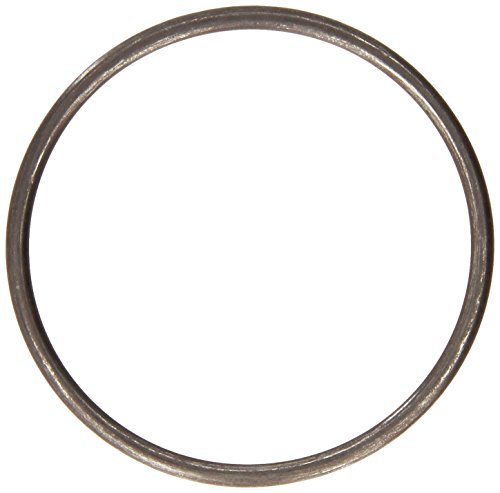
Genuine Honda 18393-SDB-A00 Pre Chamber Gasket
|
1 |
| Exhaust Pipe Gasket (NOK) | 18212-SA7-003
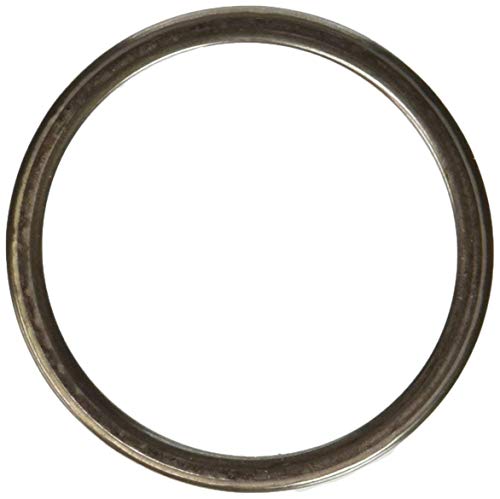
Genuine Honda 18212-SA7-003 Exhaust Pipe Gasket
|
2 |
| Split Pin (3.0 x 22) | 94201-30220 |
2 |
| Castle Nut (14 mm) | 90365-STX-A00
No products found. |
2 |
| Flange Bolt (12 x 30) | 90161-SHJ-A00 | 8 |
| Flange Bolt (14 x 140) | 90165-TZ5-A10 | 2 |
| Flange Bolt (14 x 125) | 90165-TK8-A00 | 2 |
| Spindle Nut | 90305-S3V-A11
No products found. |
2 |
| Snap Ring (32 x 2.2) | 44319-STX-A01
No products found. |
2 |
| Flange Bolt (10 x 30) | 90163-SDB-A00 | 3 |
NOTE
An extremely small percentage of vehicles may require a new battery or battery terminals.
| Part Name | Part Number | Quantity |
| Battery Plus Terminal (large) | 32413-TG7-A02 | 1 |
| Battery Sensor Assembly | 38920-TZ5-A02 | 1 |
| (L3) Johnson MSDS Battery Assembly | 31500-TZ7-AGM100M | 1 |
REQUIRED MATERIALS
| Part Name | Part Number | Quantity |
| Antifreeze/Coolant Type 2 | OL999-9011
Sale

Honda Genuine Extended Life Antifreeze/Coolant Type 2, 50/50 Pre-Diluted, 1 Gallon
|
2 |
TOOL INFORMATION
NOTE
The following tools are available through the Tool and Equipment Program.
| Part Name | Part Number | Quantity |
| Torque Wrench – A 1/4″ torque wrench with a range of 35-53 in/lb. | Model 1501MRH
Model 1501MRPH or any commercially available 1/4″ with range of 35-53 in/lb |
1 |
Battery Terminal Cleaner
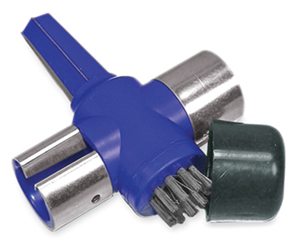 |
BTC7B | 1 |
| Engine Balance Bar | VSB02C000041 | 1 |
| Engine Hanger | AAR-T1256 | 2 |
| Subframe Adaptor | VSB02C000016 | 1 |
WARRANTY CLAIM INFORMATION
The normal warranty applies.
REPAIR PROCEDURE A
NOTE
You need to send three snapshots of the inspection process results to Tech Line. If they are not sent, your claim will be debited and you will need to repeat this procedure at your dealership’s expense. The flat rate time includes the time spent to send those snapshots.
| Operation Number |
Description | Flat Rate Time |
Defect Code |
Symptom Code |
Template ID |
Failed Part Number |
| 7105B6 | Do the park inspection procedure (includes time for assistant). Inspect the battery terminals, and check torque. Update the TCM. | 0.8 hr | 6AN00 | Z4J00 | A19046A | 28102-5MX-A610 |
| 7105B7 | Do the park inspection procedure (includes time for assistant). Repair one terminal. Update the TCM. | 0.9 hr | 6AN00 | Z4J00 | A19046B | 28102-5MX-A610 |
| 7105B7 | Do the park inspection procedure (includes time for assistant). Replace positive terminal. Update the TCM. | 0.9 hr | 6AN00 | Z4J00 | A19046C | 28102-5MX-A610 |
| 7105B8 | Do the park inspection procedure (includes time for assistant). Replace negative terminal. Update the TCM. | 1.1 hr | 6AN00 | Z4J00 | A19046A | 28102-5MX-A610 |
| 7105B8 | Do the park inspection procedure (includes time for assistant).
Repair both terminals. Update the TCM. |
1.1 hr | 6AN00 | Z4J00 | A19046D | 28102-5MX-A610 |
| 7105B8 | Do the park inspection procedure (includes time for assistant). Replace both terminals. Update the TCM. | 1.1 hr | 6AN00 | Z4J00 | A19046E | 28102-5MX-A610 |
| 7105B9 | Do the park inspection procedure (includes time for assistant). Install new battery (Includes internal resistance reset). Update the TCM. | 1.6 hr | 6AN00 | Z4J00 | A19046F | 28102-5MX-A610 |
REPAIR PROCEDURE B
NOTE
You need to send three snap shots of the inspection process results to Tech Line. If they are not sent, your claim will be debited and you will need to repeat this procedure at your dealership’s expense. The flat rate time includes the time spent to send those snapshots.
| Operation Number |
Description | Flat Rate Time |
Defect Code |
Symptom Code |
Template ID |
Failed Part Number |
| 2185E0 | 2018 Odyssey –Do the park inspection procedure (includes time for assistant). Replace the transmission (includes alignment and neutral position memorization. Inspect battery terminals, and check torque. | 7.5 hr | 6AN00 | Z4J00 | A19046G | 28102-5MX-A610 |
| 2185E0 | 2019 Odyssey –Do the park inspection procedure (includes time for assistant). Replace the transmission (includes alignment and neutral position memorization. Inspect battery terminals, and check torque. | 7.5 hr | 6AN00 | Z4J00 | A19046H | 28102-5MX-A610 |
| 2185E1 | 2018 Odyssey – Do the park inspection procedure (includes time for assistant). Replace the transmission (Includes alignment and neutral position memorization). Repair one terminal. | 7.6 hr | 6AN00 | Z4J00 | A19046J | 28102-5MX-A610 |
| 2185E1 | 2018 Odyssey – Do the park inspection procedure (includes time for assistant). Replace the transmission (Includes alignment and neutral position memorization). Replace positive terminal. | 7.6 hr | 6AN00 | Z4J00 | A19046K | 28102-5MX-A610 |
| 2185E1 | 2018 Odyssey – Do the park inspection procedure (includes time for assistant). Replace the transmission (Includes alignment and neutral position memorization). Replace negative terminal. | 7.6 hr | 6AN00 | Z4J00 | A19046B | 28102-5MX-A610 |
| 2185E1 | 2019 Odyssey – Do the park inspection procedure (includes time for assistant). Replace the transmission (Includes alignment and neutral position memorization). Repair one terminal. | 7.6 hr | 6AN00 | Z4J00 | A19046L | 28102-5MX-A610 |
| 2185E1 | 2019 Odyssey – Do the park inspection procedure (includes time for assistant). Replace the transmission (Includes alignment and neutral position memorization). Replace positive terminal. | 7.6 hr | 6AN00 | Z4J00 | A19046M | 28102-5MX-A610 |
| 2185E1 | 2019 Odyssey – Do the park inspection procedure (includes time for assistant). Replace the transmission (Includes alignment and neutral position memorization). Replace negative terminal. | 7.6 hr | 6AN00 | Z4J00 | A29046C | 28102-5MX-A610 |
| 2185E2 | 2018 Odyssey – Do the park inspection procedure (includes time for assistant). Replace the transmission (Includes alignment and neutral position memorization). Repair both terminals. | 8.0 hr | 6AN00 | Z4J00 | A19046N | 28102-5MX-A610 |
| 2185E2 | 2018 Odyssey – Do the park inspection procedure (includes time for assistant). Replace the transmission (Includes alignment and neutral position memorization). Replace both terminals. | 8.0 hr | 6AN00 | Z4J00 | A19046P | 28102-5MX-A610 |
| 2185E2 | 2019 Odyssey – Do the park inspection procedure (includes time for assistant). Replace the transmission (Includes alignment and neutral position memorization). Repair both terminals. | 8.0 hr | 6AN00 | Z4J00 | A19046Q | 28102-5MX-A610 |
| 2185E2 | 2019 Odyssey – Do the park inspection procedure (includes time for assistant). Replace the transmission (Includes alignment and neutral position memorization). Replace both terminals. | 8.0 hr | 6AN00 | Z4J00 | A19046R | 28102-5MX-A610 |
| 2185E3 | 2018 Odyssey – Do the park inspection procedure (includes time for assistant). Replace the transmission (Includes alignment and neutral position memorization). Repair both terminals, and replace the battery (includes internal resistance reset). | 8.5 hr | 6AN00 | Z4J00 | A19046S | 28102-5MX-A610 |
| 2185E3 | 2018 Odyssey – Do the park inspection procedure (includes time for assistant). Replace the transmission (Includes alignment and neutral position memorization). Replace both terminals, and replace the battery (includes internal resistance reset). | 8.5 hr | 6AN00 | Z4J00 | A19046T | 28102-5MX-A610 |
| 2185E3 | 2019 Odyssey – Do the park inspection procedure (includes time for assistant). Replace the transmission (Includes alignment and neutral position memorization). Repair both terminals, and replace the battery (includes internal resistance reset). | 8.5 hr | 6AN00 | Z4J00 | A19046U | 28102-5MX-A610 |
| 2185E3 | 2019 Odyssey – Do the park inspection procedure (includes time for assistant). Replace the transmission (Includes alignment and neutral position memorization). Replace both terminals, and replace the battery (includes internal resistance reset). | 8.5 hr | 6AN00 | Z4J00 | A19046V | 28102-5MX-A610 |
Skill Level: Repair Technician
SOFTWARE INFORMATION
NOTE
Unnecessary or incorrect repairs resulting from a failure to update the i-HDS are not covered under warranty. i-HDS Software Version: 1.004.064 or later
J2534 Software Information: 1.00.0020
- PC Application Version 1.0.6 or later
- Database update 06-APR-2019 or later
Before beginning the repair, make sure that both the i-HDS and J2534 software are updated as listed above.
Do only the update listed in this service bulletin.
You cannot apply the updates with the MVCI as a standalone tool. To update the software you must use the MVCI or the DST-i interface in conjunction with the J2534 Rewrite PC application on the i-HDS.
For more information about updating the i-HDS, the MVCI, and vehicle systems, refer to Service Bulletin 01-023, Updating Control Units/Modules.
If the program P/N in the vehicle is above (or later), the vehicle has been updated and this service bulletin does not apply, continue with normal troubleshooting.
Connect the i-HDS and go to AT Data List. Check to see if the software has been updated by comparing the program P/N against the table below.
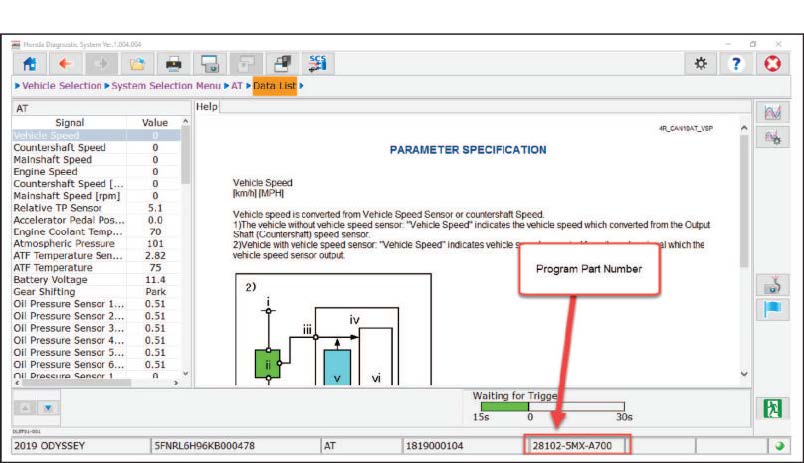
- 2018 models: If the program P/N currently in the AT Data List is not the same or later as in the chart below, the vehicle has not been updated. Go to PARK INSPECTION PROCEDURE.
- 2019 models: If the program P/N currently in the AT Data List reads 28102-5MX-A700 or 28102-5MX-A710, the vehicle has not been updated. Go to PARK INSPECTION PROCEDURE.
| Year/Model | Software System | Program ID (or later) | Program P/N (or later) |
| 2018 | A/T | MXA610 | 28102-5MX-A610 |
| 2019 | A/T | MXA001 | 28102-5MX-A001 |
NOTICE
- Connect a fully charged jump box to the battery before updating the TCM. Failure to do so may damage the TCM, requiring transmission replacement.
- To prevent damaging the TCM, do not operate anything electrical (headlights, audio system, brakes, A/C, power windows, door locks, etc.) during the update.
NOTE
If an error occurs during the update, go to TCM UPDATE ERROR.
PARK INSPECTION PROCEDURE
NOTES
- This step is critical. Make sure the park pawl is properly engaging by rocking the vehicle back and forth. See example videos.
- You will need an assistant and a surface with good traction to reach the amount of g-force needed to do this inspection.
- You need to send three snap shots of the process to Tech Line. If they are not sent, your claim will be debited and you will need to repeat this procedure at your dealership’s expense.
NOTE
The blue component is the park pawl; the red component is the park gear.
Click on the images for example videos.
- Park on a flat area with the ignition turned to ON and the parking brake released.
NOTE
Make sure the surface provides good traction. If the wheels slip, you may not be able to get the 0.30 G/ 2.9 m/s² force to complete the check.
- Connect the i-HDS, then enter the RO, and select System Selection Menu.
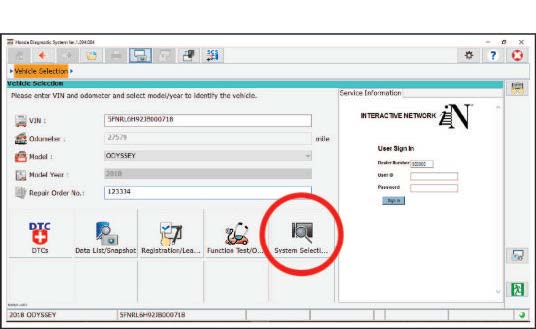
- Select ABS/VSA.
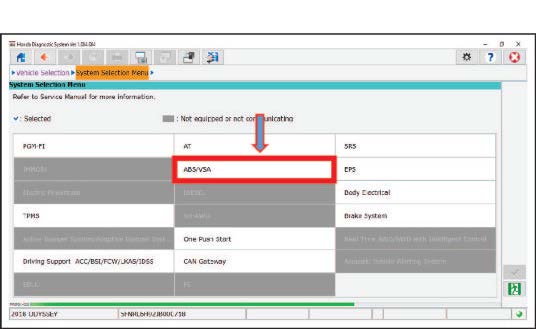
- Select Snapshot.
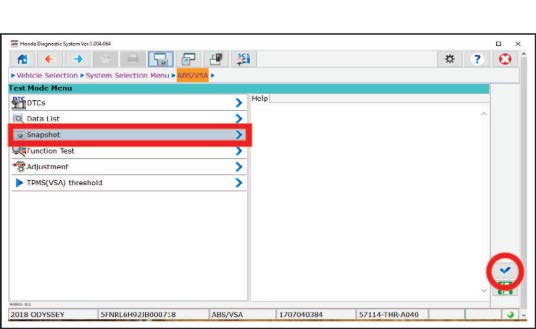
- Clear all monitor signals from the list.
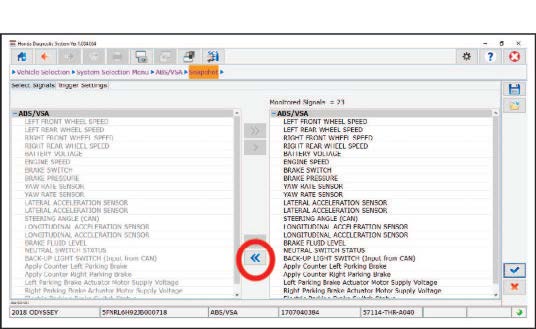
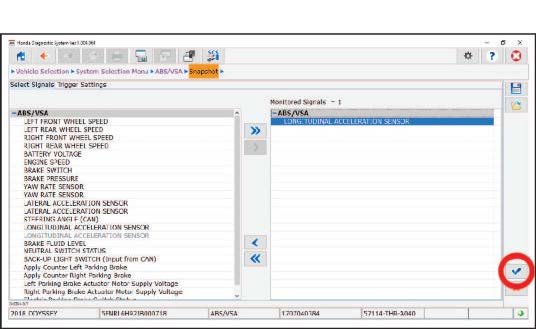
- Add LONGITUDINAL ACCELERATION SENSOR only.
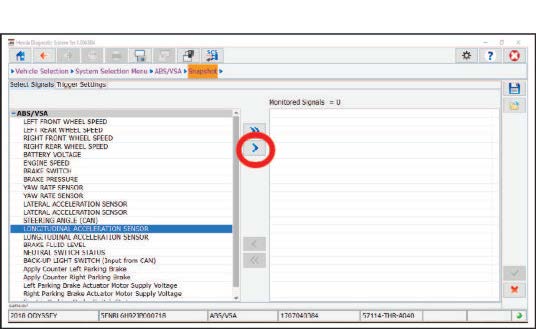
- Select the check mark.
- Select the line graph.
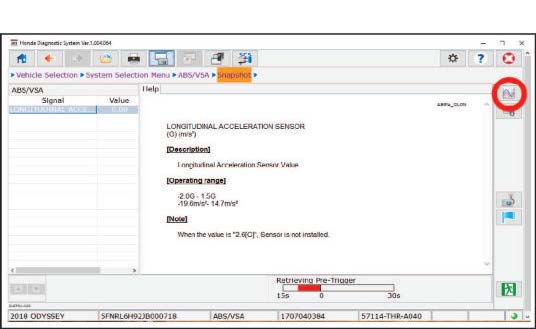
- Set up the vehicle for snapshots.
- Make sure the surface provides good traction. If the wheels slip, you may not be able to get good results.
- Place commercially available wheel chocks about a foot away from the front and back of one of the rear wheels.
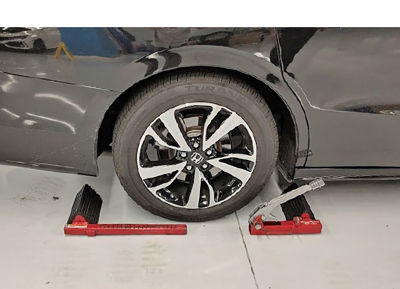
-
- Close all doors, and open all windows.
- Place a fender cover over the rear doors to protect the paint.
- Do not use the interior grab handle or exterior door handle.
- With help from an assistant, rock the vehicle back and forth by pushing and pulling on the B-pillar with maximum force while monitoring LONGITUDINAL ACCELERATION SENSOR in the data list.
NOTE
An assistant and a surface with good traction is necessary to obtain the force needed for the inspection.
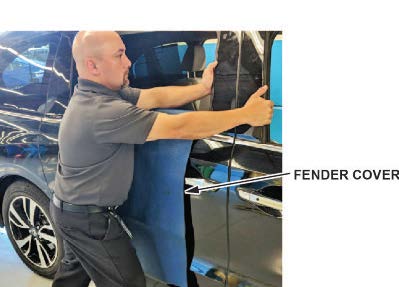
- Place the i-HDS on the rear seat so you can monitor the screen.
- Start the snapshot, and rock the vehicle back and forth with maximum force until you get at least five peak counts at or above 30 G/2.9 m/s². Once you get five counts, stop rocking the vehicle and wait for the snapshot to complete.
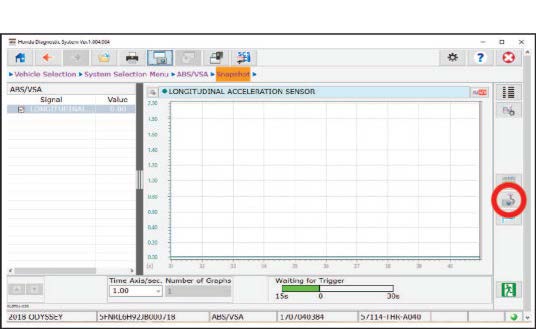
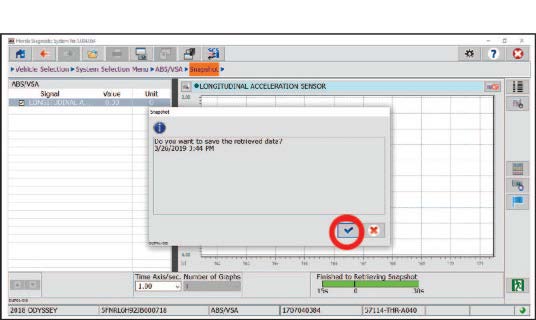
- Once the snapshot is complete, save it.
- Select the open folder to review the snapshot.
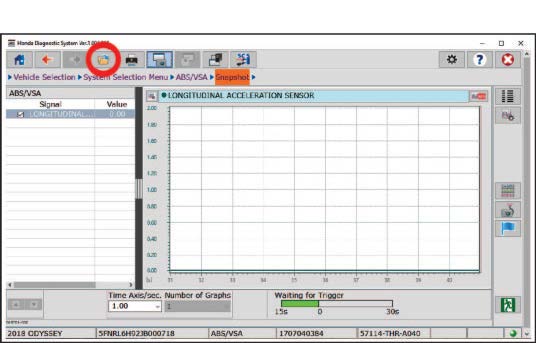
Did the vehicle stay in Park while you got at least five counts above 0.30 G//2.9 m/s²?
NOTE
The parameter display can be changed by selecting the current display unit.
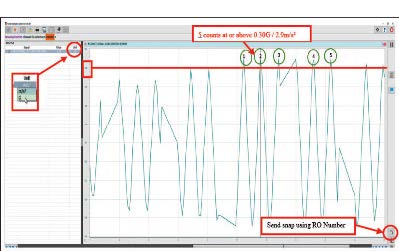
Yes – Send the snapshot to Tech Line using the RO number, then go to step 13. If it stayed in Park but you failed to get at least five peak counts of or above 0.30 G/2.9 m/s², make sure the vehicle is on a surface with good traction. Then, repeat steps 10 thru 12.
No – If it did not hold in Park, send the snapshot to Tech Line using the RO number, then go to REPAIR
PROCEDURE B.
- Remove the wheel chock, shift to Drive, move the vehicle about one foot, then shift back to Park.
- Repeat steps 9 thru 13 two more times.
NOTE
Make sure you send all three snapshots to Tech Line using the RO number. You will not need to contact Tech Line, but claims with no snapshots are subject to debit.
- Did the vehicle hold in park while you got at least five counts above 30 G/2.9 m/s² in all three of the park inspection procedures?
Yes – Go to REPAIR PROCEDURE A.
No – Go to REPAIR PROCEDURE B.
REPAIR PROCEDURE A
NOTICE
- Battery terminal installation on this vehicle is critical. Failure to follow the terminal installation, or inspection procedures could cause electrical problems, stalling, and/or DTCs to set. Do not over torque the terminals, and do not use an impact gun.
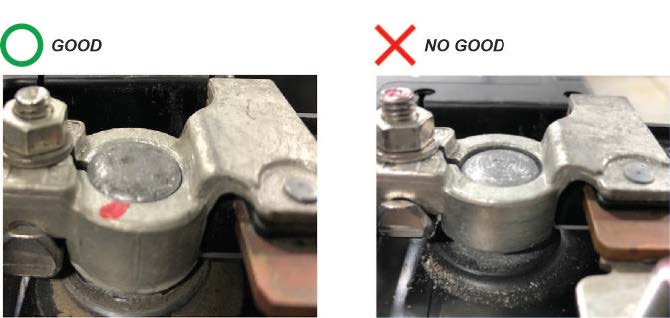
- Battery terminal installation must be level or below the post. See GOOD and NO GOOD example pictures.
- Remove the front bulkhead cover.
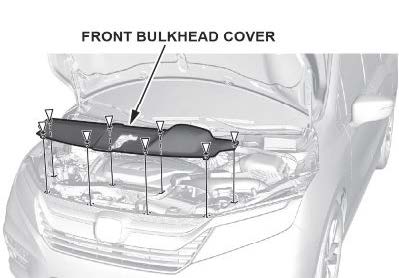
- Remove the air intake duct.
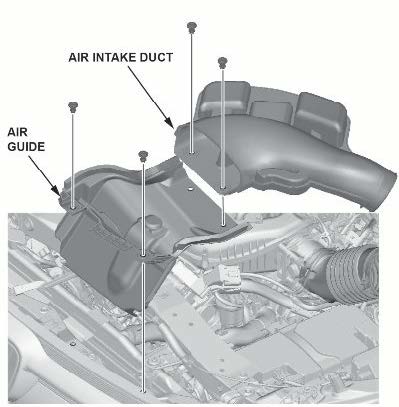
- Compare both battery terminals to the examples below.
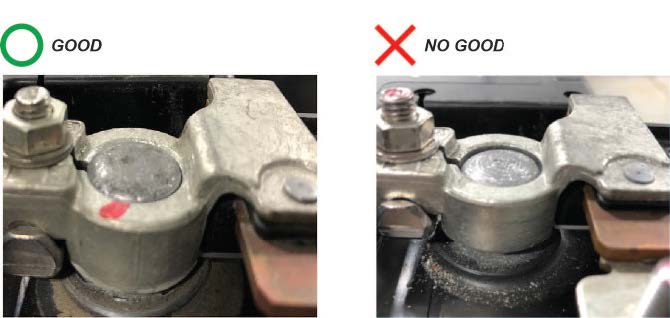
Do the battery terminals look like the good example?
Yes – Go to step 4.
No – Go to TERMINAL REPAIR.
- While holding down the terminal, torque both positive and negative clamps to 4-6 N•m (35-53 lb-in)
NOTE
Do not over torque the terminal.
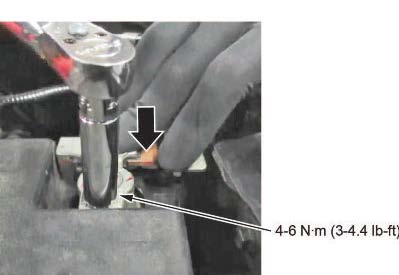
- Make sure the connection is tight by wiggling the terminals back and forth.
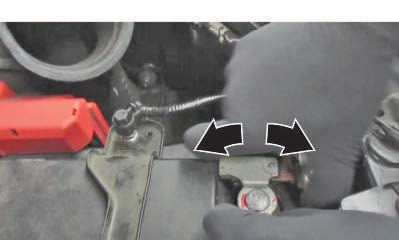
Are both terminals secure?
Yes – Apply multipurpose grease to the terminals to prevent corrosion, and install the air intake duct and the bulkhead cover. Then, go to TCM UPDATE.
No – Go to TERMINAL REPAIR.
TERMINAL REPAIR
- Remove the terminal or terminals and clean the post using an approved battery terminal cleaner.
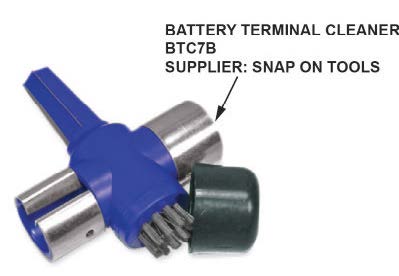
1.1 Make sure the ignition is turned to OFF.
1.2 Disconnect and isolate the negative cable with the battery sensor from the battery.
NOTES
- Always disconnect the negative side first.
- To prevent damage to the connector, do not hold it when removing the battery terminal.
- Do not disconnect the battery sensor from the cable.
1.3 Open the terminal cover.
1.4 Disconnect the terminal from the battery.
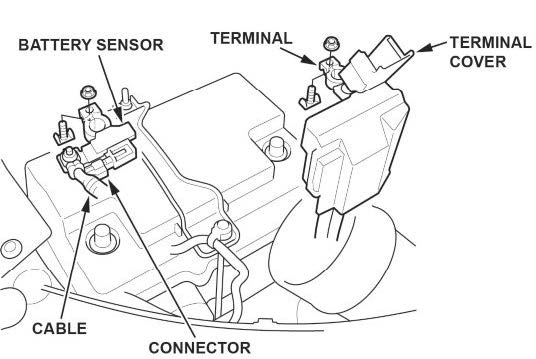
- While holding down the terminal, torque both positive and negative clamps to 4-6 N•m (35-53 lb-in).
NOTES
- Do not over torque the terminal.
- Always connect the positive side first.
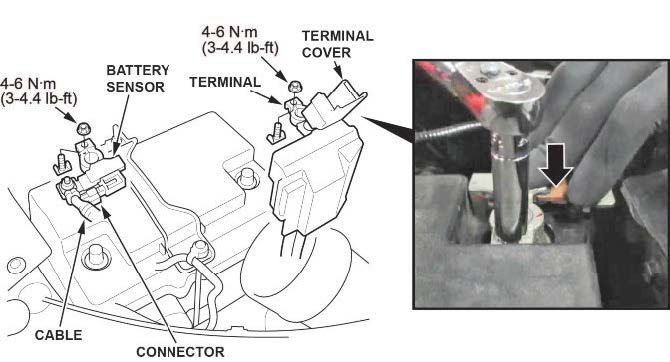
- Compare both of the battery terminals to the examples below.
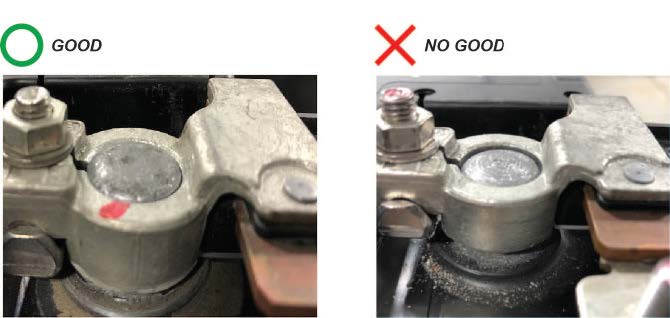
Do the battery terminals look like the good example?
Yes – Go to step 4.
No – Go to REPLACE BATTERY TERMINAL.
- Make sure the connection is tight by wiggling the terminals back and forth.
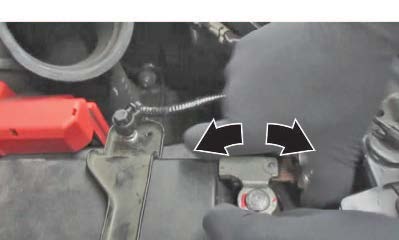
Are both terminals secure?
Yes – Apply multipurpose grease to the terminals to prevent corrosion, and install the air intake duct and the bulkhead cover. Then, go to TCM UPDATE
No – Go to REPLACE BATTERY TERMINAL.
REPLACE BATTERY TERMINAL
- Remove the battery terminal that does not sit at or below the top of the post.
- Install a new terminal, and torque the clamp nut to 4-6 N•m (35-53 lb-in) while holding it down.
NOTES
- Always disconnect the negative side first.
- To prevent damage to the connector, do not hold it when removing the battery terminal.
- Do not disconnect the battery sensor from the cable.
- Compare both of the battery terminals to the examples below.
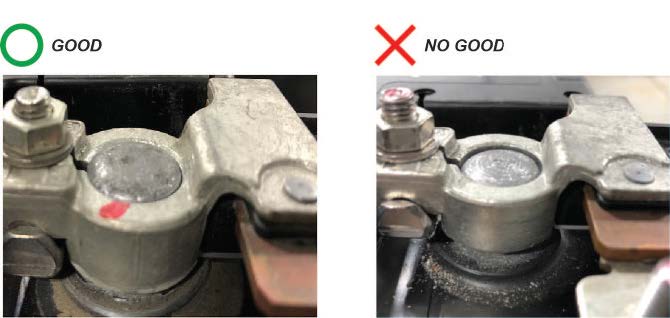
Do the battery terminals look like the good example?
Yes – Go to step 4.
No – Go to BATTERY REPLACEMENT, BATTERY RESISTANCE RESET PROCEDURE.
- Make sure the connection is tight by wiggling the terminals back and forth.
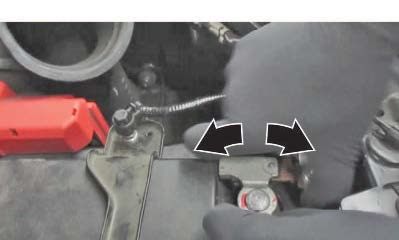
Are both terminals secure?
Yes – Apply multipurpose grease to the terminals to prevent corrosion, and install the air intake duct and the bulkhead cover. Then, go to TCM UPDATE.
No – Go to BATTERY REPLACEMENT, BATTERY RESISTANCE RESET PROCEDURE.
BATTERY REPLACEMENT, BATTERY RESISTANCE RESET PROCEDURE
- Disconnect the battery terminals.
1.1 Make sure the ignition is turned to OFF.
1.2 Disconnect and isolate the negative cable with the battery sensor from the battery.
NOTES
- Always disconnect the negative side first.
- To prevent damage to the connector, do not hold it when removing the battery terminal.
- Do not disconnect the battery sensor from the cable.
1.3 Open the terminal cover.
1.4 Disconnect the terminal from the battery.
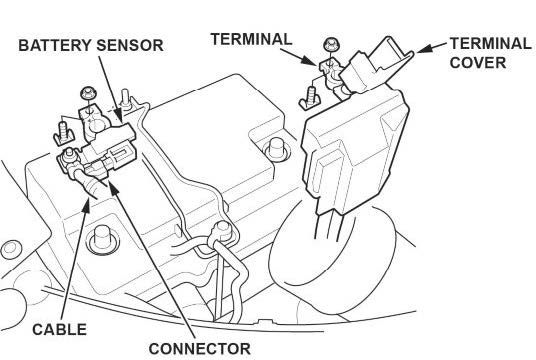
- Remove the setting plate.
- Remove the battery cover.
- Remove the battery.
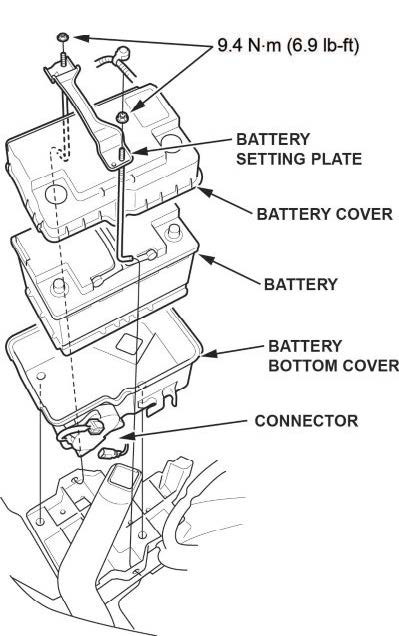
- Install a new battery. Then reinstall the battery cover, and the setting plate in the reverse order of removal.
- While holding down the terminal, torque both positive and negative clamps to 4-6 N•m (35-53 lb-in).
NOTES
- Do not over torque the terminal.
- Always connect the positive side first.
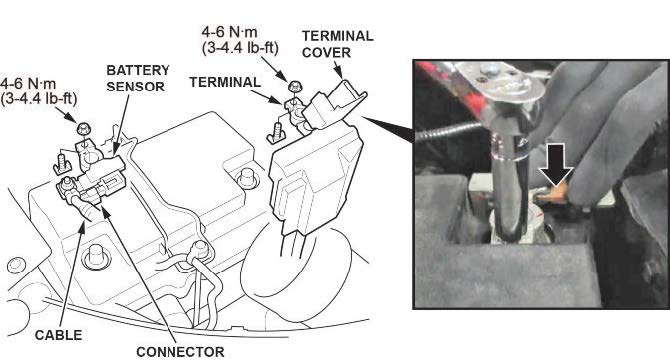
- Compare both of the battery terminals to the examples below.
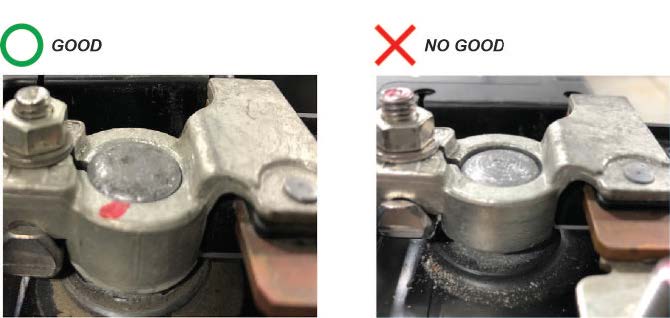
Do the battery terminals look like the good example?
Yes – Go to step 9.
No – Remove and reinstall the terminals, then go to step 7.
- Make sure the connection is tight by wiggling the terminals back and forth.
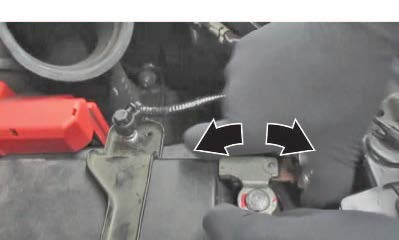
Are both terminals secure?
Yes – Apply multipurpose grease to the terminals to prevent corrosion. Then, go to BATTERY INTERNAL RESISTANCE RESET.
No – Remove and reinstall the terminals, and go to step 7.
BATTERY INTERNAL RESISTANCE RESET
NOTE
Do this procedure only if the battery was replaced.
- Make sure all electrical systems (A/C, audio, lights, etc) are turned off.
- Turn the ignition to OFF.
- Turn the ignition to ACCESSORY.
- Turn the ignition to ON.
- Start the engine, and let it idle for 1 minute or more.
- Turn the ignition to OFF.
- Repeat steps 3 thru 6 at least four times.
NOTE
The internal resistance of the battery may not be updated if the engine starts up immediately from the OFF position.
It has to go through the ACCESSORY and ON position.
- Turn the ignition to ON.
- Connect the i-HDS and select PGM-FI.
- Check IDLE STOP INHIBIT (BATTERY DETERIORATION) in the Data List.
Normal – The battery internal resistance test is complete.
INHIBITED – Replace the battery, then do this battery internal resistance reset procedure again.
- Turn the ignition to OFF, and disconnect the i-HDS.
- Install the air intake duct and bulkhead cover.
- Go to TCM UPDATE.
TCM UPDATE
NOTE
Unnecessary or incorrect repairs resulting from a failure to update the i-HDS are not covered under warranty. i-HDS Software Version: 1.004.064 or later
J2534 Software Information: 1.00.0020
- PC Application Version 1.0.6 or later
- Database update 06-APR-2019 or later
Before beginning the repair, make sure that both the i-HDS and J2534 software are updated as listed above.
Do only the update listed in this service bulletin.
You cannot apply the updates with the MVCI as a standalone tool. To update the software you must use the MVCI or the DST-i interface in conjunction with the J2534 Rewrite PC application on the i-HDS.
For more information about updating the i-HDS, the MVCI, and vehicle systems, refer to Service Bulletin 01-023, Updating Control Units/Modules.
If the program P/N in the vehicle is above (or later), the vehicle has been updated and this service bulletin does not apply, continue with normal troubleshooting.
Connect the i-HDS and go to AT Data List. Check to see if the software has been updated by comparing the program P/N against the table below.
- 2018 models: If the program P/N currently in the AT Data List is not the same or later as in the chart below, the vehicle has not been updated. Update the TCM.
- 2019 models: If the program P/N currently in the AT Data List reads 28102-5MX-A700 or 28102-5MX-A710, the vehicle has not been updated. Update the TCM.
| Year/Model | Software System | Program ID (or later) | Program P/N (or later) |
| 2018 | A/T | MXA610 | 28102-5MX-A610 |
| 2019 | A/T | MXA710 | 28102-5MX-A001 |
NOTICE
- Connect a fully charged jump box on the battery before updating the TCM. Failure to do so may damage the TCM, requiring transmission replacement.
- To prevent damaging the TCM, do not operate anything electrical (headlights, audio system, brakes, A/C, power windows, door locks, etc.) during the update.
Update the TCM software using the i-HDS J2534 rewrite software with the MVCI or DST-i. Refer to Service Bulletin 01-023, Updating Control Units/Modules.
NOTE
If an error occurs during the update, go to TCM UPDATE ERROR.
TCM UPDATE ERROR
NOTICE
- Do not disconnect the battery or turn the ignition completely to OFF (IGN 0). You may damage the TCM.
- When this error occurs, the MID information may be confusing. Pressing the ENGINE START/STOP button twice will turn the ignition to ACCESSORY, and holding it will turn the ignition to OFF. Do not press and hold the ENGINE START/STOP button, or turn the ignition to OFF during the update.
If there is an interruption during the update process, you will get the following messages on the i-HDS and MID. Do not disconnect the battery or the i-HDS.
Cycle the ignition twice; this will put the vehicle in ACC mode. Then cycle the ignition one more time to turn it to ON.
Then, do the update.
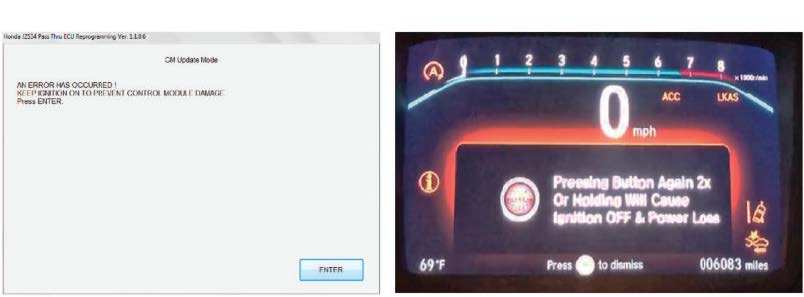
NOTE
The MID is showing partially incorrect information when this error occurs. Pressing the ignition button twice will turn it to ACC mode, and holding the ignition button will turn the ignition OFF. Do not press and hold, or turn off the ignition during the update.
REPAIR PROCEDURE B
NOTE
Do not drain the ATF from the old transmission. The replacement (Reman) transmission comes pre-filled with ATF.
- Remove the engine cover.
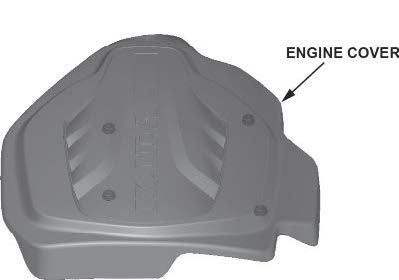
- Remove the bulkhead cover.
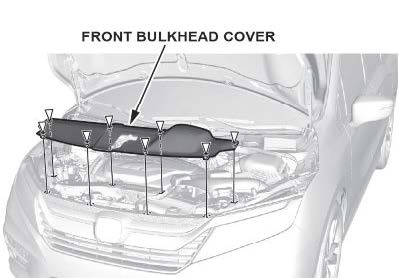
- Remove the air intake duct.
- Remove the air guide.
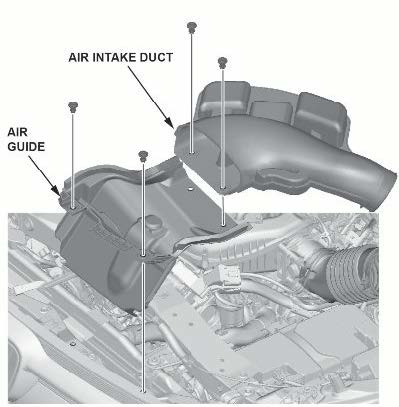
- Disconnect the battery terminals.
5.1 Make sure the ignition is turned to OFF.
5.2 Disconnect and isolate the negative cable with the battery sensor from the battery.
NOTES
- Always disconnect the negative side first.
- To prevent damage to the connector, do not hold it when removing the battery terminal.
- Do not disconnect the battery sensor from the cable.
5.3 Open the terminal cover.
5.4 Disconnect the terminal from the battery.
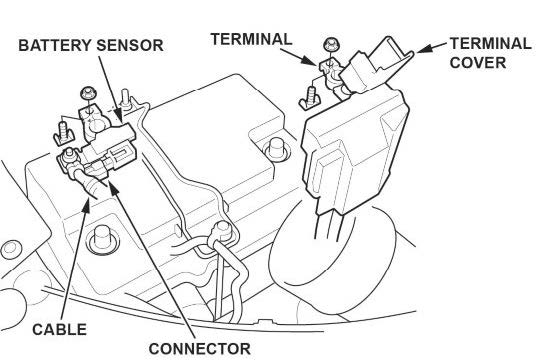
- Remove the setting plate.
- Remove the battery cover.
- Remove the battery.
- Remove the battery bottom cover.
- Disconnect the battery fan motor connector.
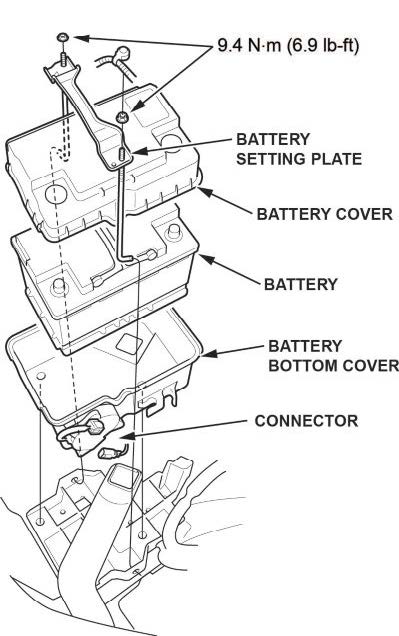
- Move the intake air duct.
- Remove the air cleaner.
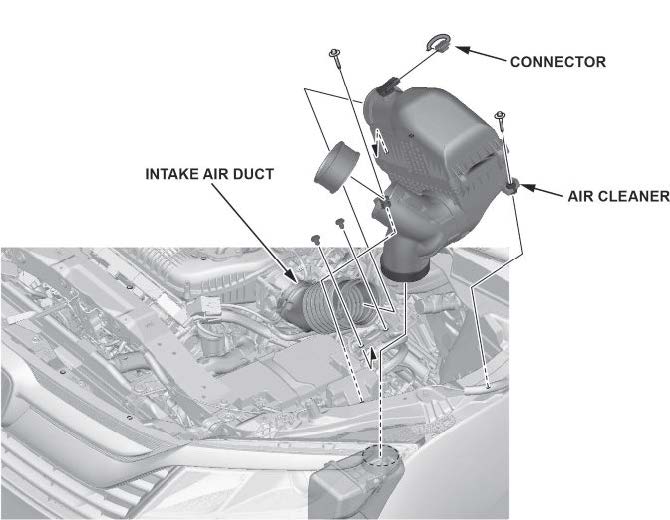
- Remove the skid block.
- Disconnect the positive cable from the starter.
- Remove the starter and connector.
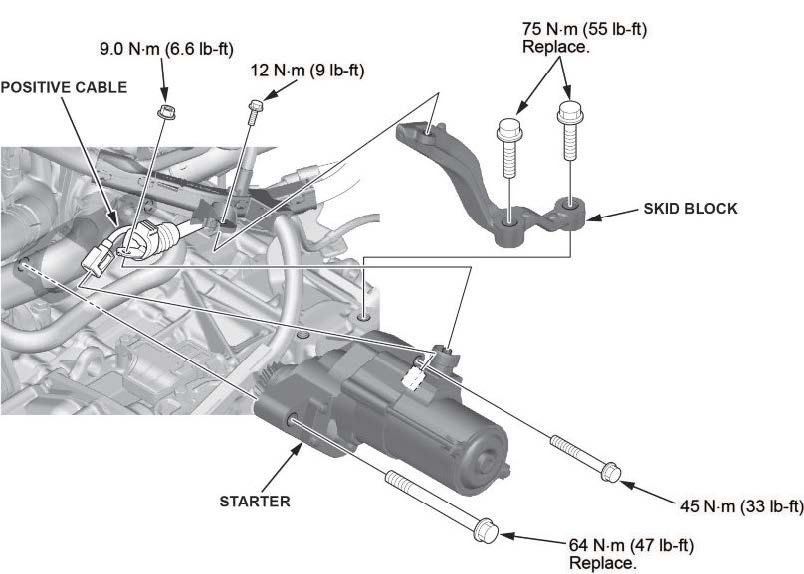
- Remove the battery base.
- Disconnect the breather tube.
- Disconnect the TCM connector.
- Remove the upper transmission mounting bolt.
- Disconnect the speed sensor.
- Remove the heater hose bracket.
- Remove the harness bracket bolts.
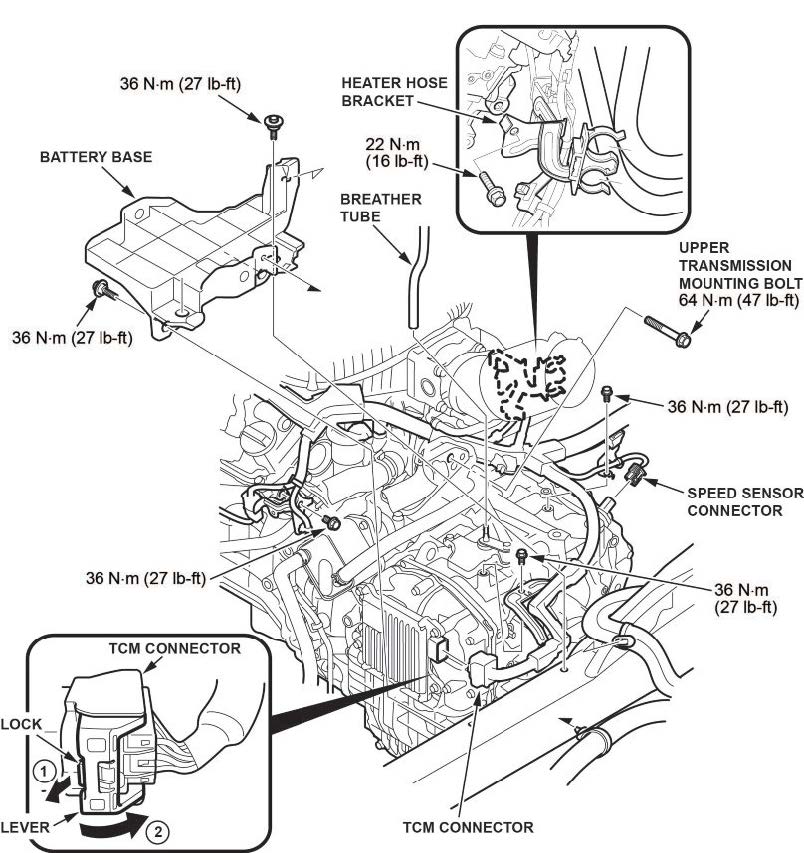
- Raise the vehicle on a lift.
- Remove the splash shield.
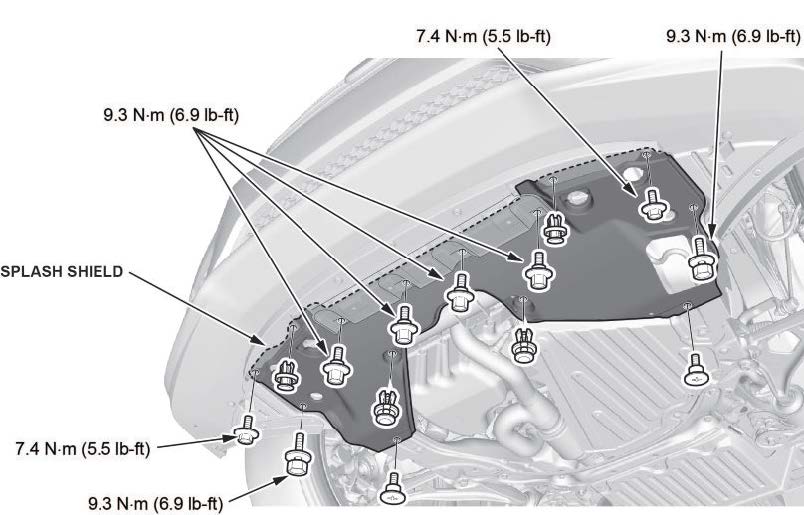
- Drain the coolant.
25.1 Install a rubber hose on the radiator.
25.2 Loosen the drain plug, and drain the coolant.
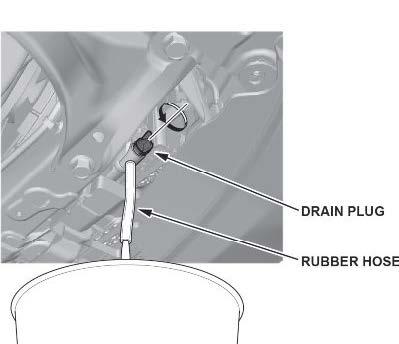
- Lower the vehicle.
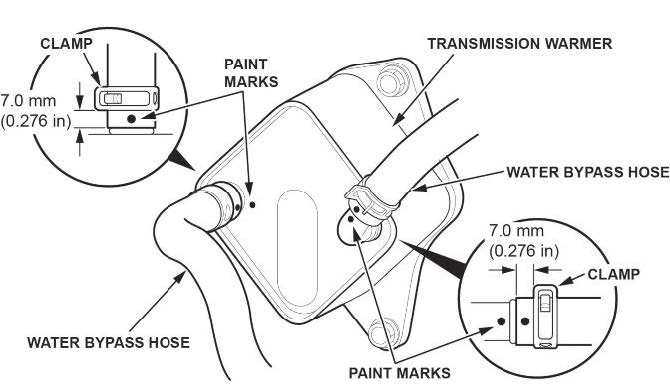
- Disconnect the water bypass hoses from the transmission warmer.
NOTE
To prevent damage, do not bend the pipes excessively.
- Install the engine support hanger.
NOTES
- Be careful when working around the windshield.
- Two sets of AAR-T1256 are required for stacking additional cross section bars.
- Be careful not to damage the hood opener cable when installing the engine support hanger at the front bulkhead.
28.1 Remove the front damper caps.
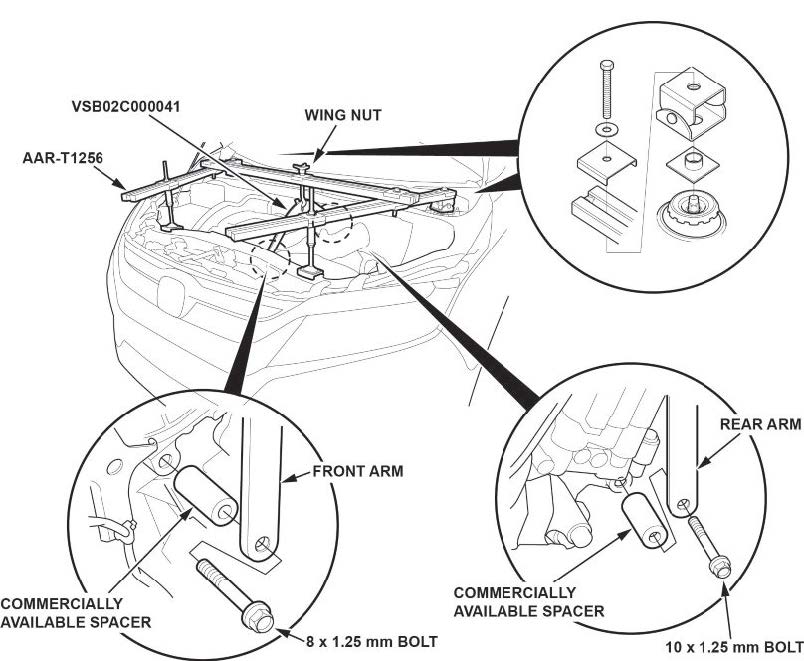
28.2 Install the engine hanger balance bar.
28.2.1 Attach the front arm to the front cylinder head with a commercially available spacer and a 10 x 1.25 mm bolt.
28.2.2 Attach the rear arm to the rear cylinder head with a commercially available spacer and a 10 x 1.25 mm bolt.
28.3 Install the engine support hanger as shown, and attach the hook to the slotted hole in the engine hanger balance bar. Tighten the wing nut by hand, and lift and support the engine/transmission.
- Remove coil number 6.
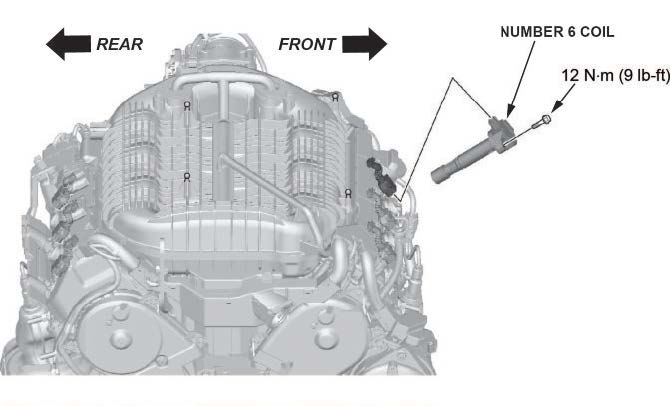
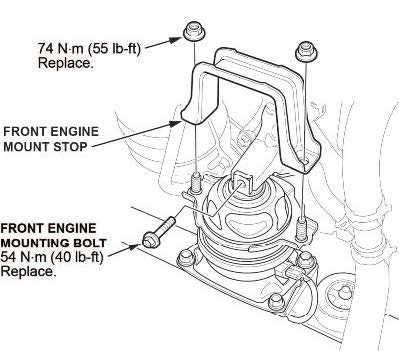
- Remove the front engine mount stop and front engine mount mounting bolt.
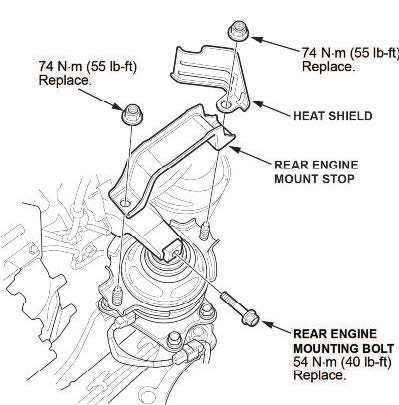
- Remove the rear engine mount stop, heat shield, and rear engine mount mounting bolt.
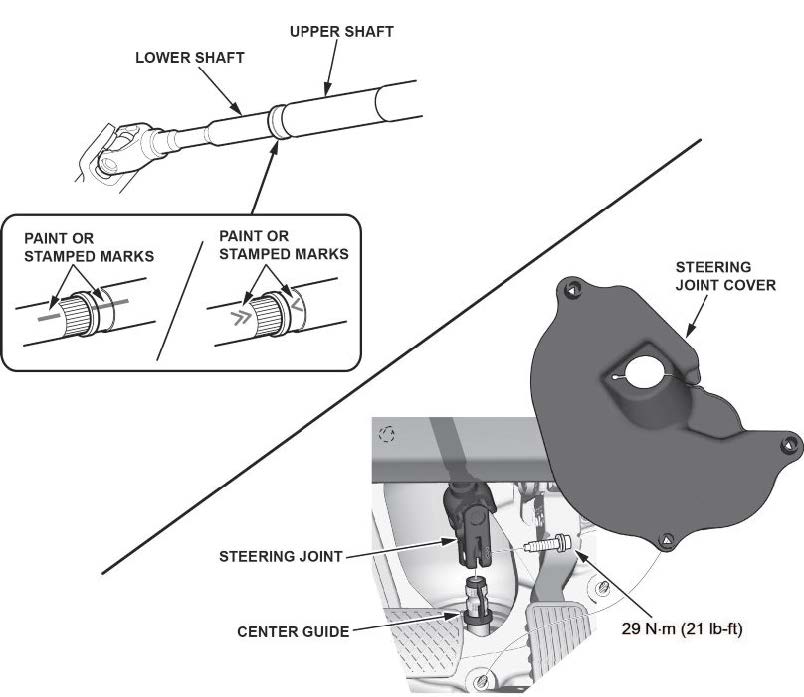
- Disconnect the steering joint.
NOTE
Be careful not to pull out the lower shaft from the upper shaft. If it separates, use the aligning paint or stamped marks on the shafts to align them.
- Lift the vehicle.
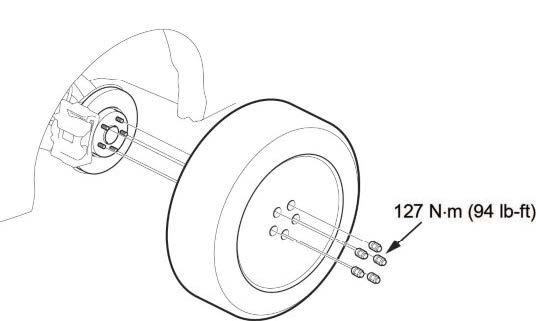
- Remove both front wheels.
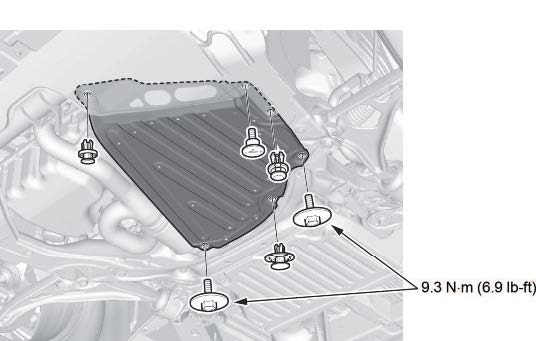
- Remove the transmission undercover.
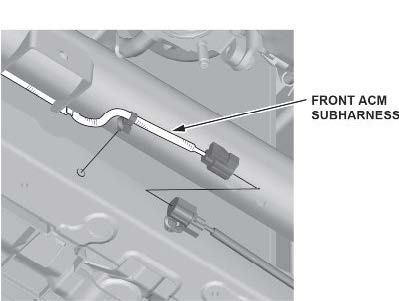
- Disconnect the front ACM (active control engine mount) sub harness.
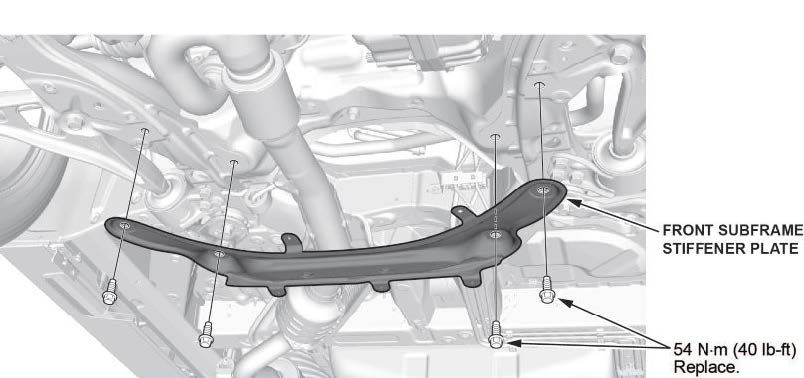
- Remove the front subframe stiffener plate.
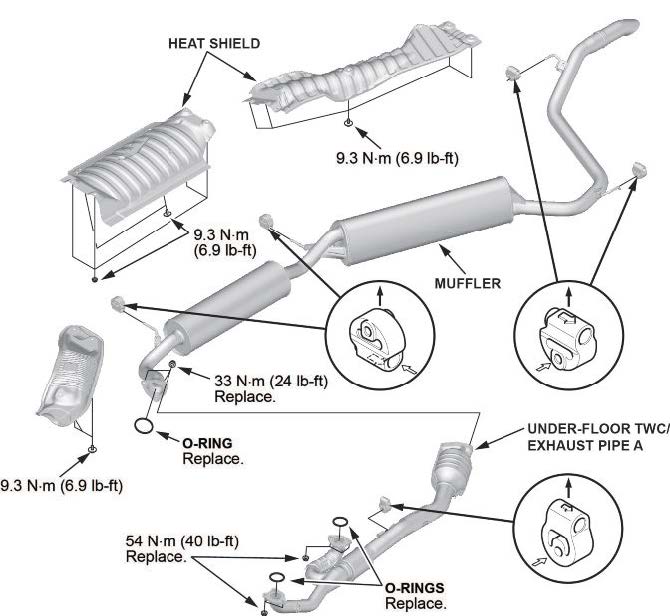
- Remove the under-floor TWC and exhaust pipe.
- Disconnect the EPS motor control unit connector.
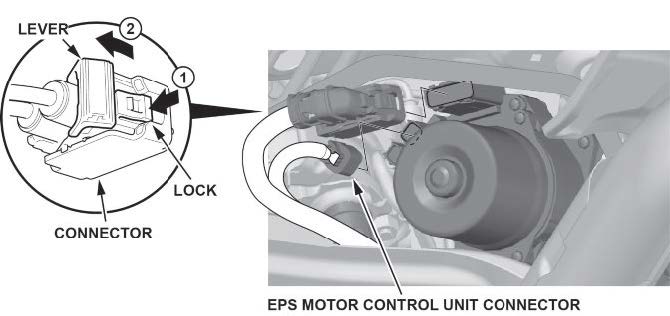
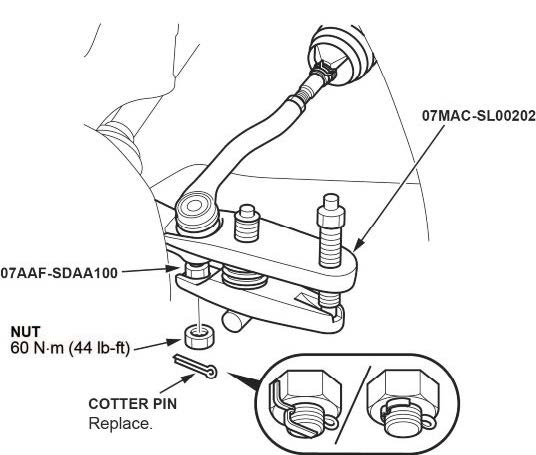
- Disconnect both tie rod end ball joints.
40.1 Remove the cotter pin.
40.2 Remove the nut.
40.3 Disconnect the tie-rod end ball joint from the knuckle using a ball joint thread protector and a ball joint remover.
NOTES
- Be careful not to damage the ball joint boot when using the ball joint remover.
- During installation, install the new cotter pin after tightening the nut, and bend its end as shown.
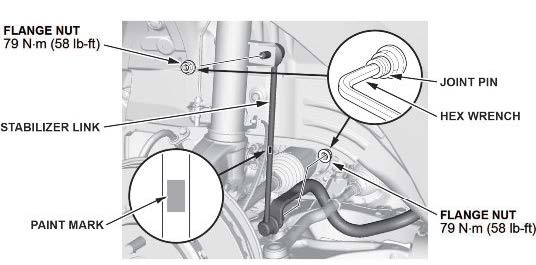
- Disconnect both lower stabilizer links.
41.1 Remove the flange nuts while holding the respective joint pin with a hex wrench.
41.2 Remove the stabilizer link.
NOTE
The stabilizer link has a paint mark. The left stabilizer link is marked with green paint, and the right stabilizer link is marked with blue paint.
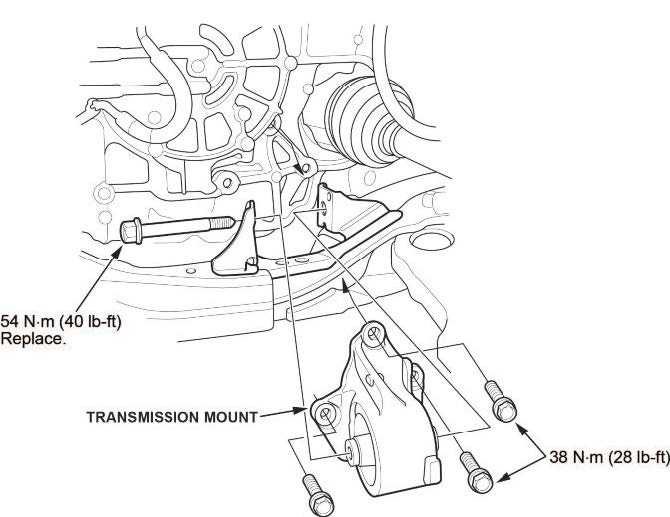
- Remove the transmission mount.
- Install the front subframe adapter tool.
43.1 Attach the subframe adapter to the front subframe by looping the belt over the front of the front subframe, then secure the belt with its stop, and tighten the wing nut.
43.2 Raise a transmission jack, and line up the slots in the subframe adapter arms with the bolt holes on the transmission jack base. Then, securely attach them with four bolts.
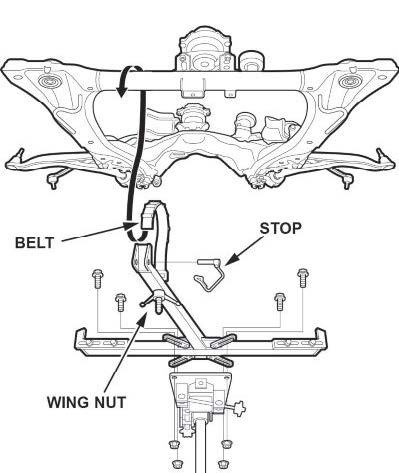
- Remove the front subframe.
NOTES
During installation:
- After loosening the subframe bolts, be sure to replace them with new ones.
- Lift the subframe up to the body, and loosely install the new subfrarme mounting bolts, new front stiffener mounting bolts, front stiffeners, new rear stiffener mounting bolts, and rear stiffeners.
- Tighten the subframe mounting bolts to the torque spec in the numbered sequence shown.
- Check all of the subframe mounting bolts, and tighten them if necessary.
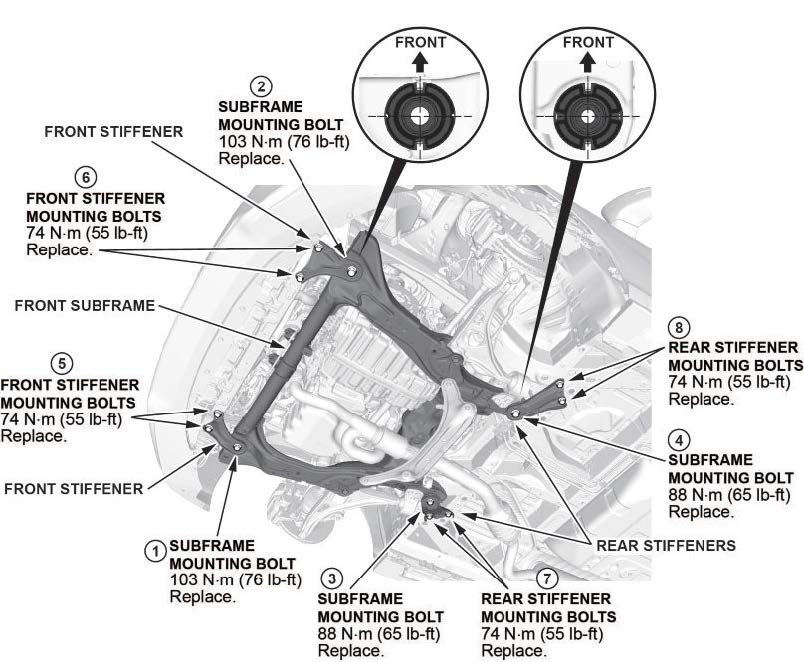
- Support the transmission with a transmission jack.
- Disconnect both lower arm ball joints.
46.1 Remove the lock pin from the lower arm ball joint.
NOTE
During installation, install the lock pin as shown after tightening the castle nut.
46.2 Remove the castle nut.
NOTES
- Use a new castle nut when installing.
- Torque the castle nut to the lower torque specification, then tighten it only far enough to align the slot with the ball joint pin hole. Do not align the castle nut by loosening it.
46.3 Disconnect the lower ball joint from the knuckle using the ball joint thread protector and the ball joint remover.
NOTES
- Be careful not to damage the ball joint boot when installing the ball joint remover.
- During installation do the following:
- Be careful not to damage the ball joint boot when connecting the knuckle.
- Degrease the ball joint before connecting the threaded section and the tapered portion of the ball joint pin, the ball joint connecting hole, the threaded section, and the mating surfaces of the castle nut.
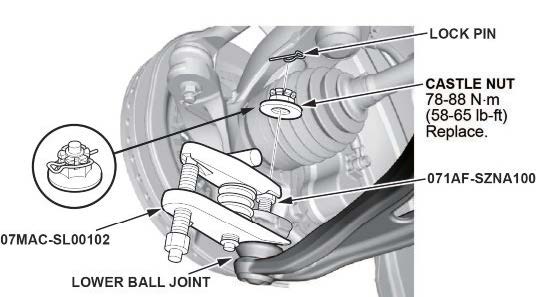
- Disconnect both inner driveline joints.
NOTES
Secure the driveshaft to the body on both sides with a nylon strap.
- Left driveshaft
47.1.1 Pry the inboard joint using a pry bar.
NOTE
Be careful to not damage the oil seal or the end of the inboard joint with a pry bar.
47.1.2 Remove the driveshaft as an assembly.
NOTE
Do not pull on the driveshaft, because the inboard joint may come apart. Pull the inboard joint straight out to avoid damaging the oil seal.
- Right driveshaft
47.2.1 Drive the inboard joint off of the intermediate shaft using a drift punch and a hammer.
47.2.2 Remove the driveshaft as an assembly.
NOTES
- Do not pull on the driveshaft, because the inboard joint may come apart. Pull the inboard joint straight out.
- Use new snap rings when installing the driveshaft.
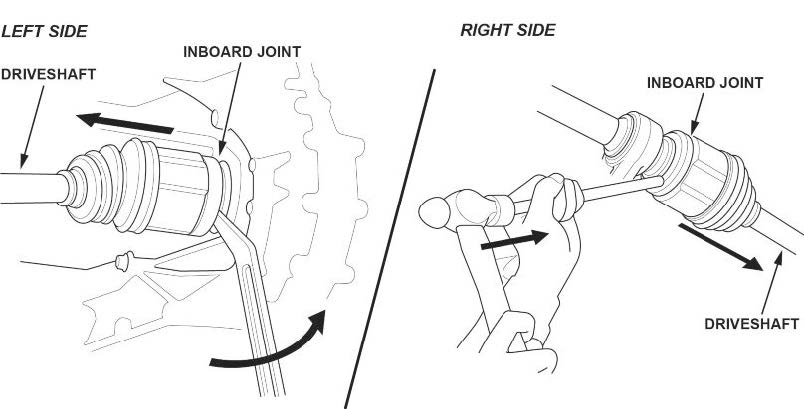
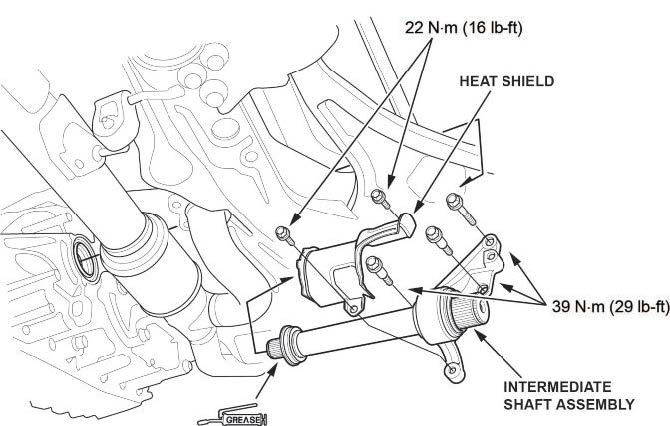
- Remove the intermediate shaft assembly.
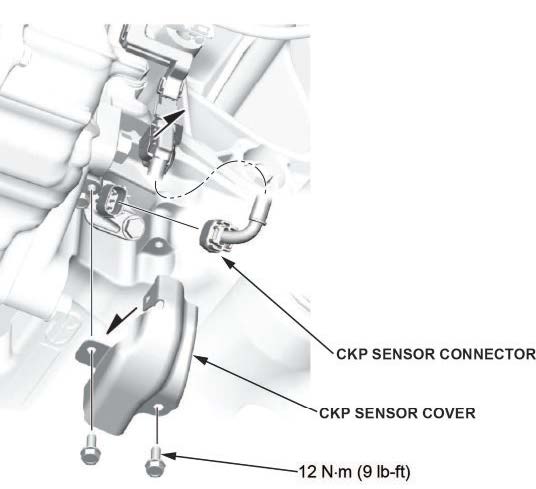
- Disconnect the CKP sensor connector.
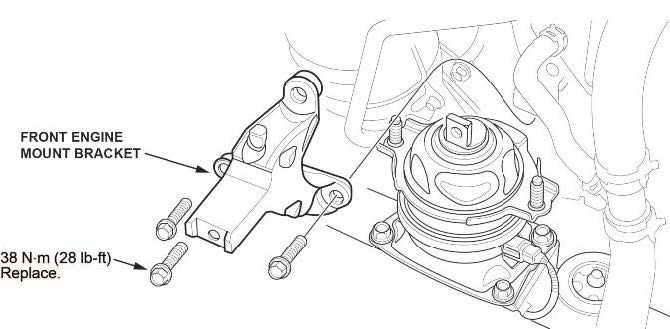
- Remove the front engine mount bracket.
- Disconnect the transmission ground strap.
- Remove the torque converter cover.
- Remove the torque converter bolts.
- Remove the remaining transmission mounting bolts.
- Remove the transmission.
- Remove the dowel pins, and install them on the new transmission.
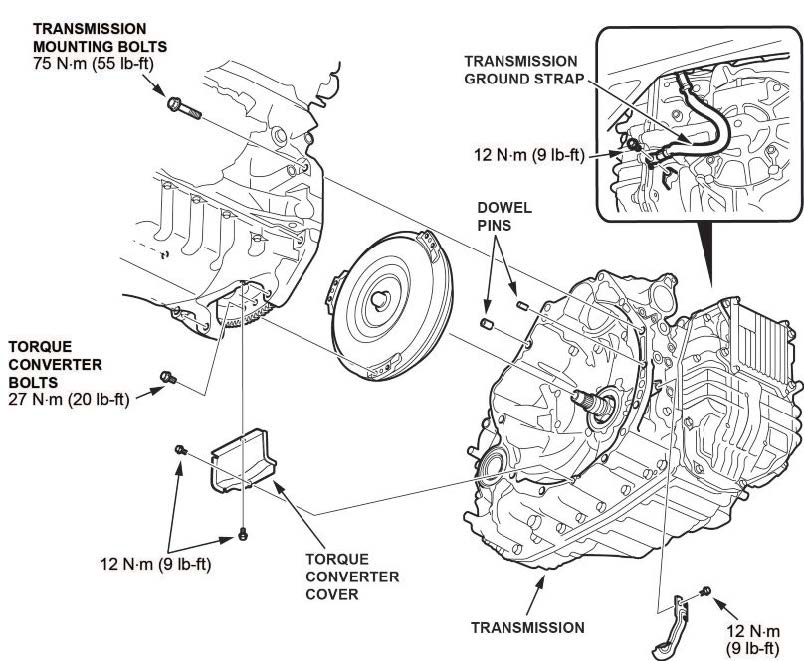
- Install the new transmission.
- Install all removed parts in the reverse order of removal except the intake air duct and the front bulkhead cover. The battery terminals will still need to be inspected.
NOTES
- Make sure to replace all must-replace parts.
- The reman transmission comes prefilled with AT. It does not need to be filled.
- Use new snap rings on drive lines.
- Fill the cooling system with coolant.
At coolant change: 7.4 L (1.90 US gal) with coolant reservoir included.
- Do the keyless access registration.
- Inspect the positive and negative battery terminals.
NOTICE
- Battery terminal installation on this vehicle is critical. Failure to follow the terminal installation or inspection procedures could cause electrical problems, stalling, and/or DTCs to set. Do not over torque the terminals, and do not use an impact gun.
- Battery terminal installation must be level or below the post. See GOOD and NO GOOD example pictures.
Compare both of the battery terminals to the examples below.
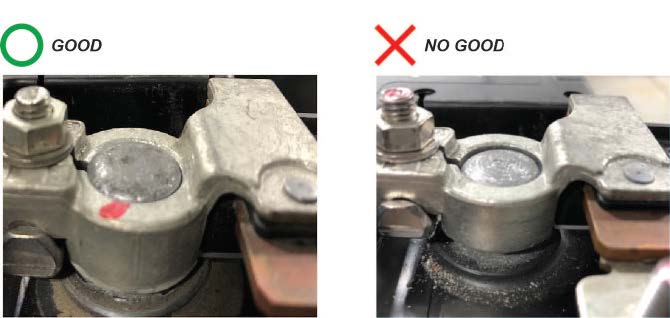
Do the battery terminals look like the good example?
Yes – Go to step 62.
No – Go to TERMINAL REPAIR.
- While holding down the terminal, torque both positive and negative clamps to 4-6 N•m (35-53 lb-in).
NOTE
Do not over torque the terminal.
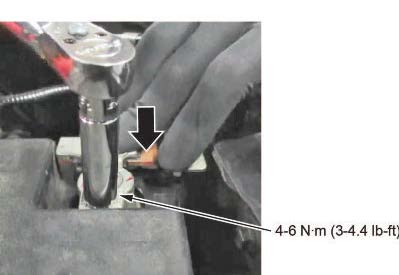
- Make sure the connection is tight by wiggling the terminals back and forth.
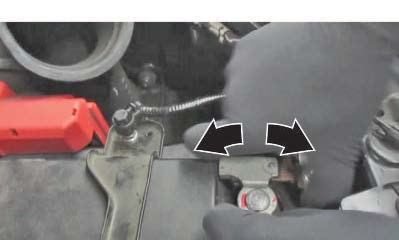
Are both terminals secure?
Yes – Apply multipurpose grease to the terminals to prevent corrosion, and install the air intake duct and the bulkhead cover. Then, do the following steps:
63.1 Check the front-end alignment.
63.2 Do the VSA Sensor Neutral Position Memorization procedure.
63.3 Test-drive the vehicle, and confirm the repair.
No – Go to TERMINAL REPAIR.
TERMINAL REPAIR
- Remove the terminal or terminals, and clean the post using an approved battery terminal cleaner or equivalent.
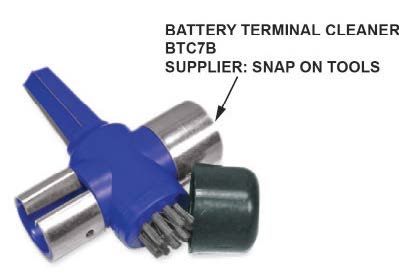
1.1 Make sure the ignition is turned to OFF.
1.2 Disconnect and isolate the negative cable with the battery sensor from the battery.
NOTES
- Always disconnect the negative side first.
- To prevent damage to the connector, do not hold it when removing the battery terminal.
- Do not disconnect the battery sensor from the cable.
1.3 Open the terminal cover.
1.4 Disconnect the terminal from the battery.
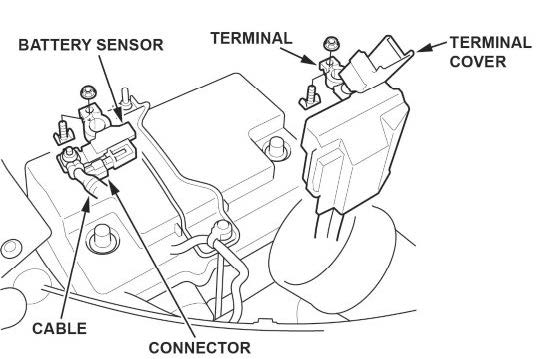
- While holding down the terminal, torque both positive and negative clamps to 4-6 N•m (35-53 lb-in).
NOTES
- Do not over torque the terminal.
- Always connect the positive side first.
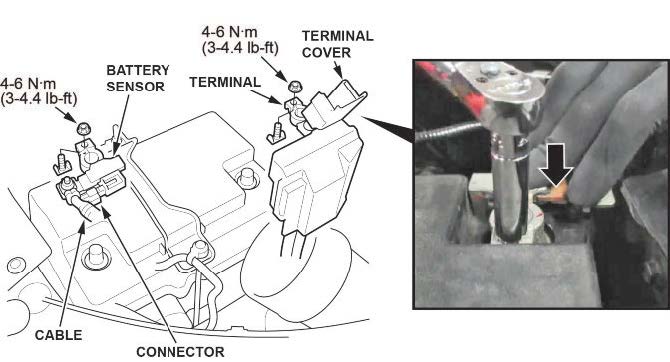
- Compare both of the battery terminals to the examples below.
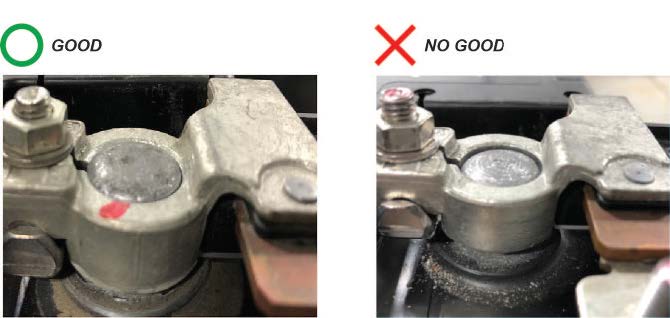
Do the battery terminals look like the good example?
Yes – Go to step 4.
No – Go to REPLACE BATTERY TERMINAL.
- Make sure the connection is tight by wiggling the terminals back and forth.
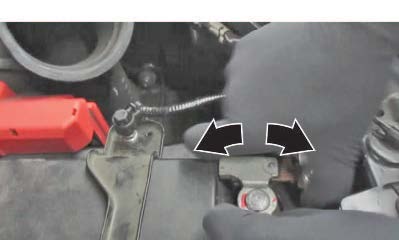
Are both terminals secure?
Yes – Apply multipurpose grease to the terminals to prevent corrosion, and install the air intake duct and the bulkhead cover. Then do the following steps:
4.1 Check the front-end alignment.
4.2 Do the VSA Sensor Neutral Position Memorization procedure.
4.3 Test-drive the vehicle, and confirm the repair.
No – Go to REPLACE BATTERY TERMINAL.
REPLACE BATTERY TERMINAL
- Remove the battery terminal that does not sit at or below the top of the post.
- Install a new terminal, and torque the terminal and clamp nut to 4-6 N•m (35-53 lb-in) while holding it down.
NOTES
- Always disconnect the negative side first.
- To prevent damage, do not hold the connector when removing the battery terminal.
- Do not disconnect the battery sensor from the cable.
- Compare both of the battery terminals to the examples below.
Do the battery terminals look like the good example?
Yes – Go to step 4.
No – Go to BATTERY REPLACEMENT, BATTERY RESISTANCE RESET PROCEDURE.
- Make sure the connection is tight by wiggling the terminals back and forth.
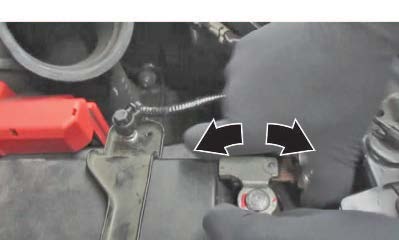
Are both terminals secure?
Yes – Apply multipurpose grease to the terminals to prevent corrosion, and install the air intake duct and the bulkhead cover. Then, go do the following steps:
4.1 Check the front-end alignment.
4.2 Do the VSA Sensor Neutral Position Memorization procedure.
4.3 Test-drive the vehicle, and confirm the repair.
No – Go to BATTERY REPLACEMENT, BATTERY RESISTANCE RESET PROCEDURE.
BATTERY REPLACEMENT, BATTERY RESISTANCE RESET PROCEDURE
- Disconnect the battery terminals.
1.1 Make sure the ignition is turned to OFF.
1.2 Disconnect and isolate the negative cable with the battery sensor from the battery.
NOTES
- Always disconnect the negative side first.
- To prevent damage to the connector, do not hold it when removing the battery terminal.
- Do not disconnect the battery sensor from the cable.
1.3 Open the terminal cover.
1.4 Disconnect the terminal from the battery.
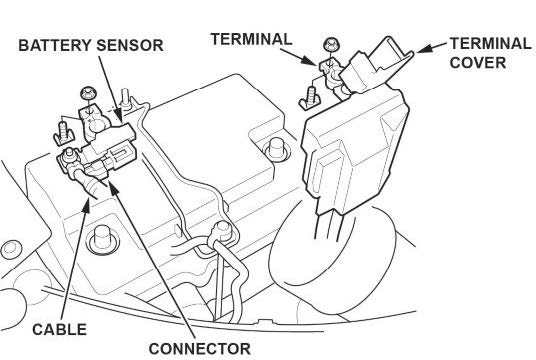
- Remove the setting plate.
- Remove the battery cover.
- Remove the battery.
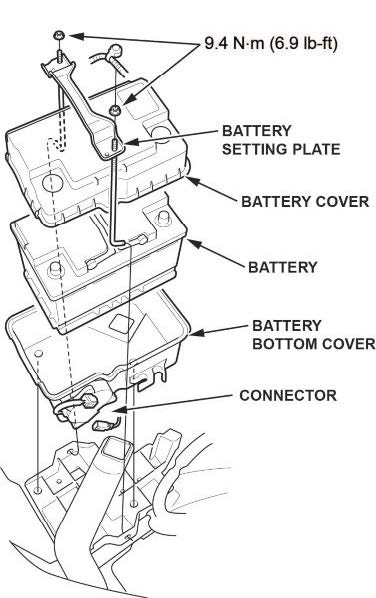
- Install a new battery. Then reinstall the battery cover, and the setting plate in the reverse order of removal.
- While holding down the terminal, torque both positive and negative clamps to 4-6 N•m (35-53 lb-in).
NOTES
- Do not over torque the terminal.
- Always connect the positive side first.
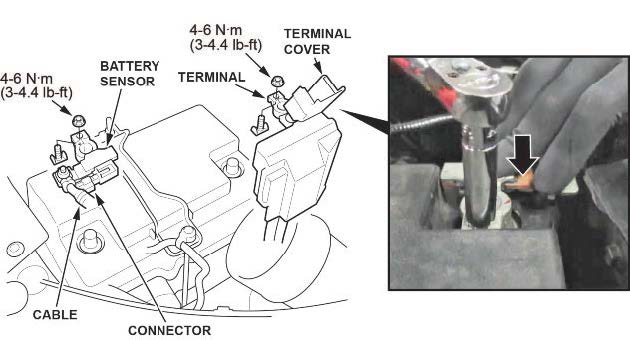
- Compare both of the battery terminals to the examples below.
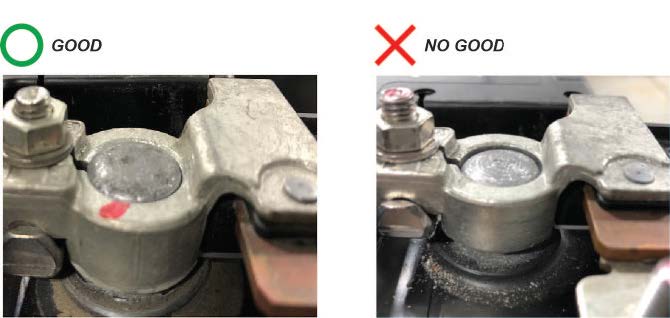
Do the battery terminals look like the good example?
Yes – Go to step 8.
No – Remove and reinstall the terminals, then go back to step 7.
- Make sure the connection is tight by wiggling the terminals back and forth.
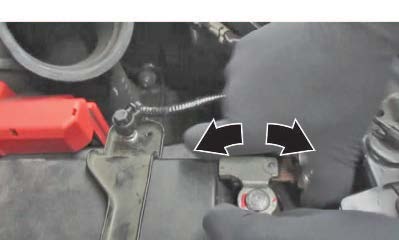
Are both terminals secure?
Yes – Apply multipurpose grease to the terminals to prevent corrosion and install the air intake duct and bulkhead cover. Then go to BATTERY INTERNAL RESISTANCE RESET.
No – Remove and reinstall the terminals, then go to step 7.
BATTERY INTERNAL RESISTANCE RESET
NOTE
Do this procedure only if the battery was replaced.
- Make sure all electrical systems (A/C, audio, lights, etc) are turned off.
- Turn the ignition to OFF.
- Turn the ignition to ACCESSORY.
- Turn the ignition to ON.
- Start the engine, and let it idle for 1 minute or more.
- Turn the ignition to OFF.
- Repeat steps 3 thru 6 at least four times.
NOTE
The internal resistance of the battery may not be updated if the engine starts up immediately from the OFF position.
It has to go through the ACCESSORY and ON position.
- Turn the ignition to ON.
- Connect the i-HDS and select PGM-FI.
- Check IDLE STOP INHIBIT (BATTERY DETERIORATION) in the Data List.
Normal – The battery internal resistance test is complete.
INHIBITED – Replace the battery, then do the battery internal resistance reset procedure again.
- Turn the ignition to OFF, and disconnect the i-HDS.
- Check the front-end alignment.
- Do the VSA Sensor Neutral Position Memorization procedure.
- Test-drive the vehicle, and confirm the repair.
END
2 Affected Products
Vehicle
| MAKE | MODEL | YEAR |
| HONDA | ODYSSEY | 2018-2019 |
16 Associated Documents
Remedy Instructions and TSB
RCRIT-19V299-2354.pdf 4846.634KB
Chronology
RMISC-19V299-0249.pdf 12.829KB
Recall Acknowledgement
RCAK-19V299-8161.pdf 384.163KB
DEFECT INFORMATION REPORT
RMISC-19V299-2515.pdf 149.435KB
Defect Notice 573 Report
RCLRPT-19V299-5941.PDF 213.779KB
Manufacturer Notices(to Dealers,etc) – April 12, 2019
RCMN-19V299-3846.pdf 213.823KB
Remedy Instructions and TSB
RCRIT-19V299-1782.pdf 4784.157KB
Remedy Instructions and TSB
RCRIT-19V299-2603.pdf 3289.759KB
Remedy Instructions and TSB
RCRIT-19V299-3867.pdf 4812.272KB
ISSUED Owner Notification Letter(Part 577) – Owner Notification Letter (Z4J
RCONL-19V299-8652.pdf 112.541KB
ISSUED Owner Notification Letter(Part 577) – Owner Notification Letter (Y4K)
RCONL-19V299-3310.pdf 310.358KB
Remedy Instructions and TSB
RCRIT-19V299-5197.pdf 5506.941KB
Statement by American Honda Regarding Transmission Control Unit Software Recall: 2018-2019 Honda Odyssey Touring and Touring Elite
RMISC-19V299-0933.pdf 74.873KB
Recall Quarterly Report #1, 2019-2
RCLQRT-19V299-4154.PDF 211.153KB
Recall Quarterly Report #3, 2019-4
RCLQRT-19V299-3346.PDF 211.354KB
Recall Quarterly Report #2, 2019-3
RCLQRT-19V299-1258.PDF 211.256KB
Latest Recalls Documents
Reprogramming
i-HDS Diagnostic Software and J2534 Reprogramming Software
Honda J2534 Pass-Thru User Guide
Honda J2534 Pass-Thru Software Download
i-HDS Diagnostic Software and J2534 Reprogramming Software
American Honda Motor Co., Inc. ("Honda") offers the i-HDS (Honda Diagnostic System) software suite for the diagnosis and repair of electronic systems on Honda and Acura automobiles, and for the reprogramming of electronic control units (including, but not limited to, ECMs and PCMs). This software provides access to all Honda and Acura vehicle systems (access to the immobilizer security system requires a Security Professional level software subscription and Vehicle Security Professional [VSP] registration with NASTF). To use the i-HDS software, you need to purchase one of our convenient subscription options. In addition, you will need a pass-thru Vehicle Communication Device (VCI) that is compliant with SAE J2534-1 and J2534-2 in order to communicate with the vehicle
Vehicle Communication Interfaces (VCI)
The i-HDS software supports the use of a generic pass-thru VCI that is compliant with SAE J2534-1 and J2534-2. However, Honda recommends the Denso DST-i or the Bosch MVCI for use on Honda and Acura vehicles, as Honda has worked closely with these manufacturers to ensure their hardware and our software interact safely and within the J2534-1 and -2 specifications, for both diagnostics and reprogramming. If you choose to use a generic VCI, please carefully consider the customer and technical support options you will receive from your chosen device supplier. Honda does not provide technical or customer support for generic VCI devices.
The VCI Application Table below lists devices that either are approved and supported by Honda or are known to have completed and passed an independent, exhaustive validation program with our i-HDS software suite.
| VCI Name | Manufacturer | Version Information | Notes | |
|---|---|---|---|---|
| Firmware | J2534 API | |||
| DST-i | DENSO | 2.02.0002* | 04.04 | This is the current generation VCI used by Honda and Acura dealers. Honda routinely validates the functionality and provides customer support for this device. |
| DST-nano | DENSO | 2.02.0002* | 04.04 | This is the current generation VCI used by Honda Canada Inc. Honda and Acura dealers. Honda routinely validates the functionality and provides customer support for this device. |
| MVCI | Bosch | 3.01.60* | 04.04 | This is the previous generation VCI used by Honda and Acura dealers. Honda routinely validates the functionality and provides customer support for this device. |
| MongoosePro Honda | Drew Technologies | 1.9.5** | 04.04 | This company has completed an independent i-HDS validation and claims it to function with the i-HDS software. Honda does not provide ongoing validation, nor customer support for this device. |
| d-briDGe Pro | Dearborn Group | 3.303** | 04.04 | This company has completed an independent i-HDS validation and claims it to function with the i-HDS software. Honda does not provide ongoing validation, nor customer support for this device. |
* These versions may have been superseded. Honda provides the latest supported versions to current i-HDS subscribers.
** Version used in validation program. See Terms and Conditions and Important Notice Regarding Reprogramming below for more details.
Reprogramming with the J2534 Rewrite Application in i-HDS
Included in the i-HDS software suite is a new reprogramming application called J2534 Rewrite. This application is made available to all subscribers of the i-HDS software suite and replaces the previous generation software, J2534 Honda Pass-thru Reprogramming Software.
This new application is compatible with generic VCIs that comply with SAE J2534. It must be used to reprogram any Honda/Acura vehicle equipped with ECUs that support reprogramming. Refer to the table below for legacy applicability for the programming of ECMs and PCMs. Though system dependent, late-model vehicles may be equipped with other ECUs that support reprogramming as well, e.g. ABS or VSA. J2534 Rewrite must be used to reprogram these control modules, as instructed in an applicable service bulletin.
As shown in this table, not all legacy Honda/Acura models are equipped with a reprogrammable ECM/PCM. Furthermore, all 2007 and later models not listed in the table are fully supported with this application.
DST-i Information:
MVCI Information:

- J2534 Pass-Thru Programmer: TOPDON RLink J2534 is an advanced diagnostic and reprogramming tool that support all J2534 protocols, as well as D-PDU, CAN-FD and DoIP, ensuring compatibility with a wide range of modern vehicles. It offers extensive versatility with support for over 18 major automotive brands, including Chrysler, Ford, GM, Nissan, Toyota, Honda, Subaru, Land Rover/Jaguar, Volvo, Wuling, Volkswagen/Audi, Mercedes-Benz, and BMW. NOTE: Not compatible with Ford IDS diagnostic software
- All-in-One OEM Diagnostics: This J2534 ECU programming tool elevates your automotive repair capabilities to new heights by delivering complete OEM diagnosis. Boasting comprehensive full-system diagnostics, intuitive repair guides, advanced ECU programming and coding, common reset services, a vast library of repair information and more, this all-in-one solution empowers technicians to effortlessly tackle complex vehicle issues with ease. *Not compatible with 24V vehicles
- Proven Performance You Can Trust: Backed by over 10000 real vehicle tests and benefit from a wealth of practical experience, this OEM reprogramming tool guarantees stable and exceptional performance. Supported by TOPDON's dedicated technical experts with in-depth knowledge of both auto repair and J2534 Pass-Thru programming, the RLink J2534 provides prompt and professional assistance, ensuring a smooth setup and reliable compatibility
- Integrated Excellence, Always Up-to-Date: Featuring the exclusive RLink Platform to provide a streamlined experience with one-click driver installation and management, ensuring flawless integration with your OE software, maintaining the original performance quality. The built-in operation guide makes mastering OE software quick and easy, so you can get started right away. Plus, with lifetime free updates, your diagnostics will stay current with the latest drivers and innovations
- Efficiency Meets Versatility: Engineered to support three CAN channels simultaneously - CAN FD and CAN-CC included, giving you the edge in fast troubleshooting. To perfectly synchronized with the OE software, please diagnose with active subscriptions and make sure your computer system is running a compatible 64-bit Windows version (7, 8, 10 or later) to fully leverage the power of RLink J2534. *We don't provide extra OE software

- Advanced VCI Box, Industry-leading J2534 Pass-Thru Technology: This J2534 Pass-Thru Programmer is designed espically for technicians, independent shop owners, and DIY enthusiasts, enables fast, reliable computer-based programming. It supports all J2534 protocols—including the latest DoIP and CAN FD—ensuring full compatibility with both legacy and next-generation vehicles.
- High-Speed OEM-Level Diagnostics & Programming: Unlock true OEM functionality with comprehensive system diagnostics, guided troubleshooting, coding, adaptations, resets, and programming—all designed to slash repair time. This all-in-one tool eliminates the need for multiple OEM devices, boosting efficiency and cutting costs. Equipped with High-Speed USB, it delivers 10x more data per second than competing solutions
- Coverage for 17 Car Brands & Ultra Reliability: Works seamlessly for Chrysler, for Ford(Forscan), for GM, for Nissan, for Toyota, for Honda, for Subaru(SSM4), for Land Rover/Jaguar, for Volvo, for Wuling, for Volkswagen, for Mercedes-Benz, and for BMW. Backed by over 10000 real vehicle tests and benefit from a wealth of practical experience, this OEM reprogramming tool guarantees stable and exceptional performance
- User-Friendly RLink Platform & Expert Support: TOPDON’s proprietary driver management platform offers a clean interface and lifetime free updates. Access a rich library of real-world case studies to stay ahead of the curve. Backed by a support team with 10+ years of J2534 and automotive repair experience, we provide one-on-one assistance to resolve any technical issue.
- 6.6 ft USB-C Cable & Portable Storage Case: The RLink J2534 diagnostic tool features a 6.6ft USB 2.0 Cable and a 1.2 ft OBDII Extension Cable, allows to connection your computer easily outside the vehicle. The included handled carry case offers easy portability, storage, and hanging options—keeping your gear clean and ready to go, anywhere.

- Dual WiFi & 10.1" Touchscreen: Provides a stable, high-speed wireless link 3x faster than bluetooth, and a responsive, professional interface. Topdon ONE obd2 scanner diagnostic tool ensures smooth, non-lagging diagnostic scan, boosting mechanic efficiency
- J2534 Pass-Thru Support: The included ONE VCI supports the J2534 standard, allowing it to function as a pass-thru device when paired with OEM diagnostic software.Through TOPDON’s RLink platform, technicians can perform dealer-level coding, expanding in-house capabilities without investing in multiple factory automotive scan tools
- OE Topology Mapping: Visualize the vehicle’s ECU network exactly as it’s built.Zoom, pan, and highlight specific modules to pinpoint component issues with precision.Topology mapping displays real-time communication between modules
- 50+ Service Functions: Covers high-demand services like ADAS calibration, DPF regen, TPMS reset, ABS bleed, and throttle adaptation.Expands your service menu, allows you to charge premium rates, and turns away zero jobs due to lack of tooling. Vehicle-specific functionality may vary
- Advaned ECU Coding: 10 of the most serviced brands in North America, including full ECU coding and flash hidden support for BMW, VW, Au-di, Benz, Porsche, Toyota, Ni ssan and more. Enables module replacement, feature customization, and personal settings with automatic backup or restore.Lets your shop safely offer high-margin customization services, attracting more customers and boosting profit

- [J2534 Pass-Thru Programmer] - TOPDON RLink J2534 is engineered for professional technicians, delivering OEM diagnostic and reprogramming capabilities. It supports all J2534 protocols, CAN-FD, DoIP, D-PDU. Compatible with 17 vehicle brands—such as Chrysler, Ford, GM, KIA, Hyundai, Nissan, Toyota, Honda, Subaru, Mitsubishi, MAZDA, Land Rover/Jaguar, Volvo, Volkswagen/Audi, Mercedes-Benz, and BMW. RLink J2534 can help reduce the cost of purchasing equipment from different brands.
- [All-in-One OEM Reprogramming and Diagnostics] - When seamlessly integrated with OEM diagnostic software, this dongle enables you to perform a wide range of functions, including ECU programming and coding, DTC reading and clearing, active tests, component matching, adaptations, rewriting, guided troubleshooting, and more. This all-in-one tool eliminates the need for multiple OEM devices, significantly boosting work efficiency.
- [Tested, Trusted, and Proven for Accuracy] - TOPDON RLink J2534 is renowned for its reliability, having successfully completed over 10,000 real-vehicle tests. The wealth of data and hands-on experience behind it ensures consistent performance and accurate results. You can trust this tool to deliver optimal performance.
- [One-Click Installation, Continuous Updates] - The exclusive TOPDON RLink platform streamlines installation with a one-click driver setup, allowing you to quickly access OEM software for diagnostic and reprogramming tasks. With lifetime free updates, your RLink J2534 stays current without any additional cost, ensuring reliable performance for the long term. *We don't provide extra OE software.
- [Works with Windows Compatibility and OEM Software Subscription] - The RLink J2534 supports three CAN channels - including CAN FD and CAN-CC, providing advantages in the process of rapid troubleshooting. Compatible with Windows 7, 8 and 10 (64-bit) and higher versions of the system. For full functionality, an active OEM software subscription is required for each supported vehicle brand. Please note that the dongle does not include OEM software, which must be purchased separately to access brand-specific diagnostic and reprogramming features.

- 【J2534 Pass-Thru Device】 This budget-friendly J2534 pass-thru device delivers OEM diagnostics and reprogramming capabilities for dealerships, repair shops and automotive DIY enthuisasts, enables you diagnose, program and repair the vehicles more efficiently and precisely. Supporting J2534, D-PDU, CAN-FD and DoIP, this J2534 passthru tool ensures wide vehicle coverage. It's compatible with OE software application, ensuring seamless integration and original performance quality
- 【All-in-One Diagnostic Tool】 Simplify your workflow and tackle the complex diagnostics and repairs with confidence! This J2534 passthrough tool provides full system diagnosis, bi-directional control, maintenance reset services, ECU programming and ECU coding to run advanced diagnostics and programming. Equipped with the specialized platform, this J2534 pass-thru tool is fully compatible with OE software that helps technicians confidently handle complicated vehicle repair issues
- 【J2534 Diagnostic Tool】 The Tabscan J2534 pass-thru device is built with a dedicated platform, making it ideal for both professional and personal use. Simply download the driver for your ford vehicle within the platform—ensuring only one driver is installed at a time. Then connect the device to your vehicle’s OBD2 port and link it to your computer using the included USB A to USB C cable. Finally launch your OE software, select Tabscan J2534 VCI as interface, and begin diagnose and program
- 【Universal Compatibility】 Tabscan J2534 reprogramming tool is designed to be compatible with Ford vehicles for advanced diagnostics and programming. It supports J2534 protocols, along with D-PDU, CAN-FD and DoIP, ensuring seamless connectivity with older or modern vehicles. This J2534 diagnostic tool only works with computer running on windows 7/10/11. Vehicle compatibility varies by model or year, please confirm with us before purchase. Note: It's not compatible with 24V vehicles
- 【Professional Technical Support】 Tabscan J2534 pass-thru device provides a stable and seamless connection between your vehicle and computer for diagnostics, programming, and coding. But that's not all—we go beyond hardware. Our dedicated technical support team brings deep expertise in automotive diagnostics and programming. Whether you need help with setup, troubleshooting or latest diagnostic resources and upgrades, we provide fast, professional and reliable support every step of the way

- ALL OF THE J2534 PROTOCOLS - This single unit has all of the protocols you need for your OEM J2534 reprogramming and diagnostics including the latest in DoIP and CanFD
- J2534 TECHNICAL SUPPORT - FREE for the life of the tool. Staffed by technicians who understand vehicle repair and J2534 Pass‑thru
- TOOLBOX WITH OEM APPLICATION DESCRIPTIONS - educational video tutorials and real-time news – Giving you the confidence and up-to-date knowledge to get the job done
- J2534 v05.00 API - The newest version of J2534 to give you the latest in pass-thru technology
- FUTURE PROOF WITH 4 CAN CHANNELS - Going beyond the 3 required by select Chrysler/FCA models, CarDAQ-Plus 3 also provides a 4th to meet the needs of future OEM applications
This product presentation was made with AAWP plugin.