A01-023
June 10, 2016
04216 Version 12
Updating Control Units/Modules
(Supersedes 01-023, dated February 15, 2013, to revise the information)
AFFECTED VEHICLES
All Models With Programmable Control/Units Modules
REVISION SUMMARY
This service bulletin has been extensively revised; American Honda recommends that you read the entire bulletin.
INTRODUCTION
Starting with the launch of the i-HDS software, updating (rewriting) a vehicle control module will require a dedicated i-HDS laptop and an approved vehicle communications interface (VCI).
NOTE: The CM Update (rewrite) feature within the MVCI menu is removed and is no longer supported.
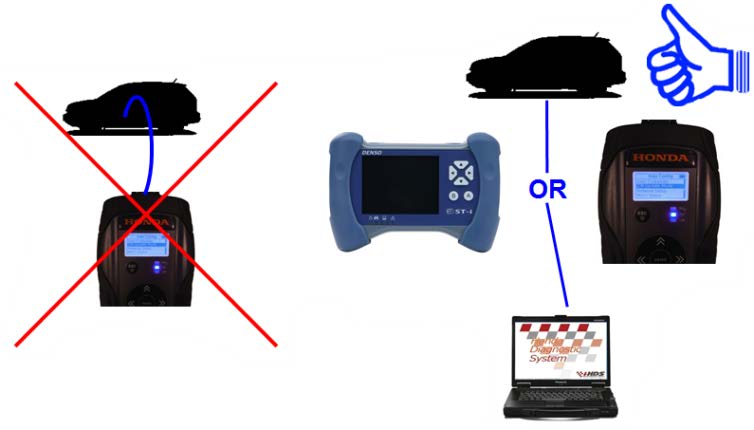
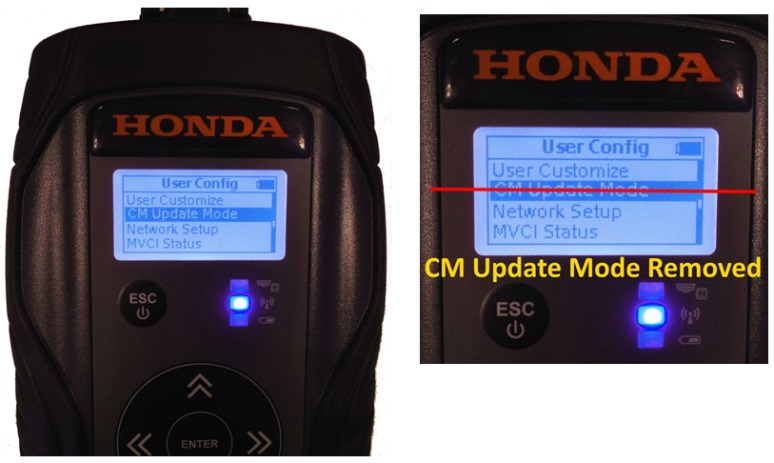
The procedures in this service bulletin are used and referenced in other service bulletins.
For detailed information on i-HDS usage, refer to the i-HDS Quick Start Guide on SIS. Click on General Publications > Tool Information. Most 2002 and later Honda vehicles have reprogrammable control modules. To update (rewrite) any of these control modules, you need the vehicle along with the Denso DST-i or the Bosch MVCI, and a laptop installed with the i-HDS software. The i-HDS software includes the J2534 Rewrite icon, which is used for vehicle control module updates.
This service bulletin describes these subjects:
- REQUIRED TOOLS AND EQUIPMENT
- UPDATING TIPS AND PRECAUTIONS
- QUESTIONS ABOUT THE UPDATING EQUIPMENT OR THE INTERACTIVE NETWORK
- STARTING UP THE APPLICATIONS
WARRANTY CLAIM INFORMATION
Skill Level: Repair Technician
Refer to the specific service bulletin for the symptom you are repairing.
REQUIRED TOOLS AND EQUIPMENT
The DST-i is available through the Honda Tool and Equipment Program. To purchase, call 888-424-6857. Note: The MVCI is supported; however it is no longer available for purchase
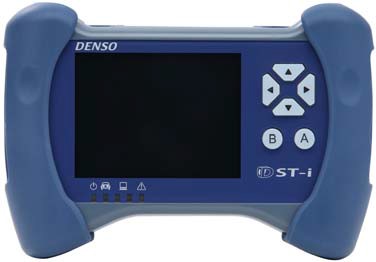
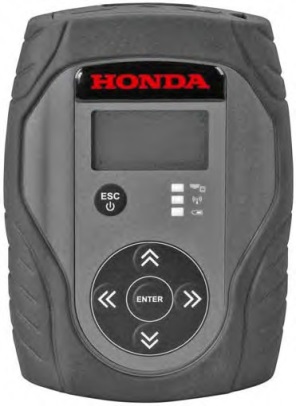
Interface Tools
NOTE: For more information about the DST-i, refer to the DST-i User Guide on SIS. Click on General Publications > Tool Information, or the Honda Tool and Equipment Program on the iN. DST-i – Model Number – DSCWIFI
3 Meter USB Cable – Model Number – DSCUSBCABL
3 Meter DLC Cable – Model Number – DSCDLCCABL
4GB SDHC Memory – Model Number – DSCSDCARD
IMPORTANT: American Honda strongly recommends against performing control module updates over a wireless connection between the laptop and interface device. If communication is disrupted during rewrite, permanent control module damage may result.
UPDATING TIPS AND PRECAUTIONS
- When updating a control module/unit on a new vehicle, make sure all its fuses were installed at PDI.
- To prevent control unit/module damage, do not operate anything electrical (audio system, brakes, A/C, power windows, moonroof, etc.) during the update.
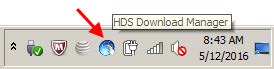
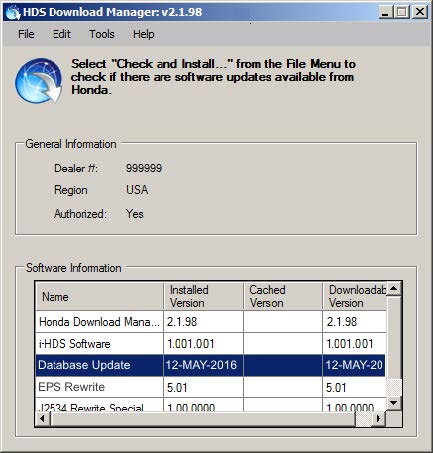
- The corresponding service bulletin will always indicate the correct database update to use. To check the database Update version on the i-HDS laptop, click on the HDS Download Manager icon on the taskbar
- Look at the Database Update then Installed Version. It should be the same or a later version than what is stated on the corresponding Service Bulletin.
- In addition, The most current software version information is also available on iN. Click on Service > Service Bay > Diagnostic Tools Software Versions.
- Do not connect an additional power supply to the DST-i or MVCI when it is connected to the vehicle; power is supplied through the DLC.
- To ensure that the control module/unit is not permanently damaged during updating, verify that the vehicle’s 12-volt battery is fully charged before starting an update.
NOTE: If the vehicle’s 12-volt battery drops below 10 volts during the update, the programming status bar may go past 100 percent, or the updating tool may display an error message.
If a problem occurs during an update, do the following to minimize the chances of damaging the control unit/module:
IMPORTANT: Keep the ignition ON.
- Connect a jumper battery (do not connect a battery charger).
- Disconnect the DST-i or MVCI from the vehicle’s DLC.
- Restart the Rewrite application.
- Reconnect the DST-i or the MVCI to the vehicle’s DLC, and retry the update procedure again.
NOTE: Unnecessary or incorrect repairs resulting from an update (rewrite) will not be covered under warranty.
QUESTIONS ABOUT THE UPDATING EQUIPMENT OR THE INTERACTIVE NETWORK
For questions about the Honda-supplied updating equipment, call the Special Tools hotline at 800-346-6327. For questions about the iN, call the iN Support Center at 800-245-4343
STARTING UP THE APPLICATIONS
- Click on the i-HDS icon from the Desktop.
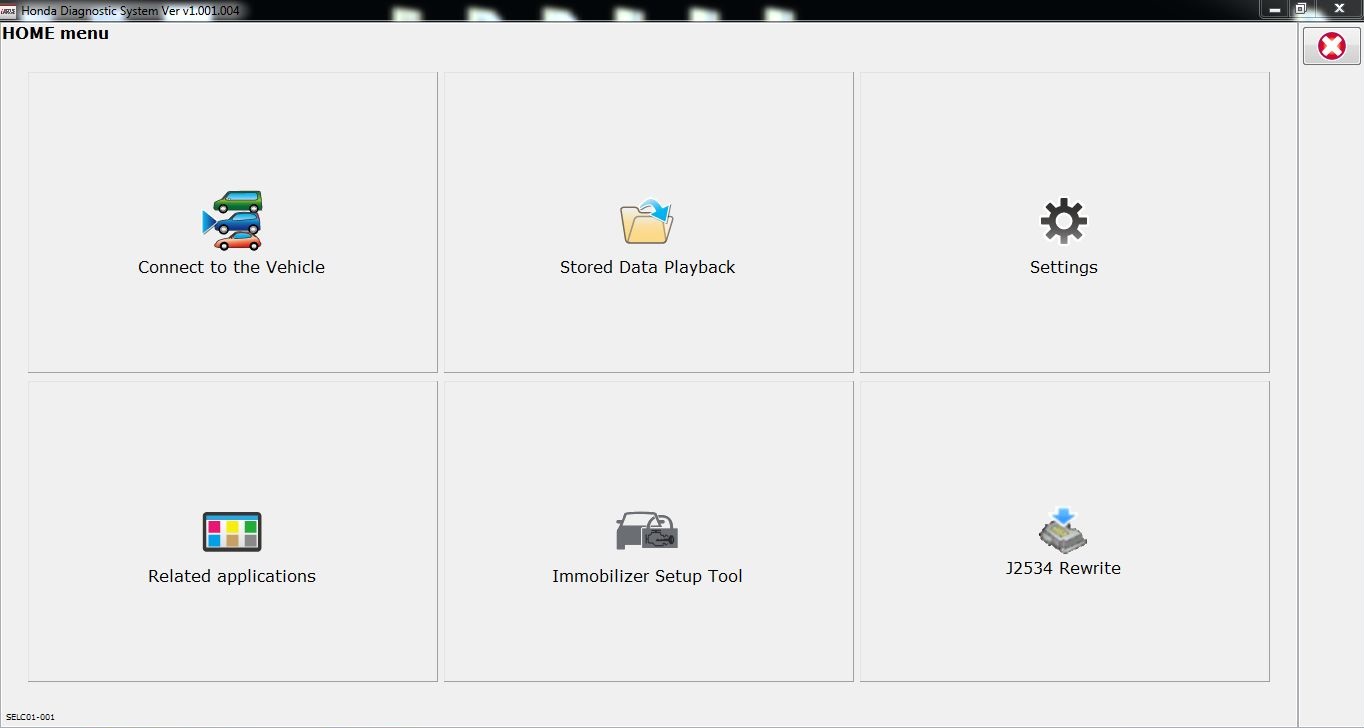
- On the HOME menu, Click on the J2534 Rewrite icon.
- Next enter a Service Bulletin, if applicable. If no bulletin number is available, click on Start to go to the regular J2534 Rewrite application.
NOTE: A correct Service Bulletin number will launch the appropriate J2534 Rewrite Special Application. Leaving the service bulletin number section blank will launch the regular J2534 Rewrite application.
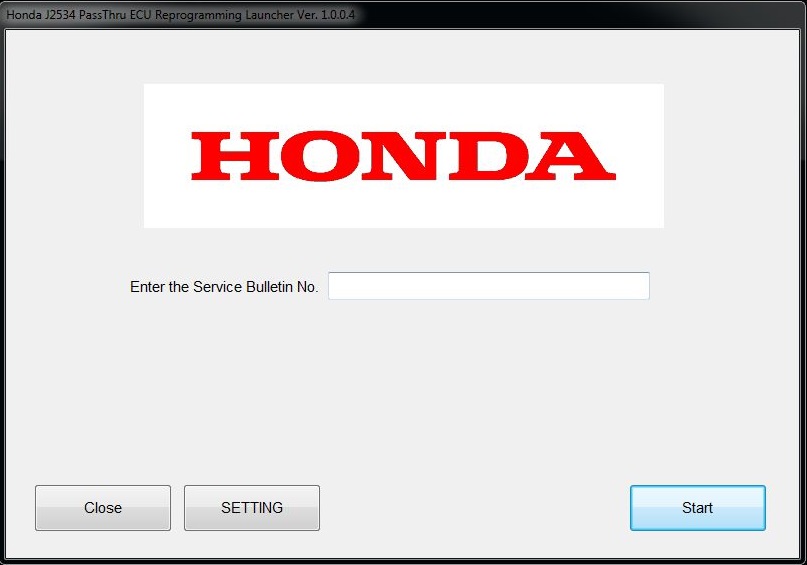
NOTE: Under certain conditions the HOME menu screen may pop back up, if it does, just minimize the screen to show the screen below.
- Connect to a vehicle and click Start to begin reprogramming procedures.
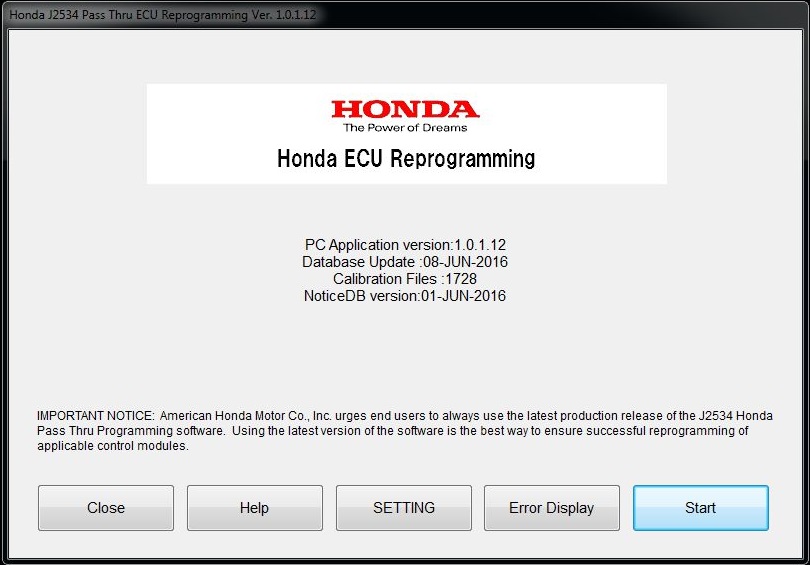
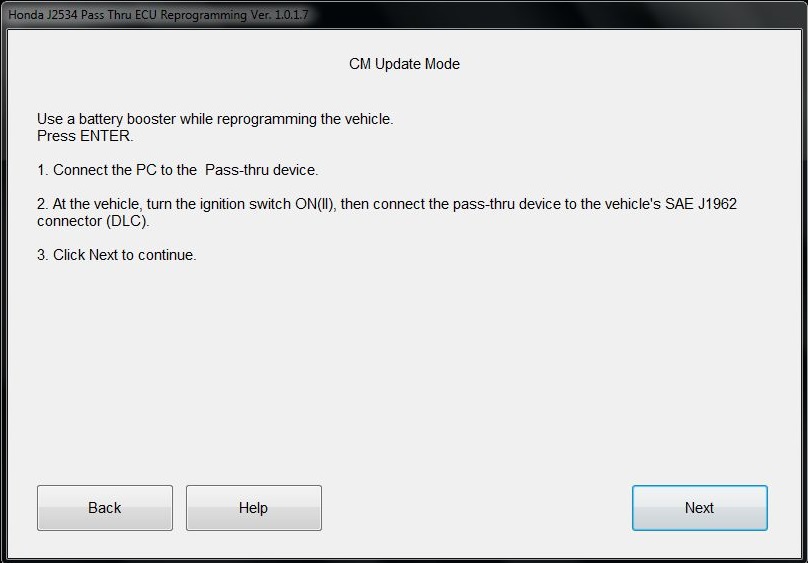
- Follow the on-screen instructions and then click Next.
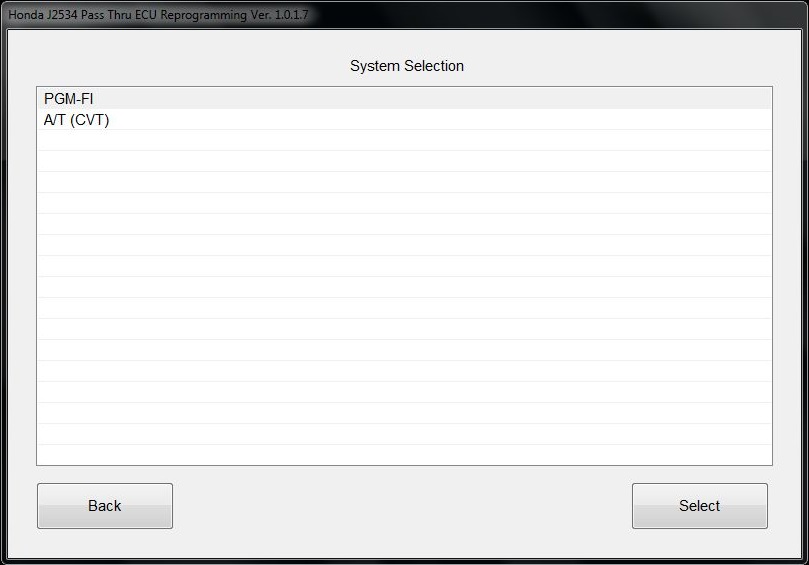
- Select the system you want to update and click Select.
NOTE: Please wait until vehicle communication has completed.
- Confirm the update information and click ENTER to start reprogramming.
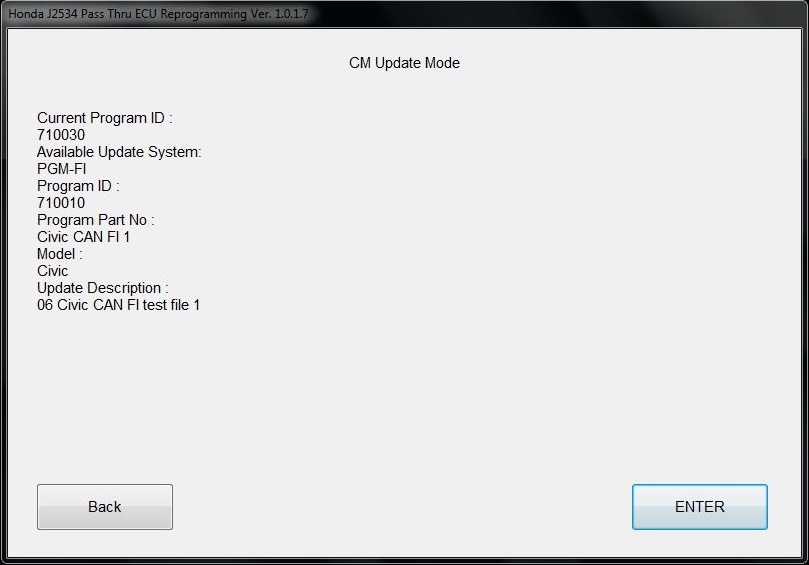
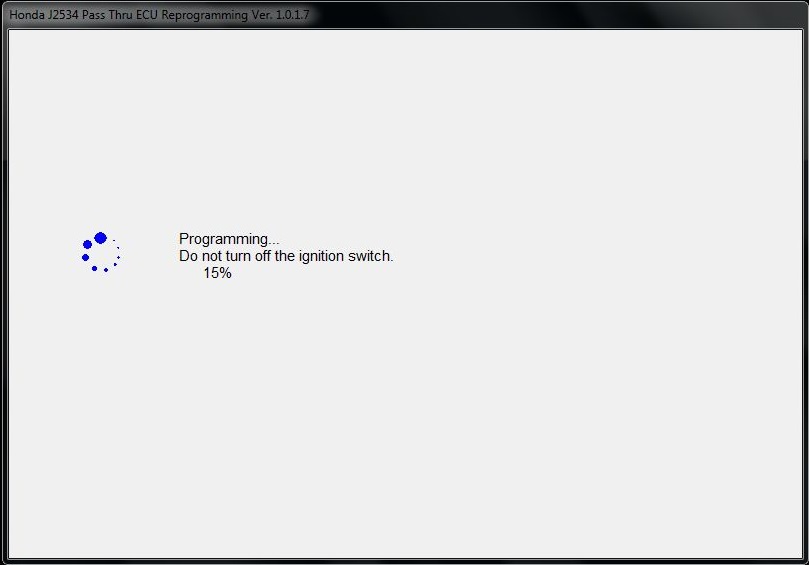
- Wait until the progress reaches 100%, then follow the on-screen prompts for ignition cycling.
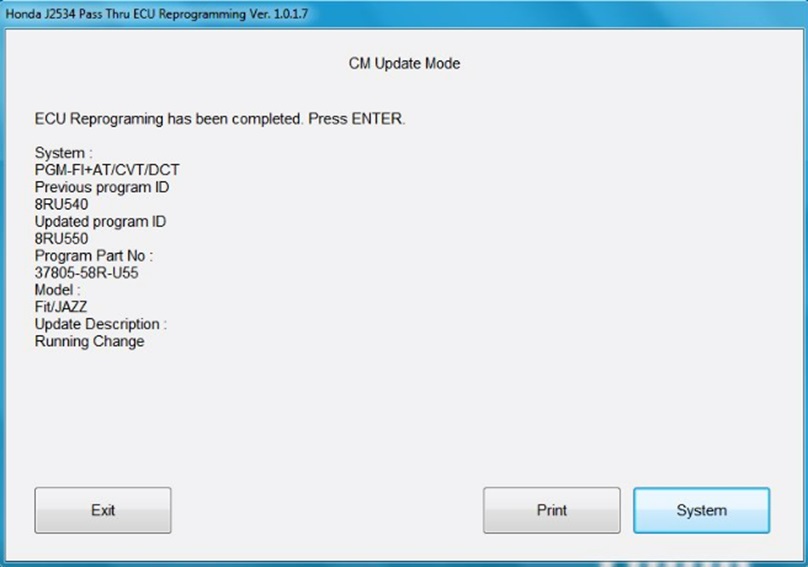
- Click System to return to the System Selection
END
Reprogramming
i-HDS Diagnostic Software and J2534 Reprogramming Software
Honda J2534 Pass-Thru User Guide
Honda J2534 Pass-Thru Software Download
i-HDS Diagnostic Software and J2534 Reprogramming Software
American Honda Motor Co., Inc. ("Honda") offers the i-HDS (Honda Diagnostic System) software suite for the diagnosis and repair of electronic systems on Honda and Acura automobiles, and for the reprogramming of electronic control units (including, but not limited to, ECMs and PCMs). This software provides access to all Honda and Acura vehicle systems (access to the immobilizer security system requires a Security Professional level software subscription and Vehicle Security Professional [VSP] registration with NASTF). To use the i-HDS software, you need to purchase one of our convenient subscription options. In addition, you will need a pass-thru Vehicle Communication Device (VCI) that is compliant with SAE J2534-1 and J2534-2 in order to communicate with the vehicle
Vehicle Communication Interfaces (VCI)
The i-HDS software supports the use of a generic pass-thru VCI that is compliant with SAE J2534-1 and J2534-2. However, Honda recommends the Denso DST-i or the Bosch MVCI for use on Honda and Acura vehicles, as Honda has worked closely with these manufacturers to ensure their hardware and our software interact safely and within the J2534-1 and -2 specifications, for both diagnostics and reprogramming. If you choose to use a generic VCI, please carefully consider the customer and technical support options you will receive from your chosen device supplier. Honda does not provide technical or customer support for generic VCI devices.
The VCI Application Table below lists devices that either are approved and supported by Honda or are known to have completed and passed an independent, exhaustive validation program with our i-HDS software suite.
| VCI Name | Manufacturer | Version Information | Notes | |
|---|---|---|---|---|
| Firmware | J2534 API | |||
| DST-i | DENSO | 2.02.0002* | 04.04 | This is the current generation VCI used by Honda and Acura dealers. Honda routinely validates the functionality and provides customer support for this device. |
| DST-nano | DENSO | 2.02.0002* | 04.04 | This is the current generation VCI used by Honda Canada Inc. Honda and Acura dealers. Honda routinely validates the functionality and provides customer support for this device. |
| MVCI | Bosch | 3.01.60* | 04.04 | This is the previous generation VCI used by Honda and Acura dealers. Honda routinely validates the functionality and provides customer support for this device. |
| MongoosePro Honda | Drew Technologies | 1.9.5** | 04.04 | This company has completed an independent i-HDS validation and claims it to function with the i-HDS software. Honda does not provide ongoing validation, nor customer support for this device. |
| d-briDGe Pro | Dearborn Group | 3.303** | 04.04 | This company has completed an independent i-HDS validation and claims it to function with the i-HDS software. Honda does not provide ongoing validation, nor customer support for this device. |
* These versions may have been superseded. Honda provides the latest supported versions to current i-HDS subscribers.
** Version used in validation program. See Terms and Conditions and Important Notice Regarding Reprogramming below for more details.
Reprogramming with the J2534 Rewrite Application in i-HDS
Included in the i-HDS software suite is a new reprogramming application called J2534 Rewrite. This application is made available to all subscribers of the i-HDS software suite and replaces the previous generation software, J2534 Honda Pass-thru Reprogramming Software.
This new application is compatible with generic VCIs that comply with SAE J2534. It must be used to reprogram any Honda/Acura vehicle equipped with ECUs that support reprogramming. Refer to the table below for legacy applicability for the programming of ECMs and PCMs. Though system dependent, late-model vehicles may be equipped with other ECUs that support reprogramming as well, e.g. ABS or VSA. J2534 Rewrite must be used to reprogram these control modules, as instructed in an applicable service bulletin.
As shown in this table, not all legacy Honda/Acura models are equipped with a reprogrammable ECM/PCM. Furthermore, all 2007 and later models not listed in the table are fully supported with this application.
DST-i Information:
MVCI Information:

- J2534 Pass-Thru Programmer: TOPDON RLink J2534 is an advanced diagnostic and reprogramming tool that support all J2534 protocols, as well as D-PDU, CAN-FD and DoIP, ensuring compatibility with a wide range of modern vehicles. It offers extensive versatility with support for over 18 major automotive brands, including Chrysler, Ford, GM, Nissan, Toyota, Honda, Subaru, Land Rover/Jaguar, Volvo, Wuling, Volkswagen/Audi, Mercedes-Benz, and BMW. NOTE: Not compatible with Ford IDS diagnostic software
- All-in-One OEM Diagnostics: This J2534 ECU programming tool elevates your automotive repair capabilities to new heights by delivering complete OEM diagnosis. Boasting comprehensive full-system diagnostics, intuitive repair guides, advanced ECU programming and coding, common reset services, a vast library of repair information and more, this all-in-one solution empowers technicians to effortlessly tackle complex vehicle issues with ease. *Not compatible with 24V vehicles
- Proven Performance You Can Trust: Backed by over 10000 real vehicle tests and benefit from a wealth of practical experience, this OEM reprogramming tool guarantees stable and exceptional performance. Supported by TOPDON's dedicated technical experts with in-depth knowledge of both auto repair and J2534 Pass-Thru programming, the RLink J2534 provides prompt and professional assistance, ensuring a smooth setup and reliable compatibility
- Integrated Excellence, Always Up-to-Date: Featuring the exclusive RLink Platform to provide a streamlined experience with one-click driver installation and management, ensuring flawless integration with your OE software, maintaining the original performance quality. The built-in operation guide makes mastering OE software quick and easy, so you can get started right away. Plus, with lifetime free updates, your diagnostics will stay current with the latest drivers and innovations
- Efficiency Meets Versatility: Engineered to support three CAN channels simultaneously - CAN FD and CAN-CC included, giving you the edge in fast troubleshooting. To perfectly synchronized with the OE software, please diagnose with active subscriptions and make sure your computer system is running a compatible 64-bit Windows version (7, 8, 10 or later) to fully leverage the power of RLink J2534. *We don't provide extra OE software

- Advanced VCI Box, Industry-leading J2534 Pass-Thru Technology: This J2534 Pass-Thru Programmer is designed espically for technicians, independent shop owners, and DIY enthusiasts, enables fast, reliable computer-based programming. It supports all J2534 protocols—including the latest DoIP and CAN FD—ensuring full compatibility with both legacy and next-generation vehicles.
- High-Speed OEM-Level Diagnostics & Programming: Unlock true OEM functionality with comprehensive system diagnostics, guided troubleshooting, coding, adaptations, resets, and programming—all designed to slash repair time. This all-in-one tool eliminates the need for multiple OEM devices, boosting efficiency and cutting costs. Equipped with High-Speed USB, it delivers 10x more data per second than competing solutions
- Coverage for 17 Car Brands & Ultra Reliability: Works seamlessly for Chrysler, for Ford(Forscan), for GM, for Nissan, for Toyota, for Honda, for Subaru(SSM4), for Land Rover/Jaguar, for Volvo, for Wuling, for Volkswagen, for Mercedes-Benz, and for BMW. Backed by over 10000 real vehicle tests and benefit from a wealth of practical experience, this OEM reprogramming tool guarantees stable and exceptional performance
- User-Friendly RLink Platform & Expert Support: TOPDON’s proprietary driver management platform offers a clean interface and lifetime free updates. Access a rich library of real-world case studies to stay ahead of the curve. Backed by a support team with 10+ years of J2534 and automotive repair experience, we provide one-on-one assistance to resolve any technical issue.
- 6.6 ft USB-C Cable & Portable Storage Case: The RLink J2534 diagnostic tool features a 6.6ft USB 2.0 Cable and a 1.2 ft OBDII Extension Cable, allows to connection your computer easily outside the vehicle. The included handled carry case offers easy portability, storage, and hanging options—keeping your gear clean and ready to go, anywhere.
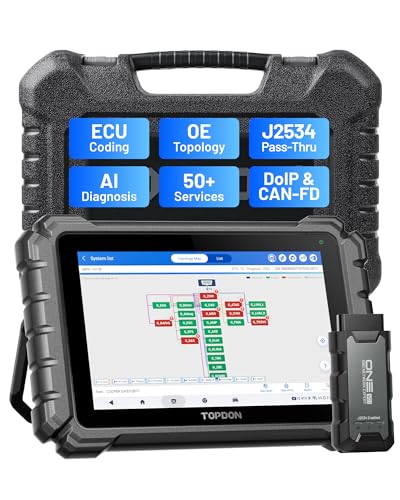
- Dual WiFi & 10.1" Touchscreen: Provides a stable, high-speed wireless link 3x faster than bluetooth, and a responsive, professional interface. Topdon ONE obd2 scanner diagnostic tool ensures smooth, non-lagging diagnostic scan, boosting mechanic efficiency
- J2534 Pass-Thru Support: The included ONE VCI supports the J2534 standard, allowing it to function as a pass-thru device when paired with OEM diagnostic software.Through TOPDON’s RLink platform, technicians can perform dealer-level coding, expanding in-house capabilities without investing in multiple factory automotive scan tools
- OE Topology Mapping: Visualize the vehicle’s ECU network exactly as it’s built.Zoom, pan, and highlight specific modules to pinpoint component issues with precision.Topology mapping displays real-time communication between modules
- 50+ Service Functions: Covers high-demand services like ADAS calibration, DPF regen, TPMS reset, ABS bleed, and throttle adaptation.Expands your service menu, allows you to charge premium rates, and turns away zero jobs due to lack of tooling. Vehicle-specific functionality may vary
- Advaned ECU Coding: 10 of the most serviced brands in North America, including full ECU coding and flash hidden support for BMW, VW, Au-di, Benz, Porsche, Toyota, Ni ssan and more. Enables module replacement, feature customization, and personal settings with automatic backup or restore.Lets your shop safely offer high-margin customization services, attracting more customers and boosting profit

- [J2534 Pass-Thru Programmer] - TOPDON RLink J2534 is engineered for professional technicians, delivering OEM diagnostic and reprogramming capabilities. It supports all J2534 protocols, CAN-FD, DoIP, D-PDU. Compatible with 17 vehicle brands—such as Chrysler, Ford, GM, KIA, Hyundai, Nissan, Toyota, Honda, Subaru, Mitsubishi, MAZDA, Land Rover/Jaguar, Volvo, Volkswagen/Audi, Mercedes-Benz, and BMW. RLink J2534 can help reduce the cost of purchasing equipment from different brands.
- [All-in-One OEM Reprogramming and Diagnostics] - When seamlessly integrated with OEM diagnostic software, this dongle enables you to perform a wide range of functions, including ECU programming and coding, DTC reading and clearing, active tests, component matching, adaptations, rewriting, guided troubleshooting, and more. This all-in-one tool eliminates the need for multiple OEM devices, significantly boosting work efficiency.
- [Tested, Trusted, and Proven for Accuracy] - TOPDON RLink J2534 is renowned for its reliability, having successfully completed over 10,000 real-vehicle tests. The wealth of data and hands-on experience behind it ensures consistent performance and accurate results. You can trust this tool to deliver optimal performance.
- [One-Click Installation, Continuous Updates] - The exclusive TOPDON RLink platform streamlines installation with a one-click driver setup, allowing you to quickly access OEM software for diagnostic and reprogramming tasks. With lifetime free updates, your RLink J2534 stays current without any additional cost, ensuring reliable performance for the long term. *We don't provide extra OE software.
- [Works with Windows Compatibility and OEM Software Subscription] - The RLink J2534 supports three CAN channels - including CAN FD and CAN-CC, providing advantages in the process of rapid troubleshooting. Compatible with Windows 7, 8 and 10 (64-bit) and higher versions of the system. For full functionality, an active OEM software subscription is required for each supported vehicle brand. Please note that the dongle does not include OEM software, which must be purchased separately to access brand-specific diagnostic and reprogramming features.

- 【J2534 Pass-Thru Device】 This budget-friendly J2534 pass-thru device delivers OEM diagnostics and reprogramming capabilities for dealerships, repair shops and automotive DIY enthuisasts, enables you diagnose, program and repair the vehicles more efficiently and precisely. Supporting J2534, D-PDU, CAN-FD and DoIP, this J2534 passthru tool ensures wide vehicle coverage. It's compatible with OE software application, ensuring seamless integration and original performance quality
- 【All-in-One Diagnostic Tool】 Simplify your workflow and tackle the complex diagnostics and repairs with confidence! This J2534 passthrough tool provides full system diagnosis, bi-directional control, maintenance reset services, ECU programming and ECU coding to run advanced diagnostics and programming. Equipped with the specialized platform, this J2534 pass-thru tool is fully compatible with OE software that helps technicians confidently handle complicated vehicle repair issues
- 【J2534 Diagnostic Tool】 The Tabscan J2534 pass-thru device is built with a dedicated platform, making it ideal for both professional and personal use. Simply download the driver for your ford vehicle within the platform—ensuring only one driver is installed at a time. Then connect the device to your vehicle’s OBD2 port and link it to your computer using the included USB A to USB C cable. Finally launch your OE software, select Tabscan J2534 VCI as interface, and begin diagnose and program
- 【Universal Compatibility】 Tabscan J2534 reprogramming tool is designed to be compatible with Ford vehicles for advanced diagnostics and programming. It supports J2534 protocols, along with D-PDU, CAN-FD and DoIP, ensuring seamless connectivity with older or modern vehicles. This J2534 diagnostic tool only works with computer running on windows 7/10/11. Vehicle compatibility varies by model or year, please confirm with us before purchase. Note: It's not compatible with 24V vehicles
- 【Professional Technical Support】 Tabscan J2534 pass-thru device provides a stable and seamless connection between your vehicle and computer for diagnostics, programming, and coding. But that's not all—we go beyond hardware. Our dedicated technical support team brings deep expertise in automotive diagnostics and programming. Whether you need help with setup, troubleshooting or latest diagnostic resources and upgrades, we provide fast, professional and reliable support every step of the way

- ALL OF THE J2534 PROTOCOLS - This single unit has all of the protocols you need for your OEM J2534 reprogramming and diagnostics including the latest in DoIP and CanFD
- J2534 TECHNICAL SUPPORT - FREE for the life of the tool. Staffed by technicians who understand vehicle repair and J2534 Pass‑thru
- TOOLBOX WITH OEM APPLICATION DESCRIPTIONS - educational video tutorials and real-time news – Giving you the confidence and up-to-date knowledge to get the job done
- J2534 v05.00 API - The newest version of J2534 to give you the latest in pass-thru technology
- FUTURE PROOF WITH 4 CAN CHANNELS - Going beyond the 3 required by select Chrysler/FCA models, CarDAQ-Plus 3 also provides a 4th to meet the needs of future OEM applications
This product presentation was made with AAWP plugin.