
May 16, 2019 NHTSA CAMPAIGN NUMBER: 19V378000
Improperly Installed Passenger Air Bag Inflator
An incorrectly installed air bag inflator may not properly deploy the passenger frontal air bag in the event of a crash, increasing the risk of injury.
NHTSA Campaign Number: 19V378
Manufacturer Honda (American Honda Motor Co.)
Components AIR BAGS
Potential Number of Units Affected 19,086
Summary
Honda (American Honda Motor Co.) is recalling certain 2009-2014 Acura TSX, 2011-2013 TSX Sport Wagon, and 2010-2012 ZDX and 2008-2012 Honda Accord, 2010-2011 Accord Crosstour, 2006-2011 Civic, Civic Hybrid and Civic NGV, 2012-2014 Crosstour, 2007-2011 CR-V, 2009-2013 Fit, 2010-2013 Insight, and 2009-2015 Pilot vehicles. The front passenger air bag inflator may have been installed incorrectly during replacement.
Remedy
Honda will notify owners, and dealers will inspect the inflator installation and, if necessary, replace the passenger frontal air bag module assembly, free of charge. The recall began July 5, 2019. Owners may contact Honda customer service at 1-888-234-2138. Honda’s numbers for this recall are M4O, P4R, T4Q, and W4P.
Notes
Owners may also contact the National Highway Traffic Safety Administration Vehicle Safety Hotline at 1-888-327-4236 (TTY 1-800-424-9153), or go to www.safercar.gov.
Check if your Acura has a Recall
Service Bulletin
B19-032
May 17, 2019
Version 1
Safety Recall: Incorrect Installation of the Takata Front Passenger’s Airbag Inflator
AFFECTED VEHICLES
| Year | Model | Trim | VIN Range |
| 2009-14 | TSX | L4 | Check the iN VIN status for eligibility. |
| 2010-12 | TSX | V6 | Check the iN VIN status for eligibility. |
| 2011-13 | TSX Sport Wagon | ALL | Check the iN VIN status for eligibility. |
BACKGROUND
Some dealers incorrectly installed passenger front airbag inflators under various campaigns to replace the inflators. The incorrect installation of the inflators may have damaged the airbag assembly. Additionally, the airbag may not deploy as designed. If the inspection reveals the inflator is not installed correctly, do not replace only the inflator. If the inflator is incorrectly installed make sure to replace the front passenger’s airbag module assembly.
There are several bulletins with similar years and models. Make sure to do an iN VIN status inquiry and follow the indicated service bulletin.
CLIENT NOTIFICATION
Owners of affected vehicles will be sent a notification of this campaign.
Do an iN VIN status inquiry to make sure the vehicle is shown as eligible.
Some vehicles affected by this campaign may be in your used vehicle inventory.
Failure to repair a vehicle subject to a recall or campaign may subject your dealership to claims or lawsuits from the client or anyone else harmed as a result of such failure. To see if a vehicle in inventory is affected by this safety recall, do a VIN status inquiry before selling it.
CORRECTIVE ACTION
Inspect the front passenger airbag inflator and, if the inflator is not installed correctly, replace the airbag module assembly.
NOTES
These notes are applicable only when the airbag assembly is replaced:
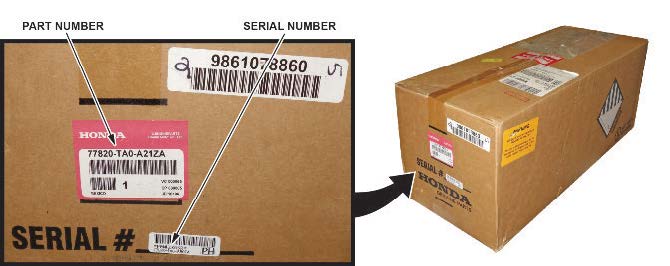
- Write the serial number and part number from the side of the new replacement front passenger’s airbag module box on the repair order.
- To properly dispose of the original inflator, you must remove it from the airbag module. See REMOVE THE INFLATOR FROM THE ORIGINAL AIRBAG MODULE.
- A new inflator box must be ordered and the original inflator must be returned in the box.
- To return the inflator, follow the shipping instructions outlined in the parts information bulletin B15-0006, Inflator Kit Return Process.
- Place the original airbag module (without the inflator) in the airbag module box that the replacement came in. It may be called in by American Honda.
PARTS INFORMATION
Airbag Module Replacement
| Part Name | Part Number |
| Refer to the parts catalog using the VIN to ensure the correct airbag module and ancillary parts are ordered. | Refer to the parts catalog. |
- Make sure the airbag inflator is removed from the original airbag module. See Remove the Inflator From the Original Airbag Module section of this bulletin.
- The new airbag module box must be used to return the old airbag module without the inflator to American Honda (if requested). Be careful not to damage the airbag module box.
- To return the inflator, follow the shipping instuctions outlined in the parts information bulletin B15-0006, Inflator Kit Return Process.
- Parts staff can scan the part number and serial number from the outside of the box into the warranty claim by using the Controlled Part Serial No. screen and scanning the applicable information. Refer to the Job Aid Ordering and Managing Replacement Inflators for more information.
WARRANTY CLAIM INFORMATION
- To avoid non-payment of warranty claims for airbag module assembly replacement, the new airbag module part number and serial number must be included in each claim. For more information, refer to step 1 of AIRBAG MODULE INSTALLATION.
- To avoid a warranty claim being charged back to your dealership, follow the normal warranty part retention rules. American Honda may call in the original airbag module.
- The serial number is encoded into the bar code label attached to the outside of the box. If your dealership uses a scanner, you can scan the serial number into the claim.
- The part number is encoded into a bar code attached to the outside of the box. If your dealership uses a scanner, you can scan the part number into the claim.
- If you confuse the serial number and part number when entering the claim information, your claim will automatically be rejected.
- Template IDs are not included because there are many model/trim/color variations.
- There are several service bulletins with similar years and models. Make sure you file your warranty claim under the correct bulletin. If you file your claim under the wrong bulletin, your claim will be debited.
| Operation Number | Description | Flat Rate Time | Defect Code | Symptom Code | Failed Part Number |
| 7540A4 | TSX – Inspect the original airbag inflator installation. | 0.3 hr | 6NG00 | T4Q00 | 77820-TL2-A20 |
| 7541F7 | TSX – Inspect the inflator and replace the original airbag module. | 0.5 hr | 6NG00 | T4Q00 | 77820-TL2-A20 |
Skill Level: Repair Technician
INSPECTION PROCEDURE
NOTE
If the VIN status inquiry indicates that the vehicle is subject to any open safety recalls, including a driver’s airbag inflator campaign/recall, make sure to also complete those recall repairs before returning the vehicle to the client. If you are unable to complete any open recall, advise the client of the recall status and when the recall could be completed.
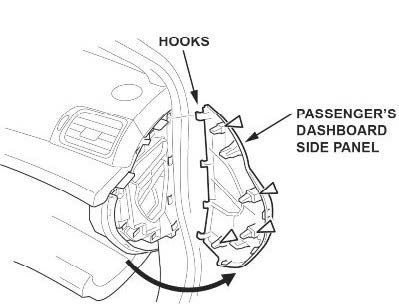
- Using a plastic trim tool, remove the passenger’s dashboard side panel.
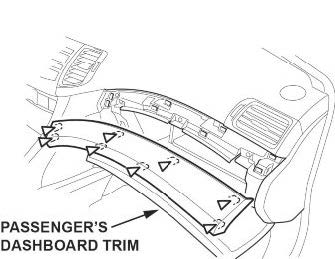
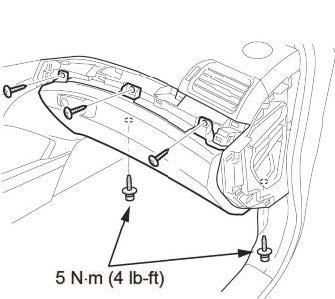
- Close the glove box, and remove the bolts and screws.
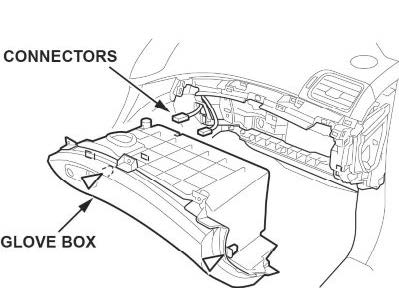
- Disconnect the glove box light connector and the trunk lid opener main switch connector.
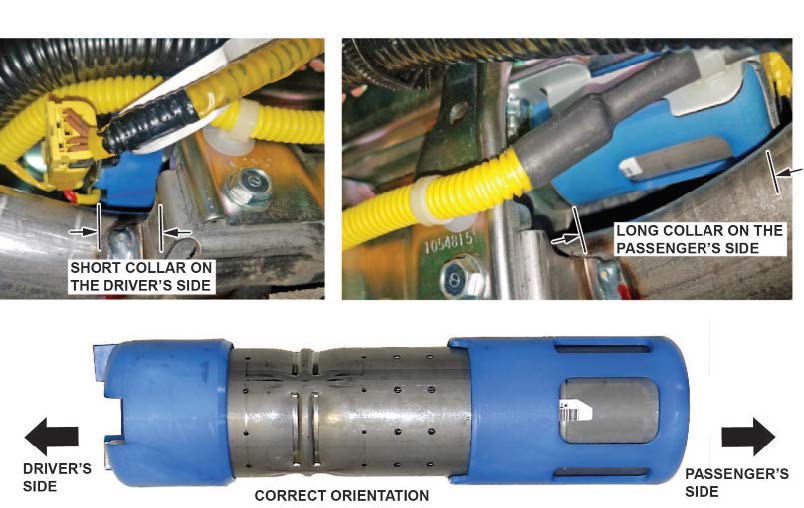
- Inspect the plastic collars on the passenger’s airbag inflator.
- If the long collar is closer to the front passenger’s door, the inflator installation is GOOD. Reassemble the glove box in the reverse order of removal.
- If the long collar is closer to the driver’s side, the inflator installation is NO GOOD. Go to AIRBAG MODULE INSTALLATION.
AIRBAG MODULE INSTALLATION
- For airbag module replacement only – Write the serial number and part number from the side of the new front replacement passenger’s airbag module box on the RO. For the warranty claim to be paid, the new front passenger’s airbag module part number and serial number must be included in the warranty claim.
- Install the passenger’s airbag module (assembly). Refer to the applicable model’s service information.
- After reconnecting the 12-volt battery, turn the ignition to ON, and check if the SRS indicator comes on for about 6 seconds, then goes off. If the indicator does not come on, or comes on and stays on, follow normal troubleshooting.
- Set the clock (for vehicles without navigation), and enter the anti-theft code for the audio and navigation system (if applicable).
- For airbag module replacement only – Remove the inflator from the original airbag module. Refer to REMOVE THE INFLATOR FROM THE ORIGINAL AIRBAG MODULE.
- For airbag module replacement only – Give your warranty clerk the RO that includes the replacement front passenger’s airbag module serial number and replacement part number. For the warranty claim to be paid the new front replacement passenger’s airbag module part number and serial number must be included in the warranty claim.
REMOVE THE INFLATOR FROM THE ORIGINAL AIRBAG MODULE
NOTE
If you replaced the original airbag module because of an incorrectly installed inflator, you must remove the inflator from the original airbag module, and return the inflator as part of your pallet shipment to its supplier.
- Order a new inflator box from XPO to return the original airbag module inflator. Use the contact information below:
Primary Contact: Tel#: 1-210-250-5079
Email: [email protected]
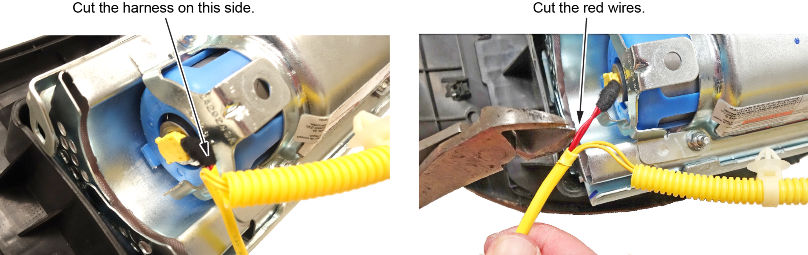
- Remove the harness from the inflator bracket.
- Short the red and yellow wires.
NOTE
Depending on the vehicle, you must cut the red or yellow wires to remove the inflator, and both sets of wires must be shorted to prevent accidental deployment.
3.1 Cut the red wires about 2 inches from the inflator.
NOTE
There may be some protective tube covering the wires that needs to be cut away to access the wires.
3.2 Strip away about 1 inch of the red wire insulation, then twist the wires together.
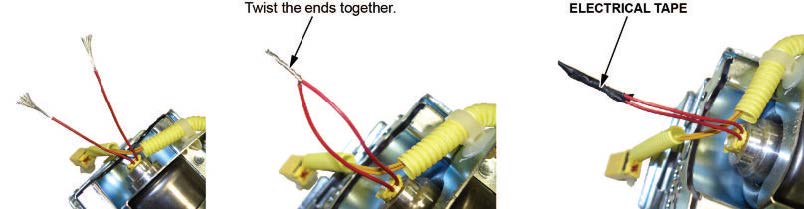
3.3 Tape the twisted ends with electrical tape.
3.4 Cut the yellow wires about 2 inches from the inflator.
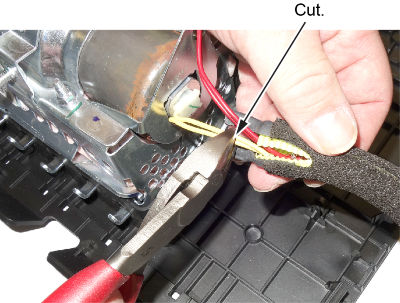
3.5 Strip away about 1 inch of the yellow wire insulation, then twist the wires together.

3.6 Tape the twisted ends with electrical tape.
3.7 Remove the four inflator nuts.
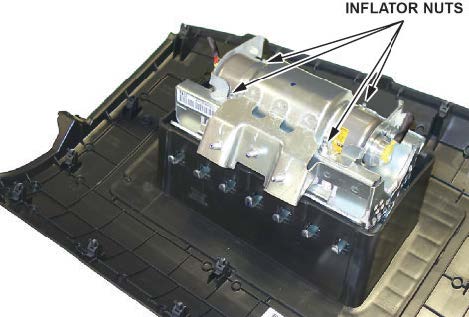
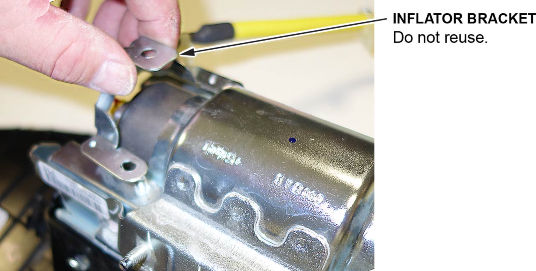
- Remove the inflator bracket.
NOTE
You can only remove one of the brackets, as the other is welded to the airbag housing.
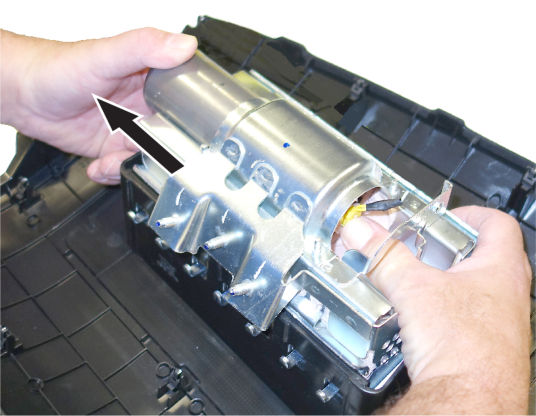
- Remove the inflator by pulling it out.
- Put the original inflator into the new inflator box acquired from XPO. Make sure there is no other hardware in the box because if the package rattles, it will not be accepted by the courier.
- Follow the shipping instructions outlined in PIB B15-0006 to return the undeployed inflator.
- Place the original airbag module (without the inflator) in the airbag module box that the replacement came in. Properly fill out and attach a warranty claim tag to it. The original airbag module may be called in by AHM.
END
61 Affected Products
Vehicles
| ACURA | TSX | 2009-2014 |
| ACURA | TSX SPORTSWAGON | 2011-2013 |
| ACURA | ZDX | 2010-2012 |
| HONDA | ACCORD | 2008-2012 |
| HONDA | ACCORD CROSSTOUR | 2010-2011 |
| HONDA | CIVIC | 2006-2011 |
| HONDA | CIVIC GX | 2006-2011 |
| HONDA | CIVIC HYBRID | 2006-2011 |
| HONDA | CR-V | 2007-2011 |
| HONDA | CROSSTOUR | 2012-2014 |
| HONDA | FIT | 2009-2013 |
| HONDA | INSIGHT | 2010-2013 |
| HONDA | PILOT | 2009-2015 |
22 Associated Documents
DEFECT INFORMATION REPORT
RMISC-19V378-9475.pdf 265.225KB
Remedy Instructions and TSB
RCRIT-19V378-4386.pdf 1439.682KB
Recall Acknowledgement
RCAK-19V378-9796.pdf 363.762KB
Defect Notice 573 Report
RCLRPT-19V378-7804.PDF 265.654KB
Remedy Instructions and TSB
RCRIT-19V378-9007.pdf 2645.852KB
Remedy Instructions and TSB
RCRIT-19V378-3310.pdf 1325.69KB
Remedy Instructions and TSB
RCRIT-19V378-3241.pdf 1719.995KB
Manufacturer Notices(to Dealers,etc) – May 17, 2019 Subject Stop Sale/Safety Recall:09-14 Acura Multi-Model Pass. Frt. Inflator Mis-Install.
Statement by American Honda Regarding Passenger Airbag Inflator Kit Installation Error Recall
RMISC-19V378-2182.pdf 108.628KB
Manufacturer Notices(to Dealers,etc) – May 17, 2019 Subject Stop Sale/Safety Recall:06-15 Honda Multi-Model Pass. Frt.Inflator Mis-Install.
Recall Quarterly Report #2, 2019-4
RCLQRT-19V378-2138.PDF 211.274KB
Recall 573 Report-Amendment 1
RCLRPT-19V378-1048.PDF 242.373KB
Remedy Instructions and TSB
RCRIT-19V378-5549.pdf 1662.846KB
Remedy Instructions and TSB
RCRIT-19V378-5367.pdf 1439.728KB
Manufacturer Notices(to Dealers,etc) – November 9, 2019 Subject Stop Sale/Safety Recall: 2009-13 TSX, TSX Sport Wagon, 2010 ZDX Passenger Front
RCMN-19V378-5191.pdf 197.121KB
Chronology
RMISC-19V378-2207.pdf 15.494KB
AMENDED DEFECT INFORMATION REPORT November 8, 2019
RMISC-19V378-8933.pdf 191.831KB
ISSUED Owner Notification Letter(Part 577) – W4P
RCONL-19V378-0327.pdf 126.222KB
ISSUED Owner Notification Letter(Part 577) – M4O
RCONL-19V378-4460.pdf 126.393KB
ISSUED Owner Notification Letter(Part 577) – T4Q
RCONL-19V378-2422.pdf 147.828KB
Recall Quarterly Report #1, 2019-3
RCLQRT-19V378-5059.PDF 211.168KB
ISSUED Owner Notification Letter(Part 577) – P4R
RCONL-19V378-1168.pdf 147.502KB
Latest Recalls Documents

- [Easy to Use—Work Out of the Box] + [FOXWELL 2026 New Version] FOXWELL NT604 Elite scan tool is the 2026 new version from FOXWELL, designed for car owners who want to figure out the cause of issues before fixing car problems by scanning common systems like ABS, SRS, engine, and transmission. The NT604 Elite obd2 scanner diagnostic tool comes with the latest software—no need to waste time downloading software first. Plug the scanner into the OBDII port with OBDII cable to start the diagnosis.
- [Affordable] + [Reliable Car Health Monitor] Will you be confused what happens when the warning light of ABS/SRS/transmission/check engine flashes? Instead of taking your cars to dealership, this FOXWELL scanner will help you do a thorough scanning and detection for your cars and pinpoint the root cause. Note:The device is a diagnostic tool, not a repair tool. To turn off a warning light, you must first physically repair the issue causing it. Only then can the scanner be used to clear the corresponding fault code.
- [5 in 1 Car Diagnostic Scanner] Compared with obd scanners (50-100), NT604 Elite code scanner not only includes their OBDII diagnosis but also serves as ABS/SRS scanner, transmission and check engine code reader. When it’s an odb2 scanner, you can use it to check if your car is ready for annual test through I/M readiness menu. In addition, live data stream, built-in DTC library, data play back and print, all these features are a big plus for it. Note: doesn't support maintenance functions like reset or relearn. For the SRS system, NT604 Elite can read and clear common fault codes not caused by a crash, but crash/collision data cannot be cleared.
- [Fantastic AUTOVIN] + [No extra software fee] Through the AUTOVIN menu, this NT604 Elite car scanner allows you to get your V-IN and vehicle info rapidly, no need to take time to find your V-IN and input one by one. What's more, the NT604 Elite ABS SRS scanner supports 60+ car brands from worldwide (America/Asia/Europe). You don’t need to pay extra software fee. AUTOVIN may not work on some older vehicles or certain vehicle brands. If AUTOVIN fails, please input the vin code manually or go to the Diagnostic Menu to select your vehicle model.
- [Solid protective case KO plastic carrying bag] + [Lifetime update] Almost all same price-level car scanner diagnostic tool only offers plastic bag to hold the scanner.However, NT604 Elite automotive scanner is equipped with solid protective case, preventing your obd2 scanner from damage. Then you don’t need to pay extra money to buy a solid toolbox.
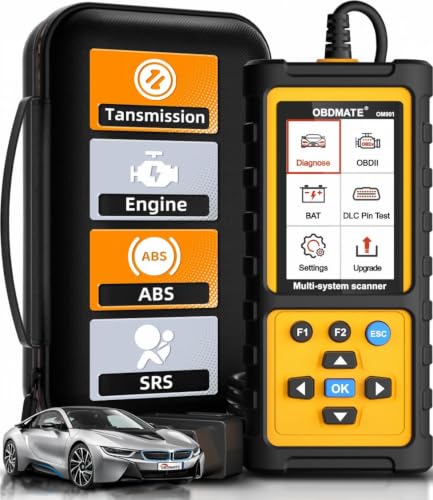
- 【Reset ABS/SRS/Transmission/Engine Lights】 More than an check engine code reader, OBDMATE OM901 obd2 scanner performs comprehensive diagnostics for the 4 most-used systems (ABS/SRS/Engine/Transmission). It quickly clears fault codes, turns off warning lights, read data stream and auto VIN.
- 【3.5" Handheld Scanner with 4 System Diagnose】 3.5" Super large TFT screen equipped displays an intuitive menu and clear readings of various sensors from ABS, SRS, ECM and TCM systems. It arrived with a silicone protective case and hard-shell carrying case, ensuring long-lived durability and drop resistance. The car diagnostic tool is plug-to-play designed, plug it and get diagnosis started without any batteries or updates required.
- 【One-Click I/M Readines&Full OBD2 Functions】 Press F1 to get an intuitive corloured form about whether various emissions-related systems on the vehicle are operating properly. Help you get smog-check ready quickly. OM901 car scanner supports all essential OBD2 functions you need: read & clear codes, view freeze frame, read I/M readiness, retrieve VIN, live data stream (with graphing display), O2 sensor test, onboard monitoring mode, and EVAP leak test.
- 【Battery Voltage Check&DLC Pin Test】 It allows you to monitor battery health by testing current battery voltage. Plus, this obd2 diagnostic tool features DLC 16-PIN test to check current voltage of every pin.
- 【Automotive Scanner Diagnostic Kit】 The package comes with 1 car scanner, 1 USB-type c cable, 1 hard storage bag and 1 user manual(en). Free to update without any hidden fees. 5 languanges available in setting including English, French, Italian, German and Espanish. Valuable and Portable, making it a great tool kit for car owners, DIY enthusiasts, and professional mechanics.
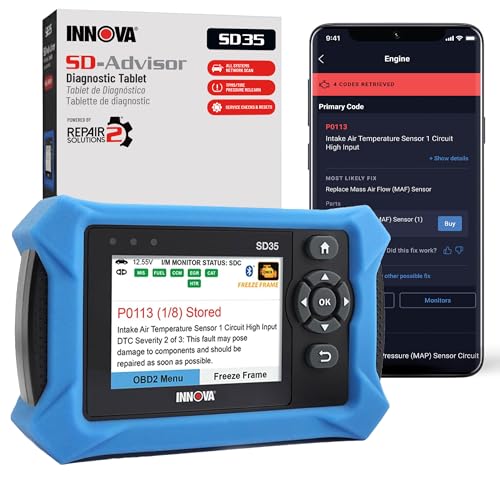
- OBD2 SCANNER FOR ALL SYSTEMS – The INNOVA SD35 is a tablet-based OBD2 scanner designed for advanced diagnostics. Read and clear check engine light, ABS, SRS, and TPMS codes, plus test your car battery and alternator to prevent unexpected failures. Vehicle coverage may vary. Please use Innova’s Coverage Checker to verify compatibility.
- ALL-SYSTEM DIAGNOSTICS & LIVE DATA – Unlike basic code readers, this OBD2 scanner for all vehicles scans engine, transmission, ABS, SRS, and more. Get real-time live data, including RPM, fuel trims, temperature readings, and oxygen sensor performance.
- OBD2 TABLET WITH USER-FRIENDLY INTERFACE – This automotive scan tool features a high-resolution display, making vehicle diagnostics faster and easier.
- ADVANCED TPMS, OIL RESET & SERVICE FUNCTIONS – Perform TPMS sensor checks, oil light reset, and other service resets with ease This professional diagnostic tool provides comprehensive vehicle maintenance capabilities in one device.
- WIDE VEHICLE COVERAGE (1996 & NEWER CARS & TRUCKS) – This OBD2 scanner Bluetooth tablet is compatible with Toyota, Ford, Honda, Chevrolet, Nissan, Dodge, and more. However, feature coverage may vary. Please use Innova's Coverage Checker to verify coverage.
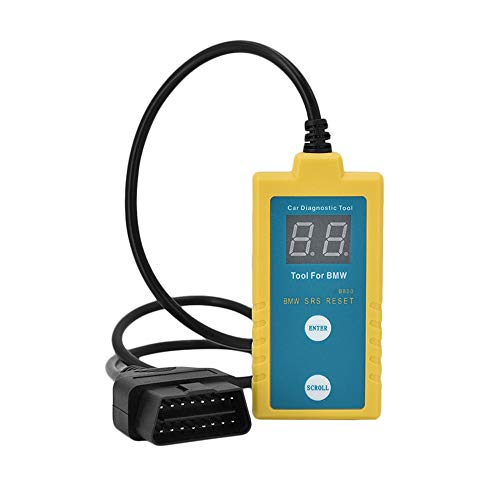
- ✔️【Professional SRS Reset for 1994-2003 BMW】 Designed specifically for classic BMW models (1994-2003). This B800 scanner reads & clears SRS airbag fault codes, turns off the warning light, and saves you a costly dealer visit. Confirmed compatible with: E36, E46 (EXCEPT 2001 330i), E34, E38, E39, Z3, and X5 (E53). NOT compatible with any BMW built before 1994 or after 2003.
- ✔️【Important: Two Different Connection Ports – Read Before Use】 To avoid “not working” issues, please note: For 1994–2000 BMWs (most E36, E34, Z3, early E39), the SRS diagnostic port is a round 20-pin connector under the hood. You MUST use the included 16-pin to 20-pin adapter cable. For 2000–2003 models (late E46, E39, X5), use the standard OBD-II port inside the cabin. Incorrect connection is the #1 reason for “incompatibility” reports.
- ✔️【Read & Clear Fault Codes in Minutes】 Quickly diagnose why your SRS light is on. The scanner accurately reads fault codes from airbag and seatbelt pretensioner systems. With one button press, clear the codes and reset the SRS warning light in seconds. No expensive dealer tools needed.
- ✔️【User-Friendly for DIYers – No Mechanic Required】 Easy operation with an intuitive button layout: ‘Enter’ to confirm, ‘Scroll’ to navigate. The clear LCD screen shows results instantly. Includes a step-by-step manual (revised for clarity) to guide you through the entire reset process.
- ✔️【Reliable Support with 1-Year Warranty】 We stand behind the quality of our B800 scanner. It comes with a 1-Year Hassle-Free Warranty. If you have any questions or need support, please contact us with your Order ID, and our dedicated team will assist you promptly.

- [All System Diagnostics, Professional-Level Scanner] - BLCKTEC 460T is the ultimate OBD2 diagnostic tool for home mechanics and professionals. It supports all 10 OBD2 modes, reads and clears Engine/Transmission/ABS/SRS codes, performs All-System Diagnostics, offers workshop reset tools, and provides real-time live data. It helps you pinpoint issues, assess your car's condition, and prepare for SMOG checks with ease. NOTE: Function availability depends on your vehicle. Before you buy, be sure to use the Compatibility Checker on BLCKTEC website or contact our customer support to verify that the features you need are supported for your vehicle’s specific year, make, and model.
- [12+ Most Popular Reset Functions] - BLCKTEC 460T OBD2 scanner offers 12+ dealer-level service functions, including Oil Maintenance Reset, ABS Bleeding, EPB Reset, SAS(Steering Angle Sensor) Recalibration, DPF(Diesel Particulate Filter) Reset, Throttle Body Relearn, Battery Reset/Initialization, TPMS Relearn, Transmission Reset, Fluid Change Reset, Maintenance Reset and more, enabling you to perform workshop services like a pro. NOTE: Function availability depends on your vehicle. Be sure to use the Compatibility Checker on BLCKTEC website to verify that the features you need are supported for your vehicle.
- [Real-Time OBD2 and OEM Live Data, Freeze Frame Data] - BLCKTEC 460T helps diagnose vehicle issues when warning lights like Check Engine Light or ABS/SRS Light appear. It offers detailed DTC info, ECU Freeze Frame Data, and real-time OBD2 and advanced OEM live data, including Engine, Transmission, ABS, SRS, and more, making it easy to diagnose and resolve vehicle problems. You can view, graph, record, replay, and overlay up to four live data streams in a single graph for better analysis.
- [AutoVIN, AutoReLink, AutoScan, 3X Faster] - Equipped with AutoVIN technology, 460T automatically retrieves the VIN to save you time. Its AutoScan and AutoReLink features scan all of the vehicle's ECUs and detect any fault codes immediately after you plug the scanner into the vehicle's OBD2 port - no button presses required. Additionally, it regathers DTC and I/M readiness information every 30 seconds, simplifying monitor tests. 460T's advanced technology makes it 3X faster than other products.
- [Get RepairSolutions2, the #1 Auto Repair App for Free] - When paired with RepairSolutions2(RS2) App, 460T becomes even more powerful. RS2's Verified Fix Database built by master technicians, provides the parts needed for the repair. Additionally, RS2 gives you access to OEM warranty info, maintenance schedules, TSB, and dealership recall info, making car care easier than ever. RS2 is free with no subscription fees and it stores your car scan reports in the cloud, allowing you to access, share, or print them anytime and anywhere.
This product presentation was made with AAWP plugin.