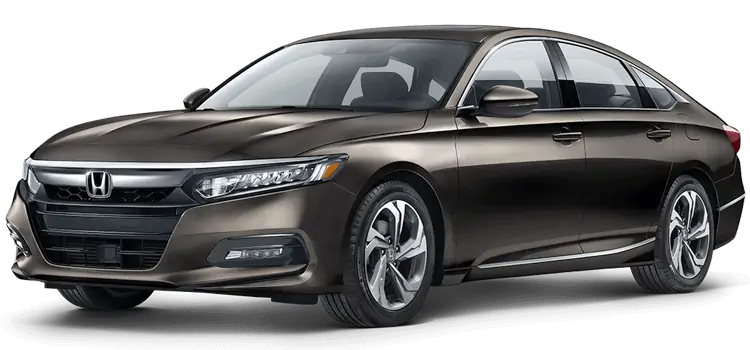
NHTSA Campaign Number: 18V629
Manufacturer Honda (American Honda Motor Co.)
Components VISIBILITY, BACK OVER PREVENTION
Potential Number of Units Affected 232,140
Rearview Image Display Failure/FMVSS 111
If the rearview camera display does not show what is behind the vehicle, it can increase the risk of a crash.
Summary
Honda (American Honda Motor Co.) is recalling certain 2018 Honda Accord and 2019 Honda Insight vehicles. In certain scenarios, the back-up camera center display may not function properly. As such, these vehicles fail to comply with the requirements of Federal Motor Vehicle Safety Standard (FMVSS) number 111, “Rearview Mirrors.”
Remedy
Honda will notify owners, and dealers will reprogram the display audio unit software, free of charge. The recall is expected to begin November 5, 2018. Owners may contact Honda customer service at 1-888-234-2138. Honda’s numbers for this recall are K2G and V2F.
Notes
Owners may also contact the National Highway Traffic Safety Administration Vehicle Safety Hotline at 1-888-327-4236 (TTY 1-800-424-9153), or go to www.safercar.gov.
Check if your Honda has a Recall
A18-092
September 21, 2018
Version 2
Safety Recall: 2018 Accord: Rear Backup Camera
Supersedes 18-092, dated September 14, 2018, to revise the information highlighted in yellow
REVISION SUMMARY
Revisions were made under REPAIR PROCEDURE
AFFECTED VEHICLES
| Year | Model | Trim | VIN Range |
| 2018 | Accord | Sport, EX, EX-L,Touring | Check the iN VIN status for eligibility. |
BACKGROUND
There is a problem with the audio/audio-navigation unit software, which may lead to one or more of the following symptoms:
- Display Audio screen only shows guidance lines with the transmission in reverse. As a result, affected vehicles do not comply with applicable Federal Motor Vehicle Safety Standards.
- Display Audio screen turns black when shifting from reverse to park.
- Head Up Display (if equipped) and Meter does not show the compass and turn by turn for navigation.
- Navigation app crashes when using VR to add destinations or when rerouting a destination.
- The key is in the OFF position while the “incoming call” screen is displayed and when key is turned back to the ON position, the “incoming call” screen will remain on Head Up Display (if equipped).
If the rear-view camera image does not appear while the vehicle is moving backwards, the driver may have limited visibility, raising the potential for a collision.
CUSTOMER NOTIFICATION
Owners of affected vehicles will be sent a notification of this campaign.
Do an iN VIN status inquiry to make sure the vehicle is shown as eligible.
Some vehicles affected by this campaign may be in your new or used vehicle inventory.
Failure to repair a vehicle subject to a recall or campaign may subject your dealership to claims or lawsuits from the customer or anyone else harmed as a result of such failure. To see if a vehicle in inventory is affected by this safety recall, do a VIN status inquiry before selling it.
CORRECTIVE ACTION
Update the audio unit/audio navigation unit software using the audio-navigation system update USB flash drive.
WARRANTY CLAIM INFORMATION
| Operation Number | Description | Flat Rate Time | Defect Code | Symptom Code | Template ID | Failed Part Number |
| 0105A9 | Update the audio unit/ audio navigation unit software. | 0.3 hr | 6RR00 | V2F00 | A18092A | 39540-TVA-A12 |
Skill Level: Repair Technician
REQUIRED TOOLS
| Tool Name | Part Number |
| Display Audio Update | 07AAU-TVAA1D0 |
HONDA FIRMWARE DOWNLOADING PROCEDURE
Honda is providing dealers with two options to do this update:
- A pre-loaded USB flash drive
- Using the Honda Firmware Downloader tool
NOTE
If the USB flash drive is damaged or misplaced, you can download the software from the Honda Firmware Downloader as a backup. You will need a 16GB USB flash drive that is clear of data and formatted to FAT32.
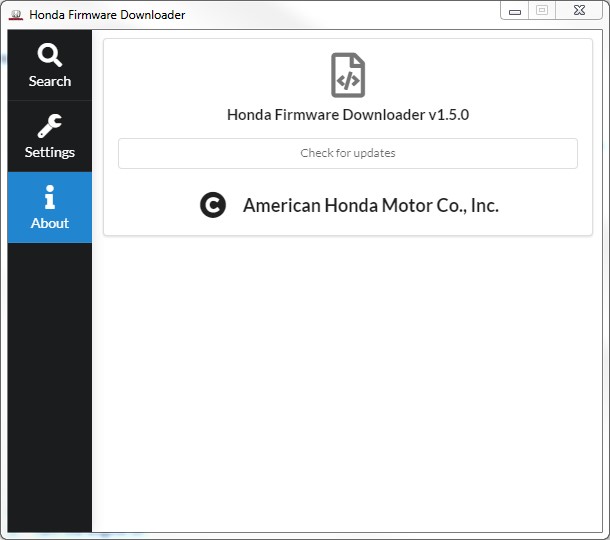
- From your computer’s desktop, open Honda Firmware Downloader. Refer to job aid Honda Firmware Downloader for additional information.
- Select About, and make sure you are running version 1.5.0 or higher.
- Enter the service bulletin number and the VIN, then select the Download icon when the software appears.
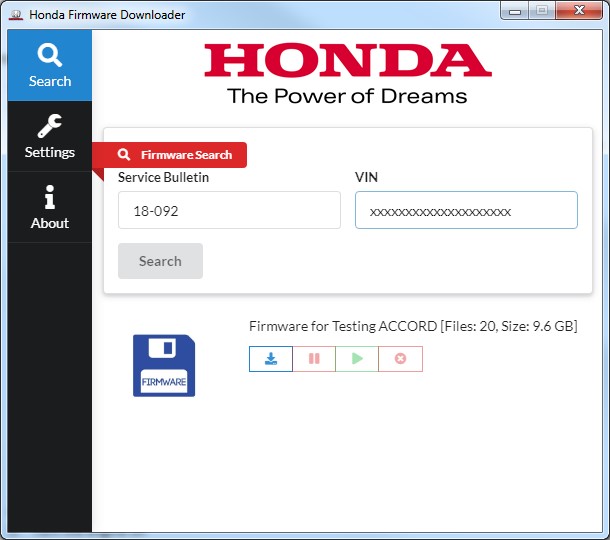
- Once the download is complete, label the USB flash drive for future use.
NOTE
Downloading could take anywhere from 30 minutes to 3 hours to complete because of the large file size and your internet speed.
REPAIR PROCEDURE
- Before updating the software, write down the customer’s audio unit presets.
- Prepare the vehicle for the update by doing either of the following:
NOTICE
If the battery voltage drops, ignition is cycled, or the USB flash drive is removed during the update, the audio unit will be permanently damaged.
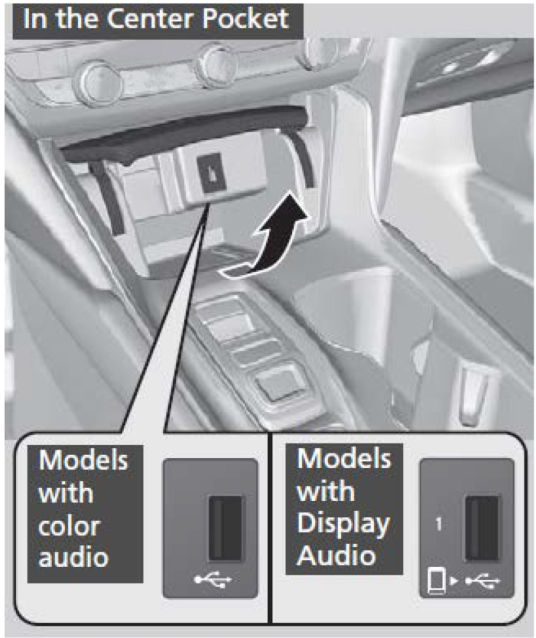
- Insert the USB flash drive into USB Port 1.
- From the Home screen, press and hold the HOME+POWER+SOURCE for at least 5 seconds to enter the Diagnosis Menu.
- From the Diagnosis Menu, select Detail Information & Setting.
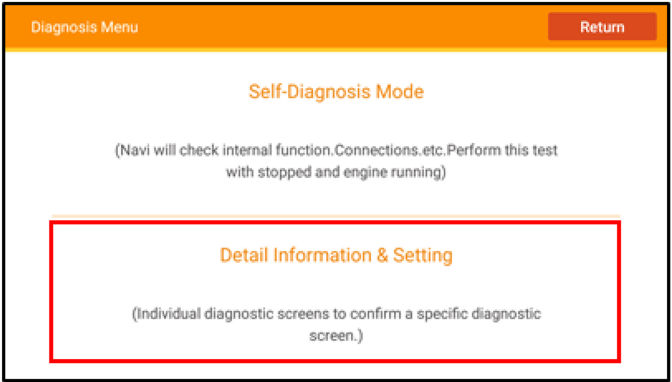
- Select Version.
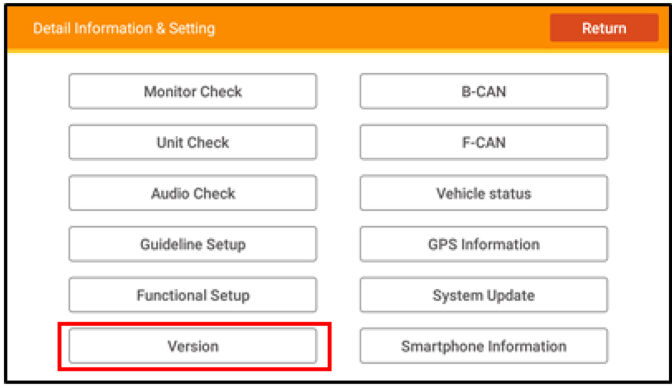
- Select Loading.
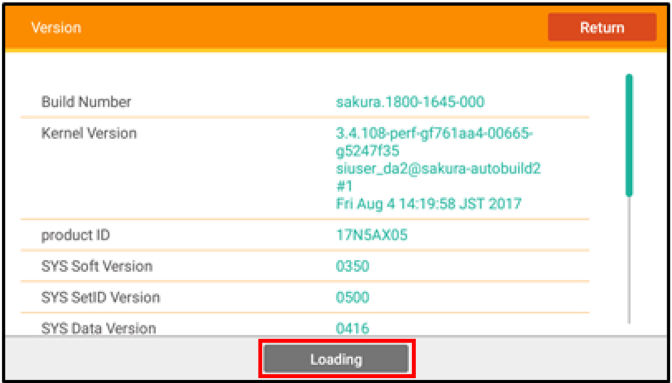
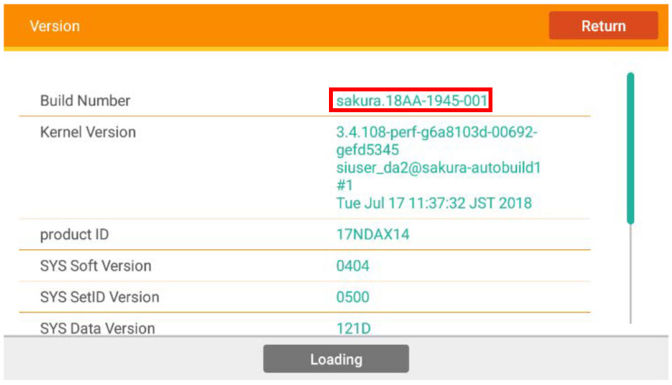
- Verify that the software verison is 18AA-1945-001. If the verison is correct, select Install to begin the update.
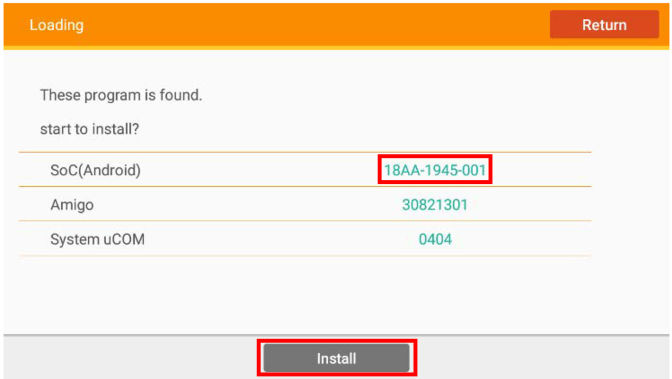
- Once you select Install, a notification will appear. Press OK.
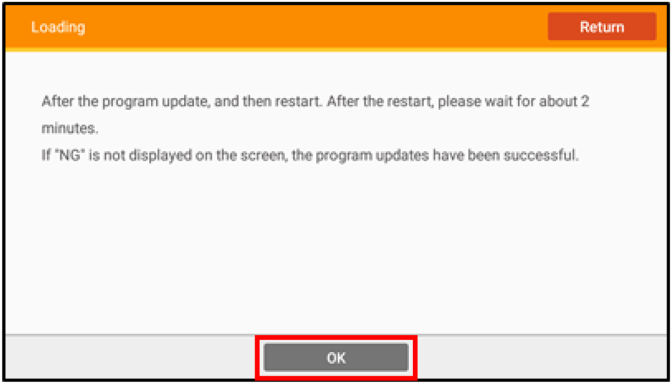
NOTE
The install takes about 25 minutes.
During the updating process, the audio unit will reset several times. If the battery voltage drops, ignition is cycled, or the USB flash drive is removed during the update, the audio unit will be permanently damaged.
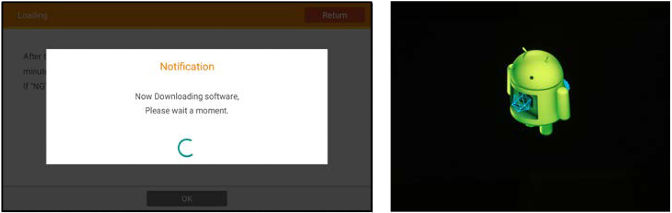
Once complete, the system will reboot and load to the Home screen.
- Go to RESETTING DATA.
RESETTING DATA
- From the Home screen, press and hold the HOME+POWER+SOURCE for at least 5 seconds to enter the Diagnosis Menu.
- From the Diagnosis Menu, select Detail Information & Setting.
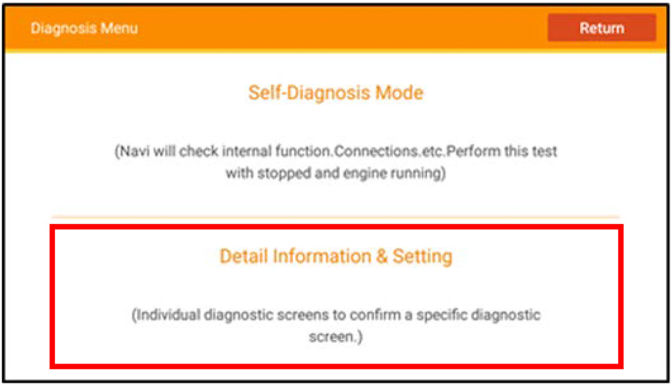
- Select Functional Setup.
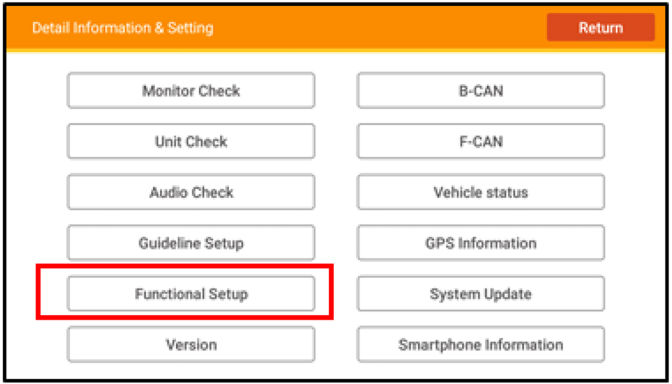
- Select Backup Data Clear.
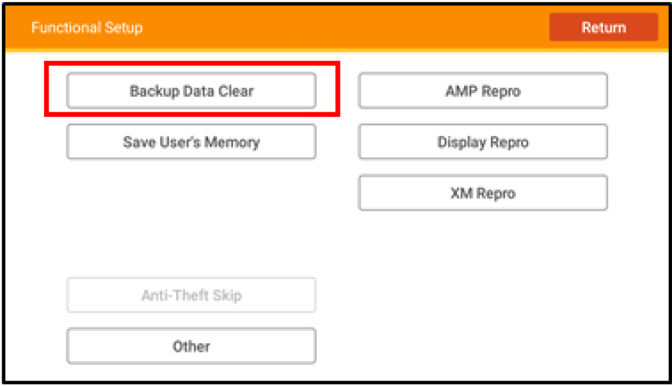
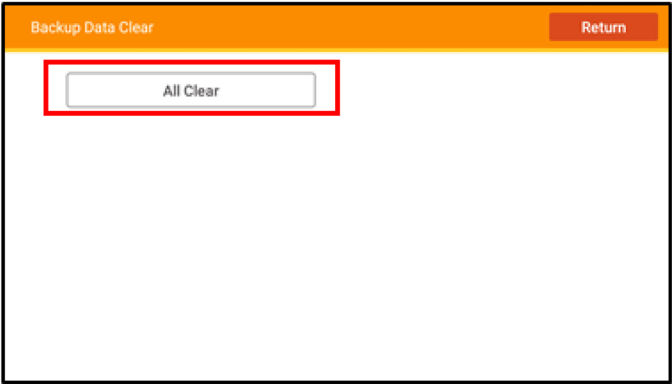
- In the Backup Data Clear menu, select All Clear.
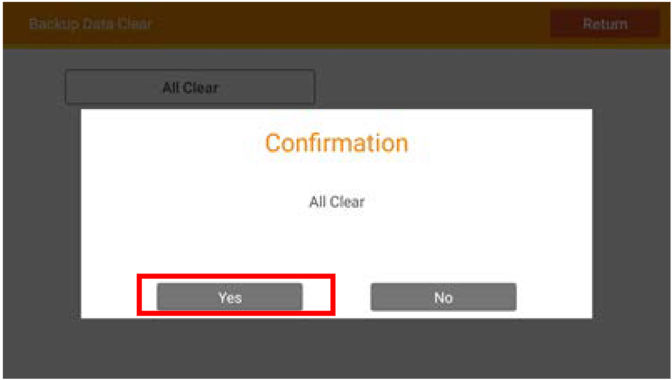
- When you see the Confirmation All Clear message, press Yes. Do not turn the engine or ignition off during the data reset.
NOTE
The system may take 10 seconds or more to respond after pressing Yes.
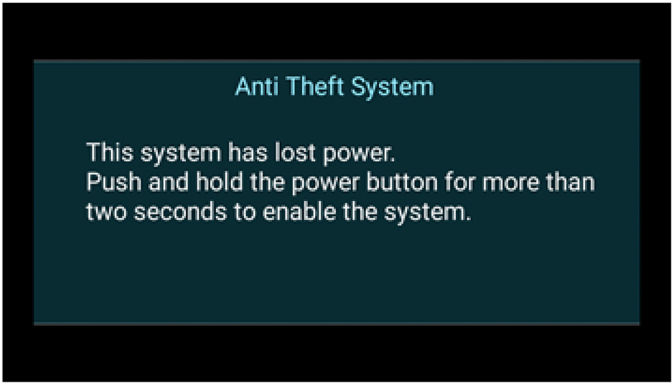
- After the Backup Data Clear is complete, the Anti-Theft System screen will display. With the engine on, press and hold the Power button to bypass the screen.
NOTE
You may need to update the time zone on the clock.
- Go to SOFTWARE UPDATE CONFIRMATION.
SOFTWARE UPDATE CONFIRMATION
- From the Home screen, press and hold the HOME+POWER+SOURCE for at least 5 seconds to enter the Diagnosis Menu.
- From the Diagnosis Menu, select Detail Information & Setting.
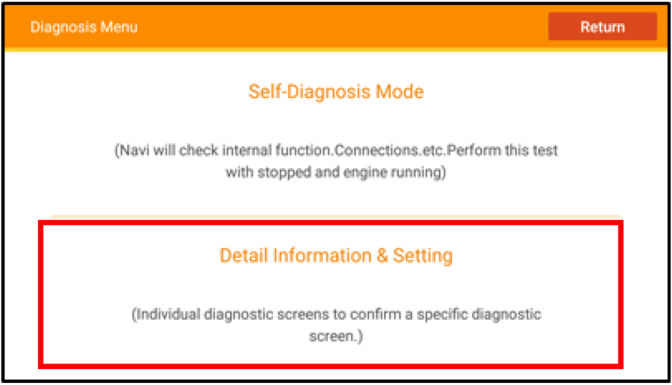
- Select Version.
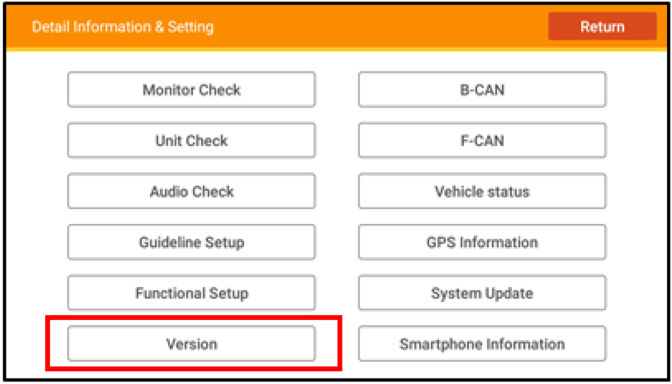
- Make sure the Build Number reads 18AA-1945-001 .
NOTE
If the Build Number does not match, repeat the procedure.
- Remove the USB flash drive. The update is complete.
- Once the procedure is complete, restore the audio unit presets, and have the service advisor tell the customer that any previously paired devices must be paired again.
END
A18-092
September 21, 2018
Version 2
A18-092
September 14, 2018
Version 1
Statement by American Honda Regarding Rear Camera Noncompliance Recall: 2018 Honda Accord and 2019 Honda Insight
Sept. 27, 2018
Manufacturer Notice
September 14, 2018
Manufacturer Notice
DEFECT INFORMATION REPORT
Recall Acknowledgement
September 27, 2018
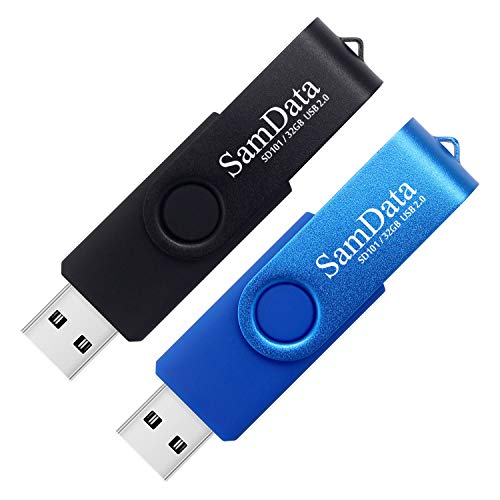
- [Package Offer]: 2 Pack USB 2.0 Flash Drive 32GB Available in 2 different colors - Black and Blue. The different colors can help you to store different content.
- [Plug and Play]: No need to install any software, Just plug in and use it. The metal clip rotates 360° round the ABS plastic body which. The capless design can avoid lossing of cap, and providing efficient protection to the USB port.
- [Compatibilty and Interface]: Supports Windows 7 / 8 / 10 / Vista / XP / 2000 / ME / NT Linux and Mac OS. Compatible with USB 2.0 and below. High speed USB 2.0, LED Indicator - Transfer status at a glance.
- [Suitable for All Uses and Data]: Suitable for storing digital data for school, business or daily usage. Apply to data storage of music, photos, movies, software, and other files.
- [Warranty Policy]: 12-month warranty, our products are of good quality and we promise that any problem about the product within one year since you buy, it will be guaranteed for free.
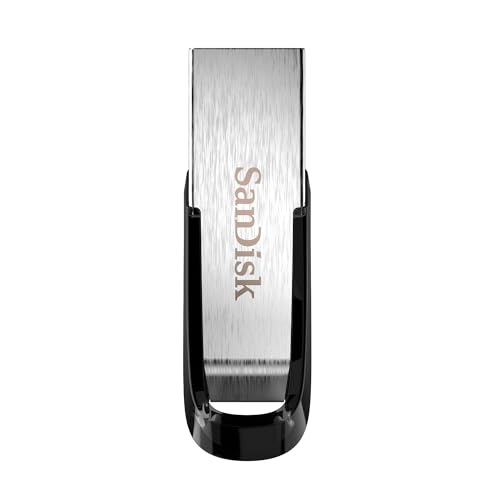
- High-speed USB 3.0 performance of up to 150MB/s(1) [(1) Write to drive up to 15x faster than standard USB 2.0 drives (4MB/s); varies by drive capacity. Up to 150MB/s read speed. USB 3.0 port required. Based on internal testing; performance may be lower depending on host device, usage conditions, and other factors; 1MB=1,000,000 bytes]
- Transfer a full-length movie in less than 30 seconds(2) [(2) Based on 1.2GB MPEG-4 video transfer with USB 3.0 host device. Results may vary based on host device, file attributes and other factors]
- Transfer to drive up to 15 times faster than standard USB 2.0 drives(1)
- Sleek, durable metal casing
- Easy-to-use password protection for your private files(3) [(3)Password protection uses 128-bit AES encryption and is supported by Windows 7, Windows 8, Windows 10, and Mac OS X v10.9 plus; Software download required for Mac, visit the SanDisk SecureAccess support page]

- USB-C 2-in-1 storage OTG: The Lexar JumpDrive Dual Drive D40E features USB Type-A and Type-C connectors in a slim, portable form factor for easy device compatibility
- Transfer speeds up to 100MB/s: Based on internal testing, performance may vary depending upon the host device, interface, and usage conditions. 1MB=1,000,000 bytes
- Plug and Play: Widely compatible with USB Type-C smartphones, tablets, laptops, Macs, and traditional Type-A devices, no software installation required. The 360° swivel design allows for easy switching between connectors without the hassle of losing a cap
- Durable & Compact: The Lexar D40E USB memory stick features a metal enclosure, withstands temperatures from 0° to 50° C (32°F to 122°F), and is lightweight at 26g with dimensions of 70.4 x 16.9 x 11.7mm
- Security & Warranty: Securely protects files using an advanced security software solution with 256-bit AES encryption. Backed by a Lexar 3-year limited warranty
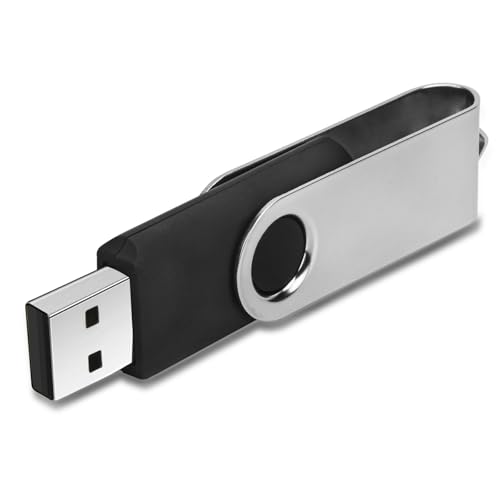
- 【16GB Flash Drive】USB flash drives with 16GB capacity, meet your needs of daily use on work, school, home and travelling for photos, music, videos, files storage and transfer. IMEASON thumb drives can be used to store different files, easy to data backup.
- 【Metal Swivel Cap Design】USB thumb drive is metal swivel cover provides extra protection for the usb thumbdrive connector, no usb drive cap to lose; keychain design makes it easier to carry without worrying lose it.
- 【Wide Compatibility】USB drive supports Windows 7/8/10/11 / Vista / XP / Unix / 2000 / ME / NT Linux and Mac OS, also Supports USB 2.0 and 1.1 ports. USB Stick support TV, desktop, notebook computer, car, audio and other device. The USB Memory Stick is your great data storage and transfer companion with traveling and working.
- 【Easy to use】usb memory stick is plug and play without any software installation. Just simply plug the Flashdrive into the port of your USB-compatible devices such as computer, laptop to start data storage or transmission.
- 【What You Get】16 GB USB Flash Drive Thumb Drive, The default format of the usb storage flash drive is FAT32.

- The durable, light-weight design of the Turbo Attaché 3 USB 3.0 Flash Drive is the essential mobile storage solution
- Perfect for transferring large files such as movies, videos, photos, music & documents
- Transfer speeds up to 10 times faster than standard USB 2.0 flash drives
- Convenient sliding collar, and cap-less design protects your content when not in use
- Compatible with most PC and Mac laptop and desktop computers with USB 3.0 ports

This product presentation was made with AAWP plugin.