A12-077
July 10, 2015
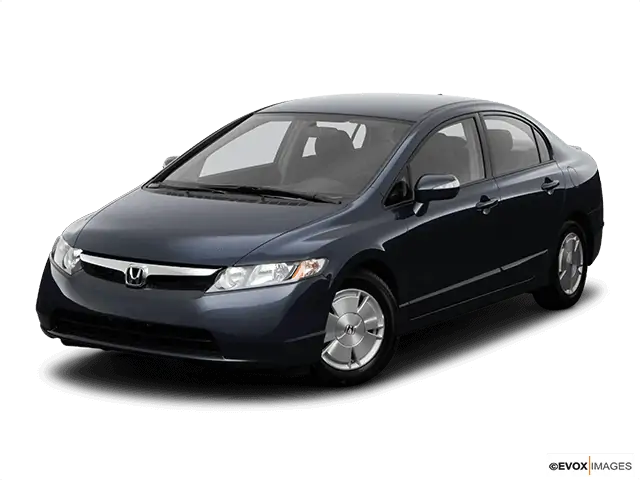
Applies To: 2003–08 Civic Hybrid – Check the iN VIN status for eligibility
Warranty Extension: IMA Battery Module
(Supersedes 12-077, dated December 21, 2012, to revise the information marked by the black bars)
REVISION SUMMARY
Under BACKGROUND, part numbers are included for lookup reference and the image was updated.
BACKGROUND
American Honda is extending the warranty coverage on the IMA battery module for some 2003–08 Civic Hybrids an additional 12 months or 12,000 miles, whichever comes first.
| Year/Model | Original Warranty | Extended Warranty | Warranty Claim Information |
| 2003–05 Civic Hybrid | 8 years/ 80,000 miles | 9 years/ 96,600 miles | Warranty Claim Information A |
| 10 years/150,000 miles | 11 years/170,100 miles | Warranty Claim Information B | |
| 2006 Civic Hybrid | 8 years/ 80,000 miles | 9 years/ 96,600 miles | Warranty Claim Information C |
| 10 years/150,000 miles | 11 years/170,100 miles | Warranty Claim Information C | |
| 2007–08 Civic Hybrid | 8 years/ 80,000 miles | 9 years/ 92,000 miles | Warranty Claim Information C |
| 10 years/150,000 miles | 11 years/162,000 miles | Warranty Claim Information C |
NOTE: 2003–06 Civic Hybrids are covered by Service Bulletin 06-085, Warranty Extension: Vehicle Warranty Mileage, which adds an additional 5% to the warranty coverage.
The original battery warranty coverage was either 8 years/80,000 miles or 10 years/150,000 miles. To determine the vehicle’s IMA battery warranty, go to the iN.
- Under SERVICE, select Vehicle Information.
- Select Powertrain & Emissions Inquiry.
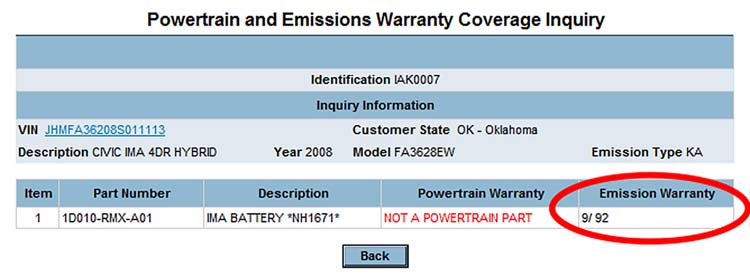
- Select the Customer State where the vehicle is registered or normally operated, and enter the VIN. If you don’t have the VIN, use the model information.
- Enter the original part number from the part catalog (the original number does not have an RM suffix) under Part, then click Submit. You can also use the applicable P/N from the table below:
NOTE: Do not use the part numbers listed under PARTS INFORMATION as the Emission Warranty will not appear.
| Model Year | Part Number for Warranty Look-up |
| 2003–05 | 1D070-PZA-325 |
| 2006 | 1D010-RMX-A01ZA |
| 2007–08 | 1D010-RMX-A01 |
- The vehicle’s warranty coverage is listed under Emission Warranty. Use this information to select the applicable extended warranty.
CUSTOMER NOTIFICATION
Customers of affected 2003–08 Civic Hybrids were notified of this warranty extension.
Before doing work on a vehicle, verify its eligibility by doing an iN VIN status inquiry.
CORRECTIVE ACTION
Diagnose the IMA battery problem, and replace the IMA battery if needed.
PARTS INFORMATION
NOTE: To order a replacement battery, refer to Service Bulletin 10-061, IMA Battery Exchange Program.
| P/N | |
| 2003–05 Civic IMA Battery: | 1D070-PZA-335RM |
| 2006–08 Civic IMA Battery: | 1D070-RMX-A80RM |
WARRANTY CLAIM INFORMATION A
| Operation Number: | 1181R6 |
| Flat Rate Time: | 1.7 hours (includes diagnosis, IMA battery replacement, and junction board transfer) |
| Failed Part: | P/N 1D010-RMX-A01ZA |
| Defect Code: | 5E300 |
| Symptom Code: | S7000 |
| Skill Level: | Repair Technician |
WARRANTY CLAIM INFORMATION B
| Operation Number: | 1181R7 |
| Flat Rate Time: | 1.7 hours (includes diagnosis, IMA battery replacement, and junction board transfer) |
| Failed Part: | P/N 1D010-RMX-A01ZA |
| Defect Code: | 5E300 |
| Symptom Code: | S7100 |
| Skill Level: | Repair Technician |
WARRANTY CLAIM INFORMATION C
| Operation Number: | 1181R8 |
| Flat Rate Time: | 1.7 hours (includes diagnosis, IMA battery replacement, and junction board transfer) |
| Failed Part: | P/N 1D010-RMX-A01ZA |
| Defect Code: | 5E300 |
| Symptom Code: | S7200 |
| Skill Level: | Repair Technician |
DIAGNOSIS
Diagnose the problem with the IMA battery. Refer to the applicable service manual or online, enter keywords HOW TO, and select How to Troubleshoot the IMA System.
REPAIR PROCEDURE
The following service manual procedures have been used in full or in part within this service bulletin. For more detail on these procedures, refer to the appropriate service manual, or view them online.
- 12 Volt Battery Terminal Disconnection and Reconnection
- IPU Lid Removal/Installation
- Rear Seat Removal/Installation
- IMA System Service Precautions
NOTE: You will need to transfer the junction board from the original battery module to the replacement battery module. Make sure that you review Service Bulletin 12-048, Junction Board Replacement (IMA Battery Module Replacement and Transfer of Junction Board) and complete the required training modules before starting this procedure.
- Make sure the ignition switch is in LOCK (0).
- Do the battery terminal disconnection procedure.
- Remove the rear seat-back and the rear seat cushion.
- Remove the battery module switch lid.
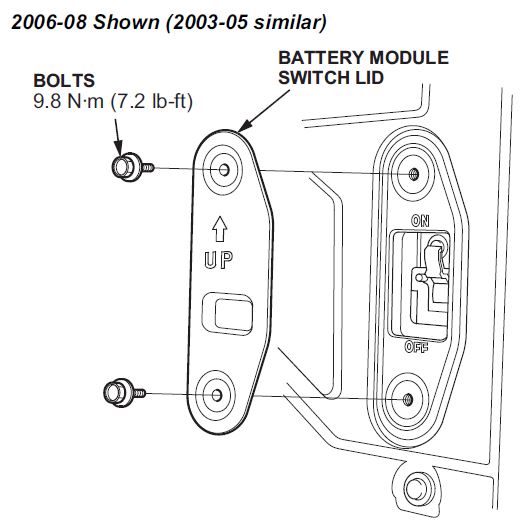
- Turn the battery module switch OFF.
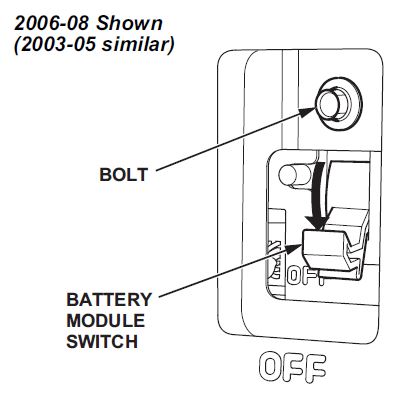
- Remove the IPU lid.
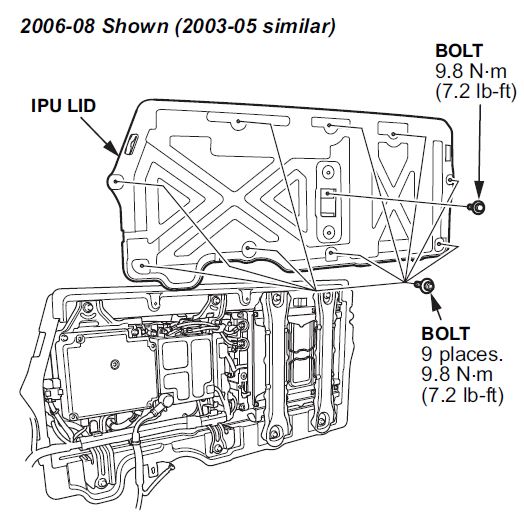
- 2003–05 Models: Remove the battery module.
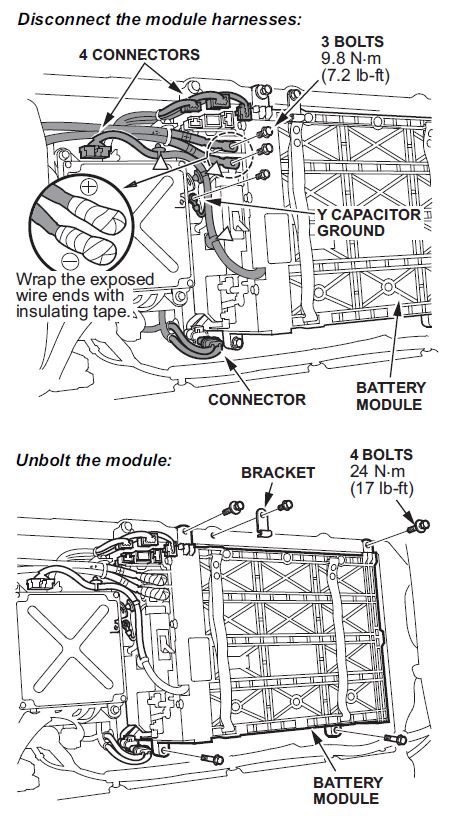
- 2006–08 Models: Remove the battery module.
- Remove the high voltage cables and wrap them with insulating tape.
- Disconnect the BCM module connector and the junction board connector.
- Remove the four bolts.
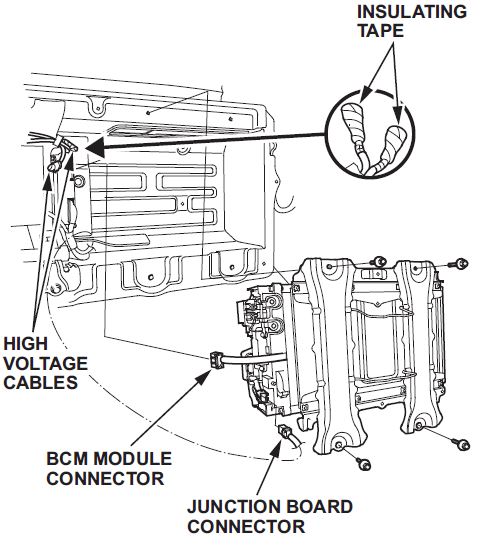
- Remove the junction board from the original battery module and install it on the replacement battery module. Refer to Service Bulletin 12-048, Junction Board Replacement (IMA Battery Module Replacement and Transfer of Junction Board).
- 2003–05 Models: Install the battery module.
- Reinstall the four bolts and torque them to 24 N•m (17 lb-ft).
- Reinstall the battery bracket.
- Reconnect the Y capacitor ground.
- Reconnect the connectors.
- Reconnect the high voltage cables and torque the bolts to 8 N•m (7.2 lb-ft).
- Reconnect the clips.
- 2006–08 Models: Install the battery module.
- Reinstall the four bolts and torque them to 22 N•m (17 lb-ft).
- Reconnect the BCM module connector and the junction board connector.
- Reconnect the high voltage cables.
- Reinstall the IPU lid.
- Turn the battery module switch ON.
- Reinstall the battery module switch lid.
- Reinstall the seat-back and the rear seat cushion.
- Do the battery terminal reconnection procedure.
- Update the BCM software. Refer to Service Bulletin 10-083, IMA Battery Software And Hardware Updates.
- Charge the new battery by starting the engine, and maintaining 3500 to 4000 RPM in park until the IMA battery charge display shows that the IMA battery has 4 bars of charge.
NHTSA ID Number: 10107355
Manufacturer Communication Number: WE – A12-077
Summary
“BACKGROUND
AMERICAN HONDA IS EXTENDING THE WARRANTY COVERAGE ON THE IMA BATTERY MODULE FOR SOME 2003–08 CIVIC HYBRIDS AN ADDITIONAL 12 MONTHS OR 12,000 MILES, WHICHEVER COMES FIRST.”
NHTSA ID Number: 10051509
Manufacturer Communication Number: SB-12-077
Summary
HONDA: WARRANTY COVERAGE HAS BEEN EXTENDED ON SOME VEHICLES FOR THE IMA BATTERY MODULE. MODELS 2003-2008 CIVIC HYBRIDS. *PE
1 Associated Document
Service Bulletin Document
A12-077
December 21, 2012
SB-10051509-6014.pdf 572.751KB
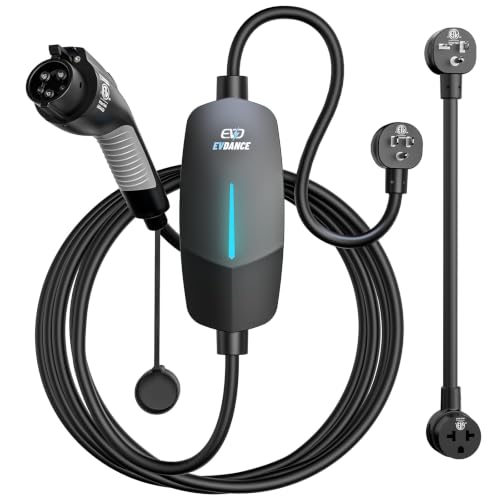
- Flex Level 1 EV Charger - The EVDANCE Level 1 electric car charger is compatible with J1772 electric vehicles and plug-in hybrid vehicles (North American Standard). *Tesla requires a SAE J1772 adapter.
- Convenient to Use - This charger has both NEMA 6-20 plug for 16A 240V charging (3.68kW, 10-12 mi/h) and a NEMA 6-20 to 5-15 plug adapter for 12A 120V charging (1.44kW, 2-5 mi/h). The included bag makes it easier to carry on the go. It also has a 25ft cable length, you can use it flexibly from anywhere in the garage or driveway.
- Check Your Outlet Type -This charger works with standard 120V NEMA 5-15/5-20 outlets (2-5 mph charging speed) and 240V NEMA 6-20 outlets (10-12 mph) . It's not compatible with NEMA 6-15/10-30/14-30/14-50/6-50 outlets – you'll need a NEMA 14-50/14-30/10-30/6-50 to 6-20 adapter (sold separately) to connect.
- Compatible EV Models -This EV charger works with most major electric vehicles, including Ford, Chevrolet, Hyundai, Audi, Nissan Ariya, Rivian R1S, Kia, and others. However, it's not compatible with Mini Cooper Electric Hardtop,Toyota Prus Prime/Z4X/RAV4Prime, Porsche Taycan Base/4S/Turbo/Turbo S or Tesla models (Tesla requires a J1772 to Tesla Adapter, sold separately). For a full list of compatible models, check out the Full Compatibility List on our product page.
- Indication Displays - LED display that can tell you the status as well as indicate errors while charging your electric vehicle.
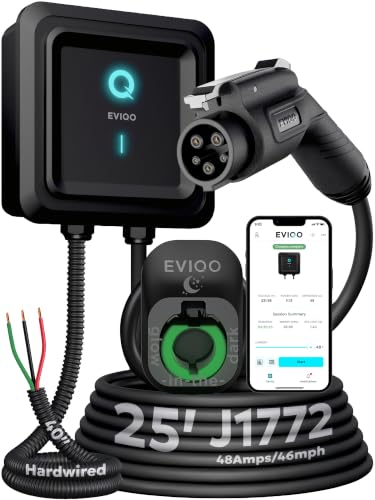
- WORKS WITH EVERY NON-TESLA EV: Standard J1772 connector plugs straight into Ford, Chevrolet, Hyundai, Kia, Nissan, BMW, Volkswagen, Audi, Rivian, Lucid and every other EV or plug-in hybrid sold with a J1772 port - no adapter needed. Tesla drivers can charge too, using the J1772 adapter that comes with the car. The extra-long 25 ft cable easily reaches across a garage or driveway.
- HARDWIRED - PROFESSIONAL INSTALL: This Level 2 charger is hardwired (not plug-in), so a licensed electrician installs it per National Electrical Code. It delivers up to 48A on a dedicated 60A, 240V circuit - enough to charge most EVs fully overnight. Want more speed? You can set DIP switches 4 and 5 to unlock 50A on a dedicated 70A circuit. Before ordering, check your car's port type and that your electrical panel can support the circuit.
- CONTROL FROM YOUR PHONE: A stronger built-in antenna keeps the charger online even in a garage or basement. Use the free app to start and stop charging, set the charging speed (6-48A), get reminders, and track how much energy and money each charge uses. Requires a 2.4 GHz home WiFi network.
- SAFETY-CERTIFIED & WEATHERPROOF: Independently tested and certified (UL, ETL, FCC, Energy Star). A fully sealed IP66 / NEMA 4 housing stands up to rain, snow, heat and dust indoors or out, and internal steel shielding protects the electronics for years of reliable use.
- GLOW-IN-THE-DARK HOLSTER: The included high-visibility holster glows in the dark so you can find and dock the plug easily at night. Holds the connector securely when not in use.

- Fast & Adjustable Charging: Up to 9.6 kW (37 mph), 7x faster than Level 1, with 5 current levels (16/20/24/32/40A) to match home capacity, plus 1–12H timing delay for off-peak charging, reducing costs and easing range anxiety
- Plug & Extended Reach: NEMA 14-50 plug fits 240V outlets for true plug-and-play use, while the 25FT cable offers flexible reach across garages and driveways, eliminating the need to reposition vehicles for easier daily charging
- ETL Certified & ELEGRP PBE Protection: Fully ETL certified, ELEGRP’s exclusive PBE technology combines full-link overheat protection with a triple-layer safety system, ensuring safer, more efficient charging. Includes a 2-year warranty
- All-Weather Indoor & Outdoor Use: IP67-rated for durability in rain, snow, and extreme temps (-21°F to 121°F), with a portable design that supports home, travel, and outdoor charging, delivering reliable performance anywhere
- Universal Compatibility: Works seamlessly with Mercedes, Chevy, Ford, Mustang Mach-E, Cadillac, Hyundai Ioniq, Kia EV6/EV9, Nissan Leaf, Chevy Bolt, Chrysler Pacifica Hybrid, and all PHEV/BEV. Tesla compatible with NACS adapter (sold separately)

- WORKS WITH EVERY NON-TESLA EV: Standard J1772 connector plugs straight into Ford, Chevrolet, Hyundai, Kia, Nissan, BMW, Volkswagen, Audi, Rivian, Lucid and every other EV or plug-in hybrid sold with a J1772 port - no adapter needed. Tesla drivers can charge too, using the J1772 adapter that comes with the car.
- PLUG IN, NO HARDWIRING: Level 2 charger delivers up to 40A to fully charge most EVs overnight. Plugs into a 240V, 4-prong NEMA 14-50 outlet (the RV/range type - NOT a dryer outlet) on a dedicated 50A circuit. The extra-long 25 ft cable easily reaches across a garage or driveway. Before ordering, check your car's port type and that you have the right outlet.
- CONTROL & SAVE FROM YOUR PHONE: A stronger built-in antenna keeps the charger online even in a garage or basement. Use the free app to start/stop charging, set speed (6-40A), get reminders, and track energy use and cost. Schedule off-peak overnight charging to cut your electric bill. Requires 2.4 GHz WiFi.
- SAFETY-CERTIFIED & WEATHERPROOF: Independently tested and certified (UL, ETL, FCC, Energy Star). A fully sealed IP66 / NEMA 4 housing stands up to rain, snow, heat and dust indoors or out, and internal steel shielding protects the electronics for years of reliable use.
- GLOW-IN-THE-DARK HOLSTER: The included high-visibility holster glows in the dark so you can find and dock the plug easily at night. Holds the connector securely when not in use.

- Charge with Confidence: ChargePoint builds reliable, flexible EV charging stations for home, business, and fleets. Get 24/7 support and access to hundreds of thousands of North American charging locations
- Charge Smart: With the user-friendly ChargePoint Mobile App, you can control your electric car charger, manage reminders, connect to smart home devices, find stations, get data and charging info, and access the latest features
- Vast Network: Wherever you go, ChargePoint’s network includes 274k+ stations across North America and Europe and 565k+ roaming partner stations
- Safe & Durable: Rely on this UL-certified EV charger for safe home charging. It can be installed indoors or outdoors by an electrician and includes a cold-resistant cable
- Fast & Powerful: This EV charger charges 9× faster than a 120V outlet, delivering up to 45 mi/hr., dependent upon your vehicle. It features a J1772 connector for all non-Tesla EVs and plugs into a 240V outlet with a 14-50 receptacle, requiring a 40A or 50A circuit. For Tesla EVs, this will require an adapter
This product presentation was made with AAWP plugin.