
A15-033
October 23, 2015
01944 Version 3
2016 Pilot: PDI and New Model Service Information
Supersedes 15-033, dated August 12, 2015, to revise the information highlighted in yellow.
AFFECTED VEHICLES
| Year | Model | Trim Level | |
|---|---|---|---|
| 2016 | Pilot | 2WD | 4WD |
| LX | LX | ||
| EX | EX | ||
| EX with Honda Sensing | EX with Honda Sensing | ||
| EX-L | EX-L | ||
| EX-L with Honda Sensing | EX-L with Honda Sensing | ||
| EX-L with Rear Entertainment System | EX-L with Rear Entertainment System | ||
| EX-L with Navigation | EX-L with Navigation | ||
| Touring | Touring | ||
| Elite | |||
REVISION SUMMARY
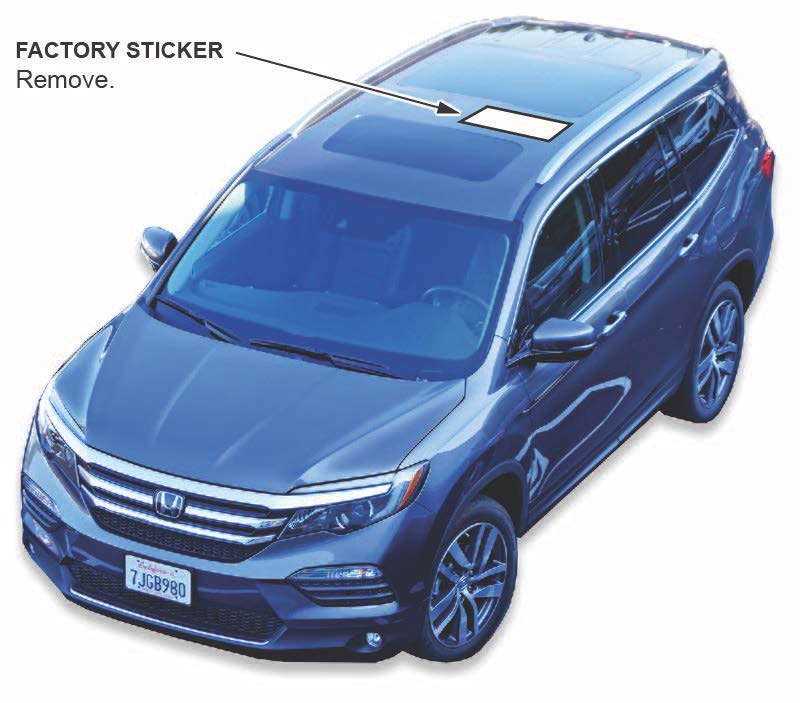
- Under PDI PROCEDURES, 1. Remove the Exterior Protective Coatings, added text and art to cover removal of factory sticker from roof.
- Under PDI PROCEDURES, 9. Do the Idle Learn Procedure, added note on consequences of incorrectly doing procedure.
- Under PDI PROCEDURES, 10. Do the CKP-Pattern Learn Procedure, revised text to cover models with 9-speed automatic transmission (Touring and Elite)
INTRODUCTION
This bulletin covers the pre-delivery inspection (PDI) of the 2016 Pilot. It includes these procedures:
To do a PDI on a model with a navigation system, be sure to complete Service Bulletin 15-034, 2016 Pilot: PDI of the Navigation System.
This bulletin also includes this new model service information:
CLAIM INFORMATION
Reimbursement Time: 1.4 hours
NOTE: This time includes the PDI of the navigation system, if equipped.
PDI PROCEDURES
Before Starting
Review these items:
- Perfect Delivery documents, especially the information on battery maintenance and tire pressures
- Checklist in the PDI and Final Delivery Checklist booklet
Make sure you record the PDI on the appropriate pages of the checklist. The PDI is not done until this bulletin and the checklist are both complete. Note on the repair order any repairs or problems that cannot be fixed within a few minutes. Remove all PDI items from the cargo area and glove box.
Models Equipped with Push Button Start
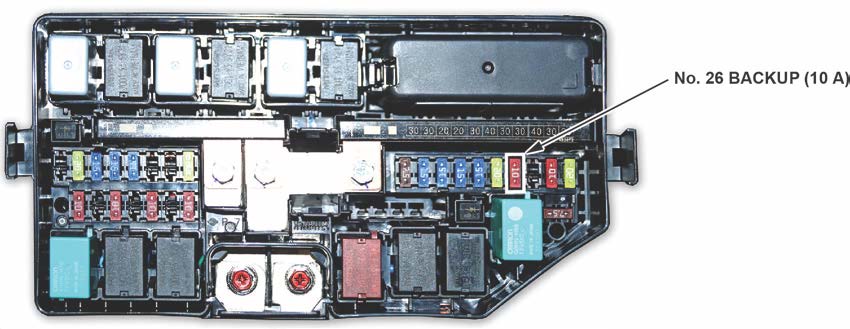
To prevent parasitic draw, the vehicle comes from the factory with the No. 26 BACKUP (10 A) fuse removed from the main under-hood fuse box. With it removed, the engine will not start when you apply the brake pedal and press the ENGINE START/STOP button.
To start the engine with the No. 26 fuse removed, you must do this:
- Press the ENGINE START/STOP button once.
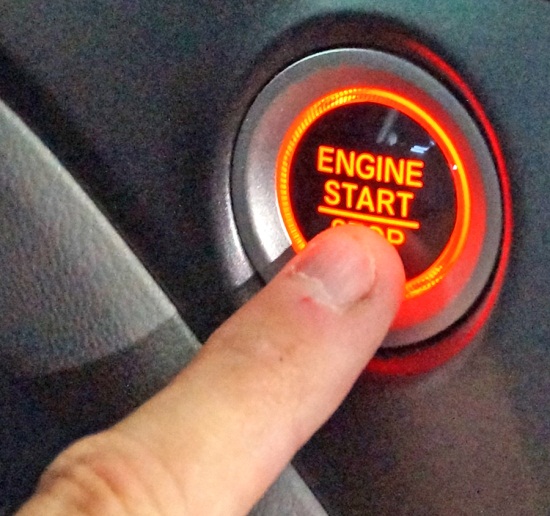
- When the indicator blinks, touch the keyless remote to the ENGINE START/STOP button.
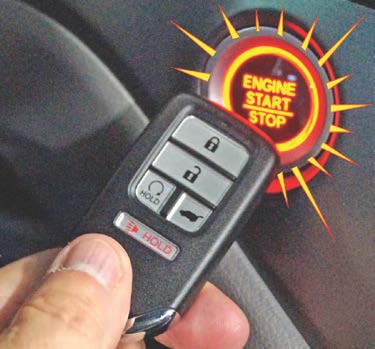
NOTE: The indicator will switch from blinking to steady when communication is complete.
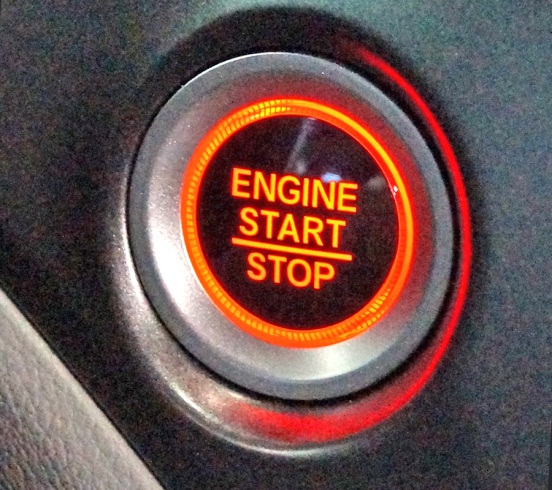
- Start the engine by pressing the ENGINE START/STOP button while pressing the brake pedal. You must start the engine within 10 seconds of touching the remote to the button.
1. Remove the Exterior Protective Coatings
Carefully remove the exterior protective coatings. See S/B 03-080, Removal of Protective Coatings During PDI. Also, be sure to remove the factory sticker from the roof.
2. Install the Fuses
To prevent battery drain during vehicle shipping, the No. 26 BACKUP (10 A) fuse is removed from the under-hood fuse box and stored in the glove box. Make sure the ignition is turned to OFF before reinstalling the fuse.
Vehicle Interior
3. Remove the Interior Protective Coverings
There are several protective coverings on the interior trim pieces and some areas of the carpet. Carefully remove all of them with clean hands to avoid soiling any surfaces. If any of the interior is dirty, clean it with mild soap or a Honda cleaning product such as Leather & Vinyl Cleaner (P/N 08700-9214) or Carpet Spot Remover (P/N 08700-9215).
4. Install the Floor Mats
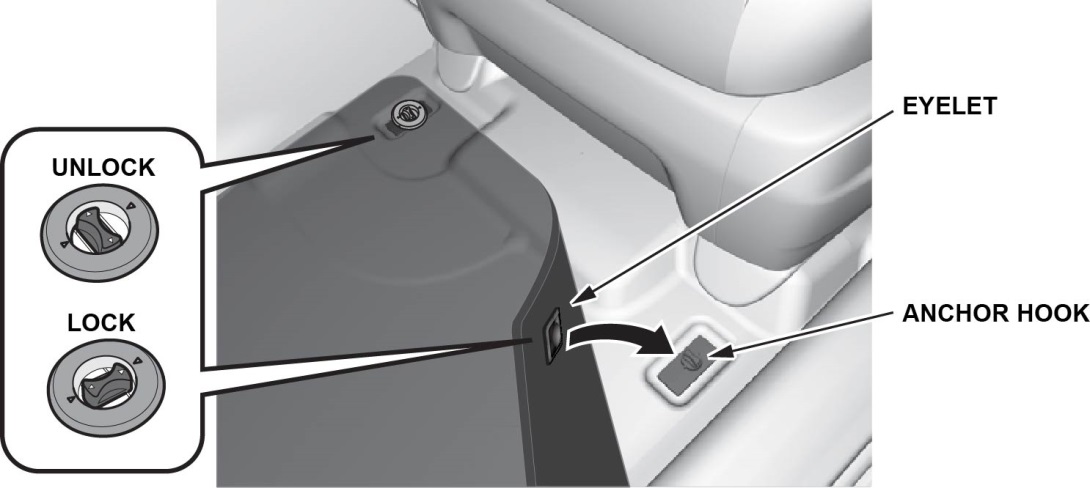
Be sure to place the eyelets in the driver’s and front passenger’s floor mats over the anchors in the floor and turn the knobs clockwise to the lock position. Also do the same for the second row floor mats. The anchors for those mats are under the front seats.
Under-Hood (Engine Cold)
5. Check the Battery
Depending on the trim level, this vehicle comes with either a conventional flooded lead acid (FLA) battery or the new absorbed glass mat (AGM) battery. Here is the breakdown:
- LX, EX, and EX-L: FLA
- Touring and Elite: AGM
Each battery type has its own uniquely tuned charging and battery management systems, therefore cannot be interchanged.
To ensure long battery life and that the customer gets a fully charged battery as outlined in S/B 89-003, Battery Maintenance at Dealers, it must be checked at these times:
- When the vehicle first arrives at the dealership
- During the PDI, if done at a later date
- At regular intervals
- Just before vehicle delivery
If the vehicle will be kept in long-term storage, be sure to remove the No. 26 BACKUP (10 A) fuse.
Test the battery with the ED-18 battery tester using S/B 88-023, Battery Testing and Replacement. Make sure the ED-18 has the latest software installed before using it. See S/B 09-045, ED-18 Battery Tester Update Information.
If the test results show GR8 DIAGNOSTIC NEEDED, you must charge the battery with the GR8 battery diagnostic station. Make sure the GR8 has the latest software installed before using it. See S/B 09-060, GR8 Battery Diagnostic Station Update Information.
NOTE: When charging an AGM battery, always select AGM. Serious damage can result if you select FLOODED (FLA). Also, make sure you connect the negative battery lead to the negative battery post; its handle contains a temperature probe. The GR8 monitors battery temperature during charging so that it does not overheat and destroy the battery.
Write down the GOOD BATTERY 10-digit code in the PDI and Final Delivery Checklist booklet. During the PDI, write down the code in the “Under Hood (Engine Cold)” section. Then, at vehicle delivery, write it down in the “Final Inspection (At Delivery)” section.
Vehicle Exterior (Vehicle Raised to Full Height)
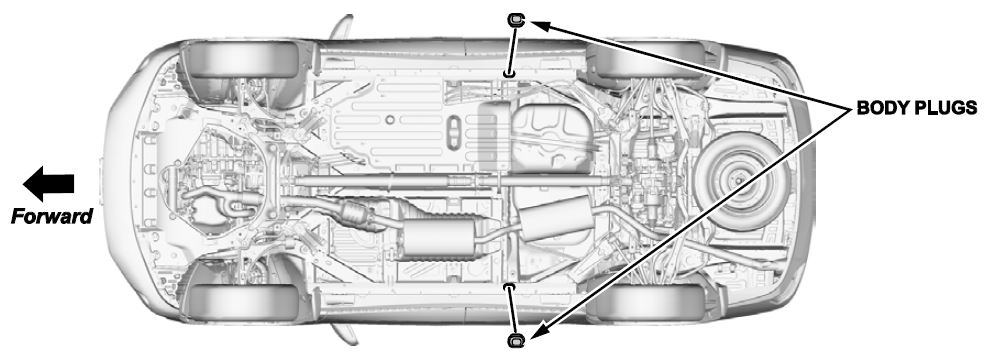
6. Install the Body Plugs
Install the body plugs on each side of the vehicle as shown.
Vehicle Exterior (Vehicle Lowered to Half-Height)
7. Install the Front License Plate Holder
If state regulations require the use of a front license plate, do this:
- Find the two dimples near the middle of the front bumper.
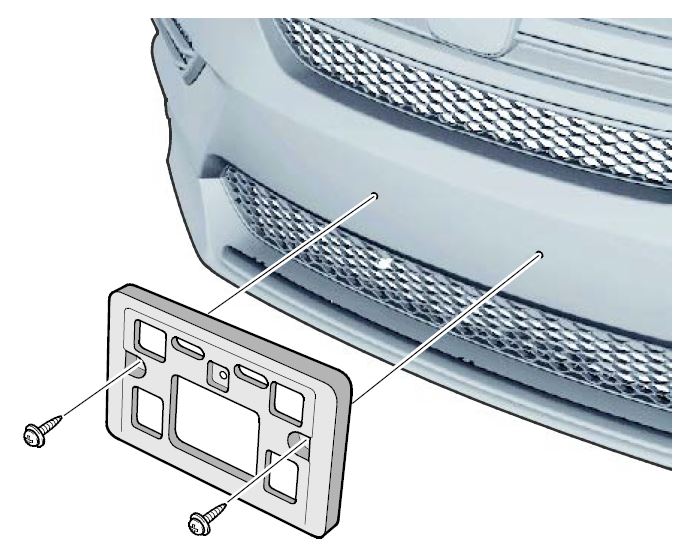
- Center the holes in the front license plate over the dimples, then attach the holder with the two long Philips-head screws.
The remaining screws in the kit are for attaching the front and rear license plates.
Vehicle Exterior (Vehicle Lowered to Ground)
8. Set the Tire Pressures
To prevent flat spots during vehicle shipping and storage, the tires are inflated to over 40 psi. If the vehicle is going into dealer storage, leave the tire pressures at 40 psi until it is sold (see the “Perfect Delivery Action Plan”).
If the vehicle is moved to the sales lot or is sold, adjust the tire pressures as follows:
NOTE:
- Be sure to follow this procedure exactly as written. If you fail to do this, the MID may not show the tire pressures.
- If you are in a cold climate region, make sure the tires are at the same temperature as the outside air before adjusting the pressures; otherwise, the Low Tire Pressure/TPMS indicator may come on in cold weather.
- Turn the ignition to ON.
- Use a tire pressure gauge with a bleeder valve to quickly lower the pressure in each tire to around 28 psi.
- Set the pressure in each tire to the recommended value listed on the driver’s doorjamb label and check it with a hand-held gauge.
- Test-drive the vehicle for at least 2 minutes above 15 mph. If the MID does not show the tire pressures, make sure you completed the test drive as specified.
Be sure to check the pressure in the spare tire (if equipped).
Under-Hood (Engine Idling)
9. Do the Idle Learn Procedure
To ensure a steady engine idle, do the applicable idle learn procedure after installing the No. 26 BACKUP (10 A) fuse.
NOTE:
- This procedure must also be done after updating or replacing the PCM. If does not need to be done after clearing DTCs.
- Failure to do this procedure correctly may result in poor shift quality and DTC P2638 (torque management feedback signal A range performance).
All Except Touring and Elite
- Make sure all electrical items (A/C, audio unit, rear window defogger, lights, etc.) are turned off.
- Start the engine and let it reach operating temperature (the cooling fans cycle twice).
- Let the engine idle for 10 minutes with the throttle fully closed.
Touring and Elite
- Make sure all electrical items (A/C, audio unit, rear window defogger, lights, etc.) are turned off.
- Start the engine and let it reach operating temperature (the cooling fans cycle twice).
- Let the engine idle for 10 minutes with the throttle fully closed.
- Turn the ignition to OFF.
- Jump the SCS line with the HDS.
- Wait 60 seconds, then exit the SCS mode.
10. Do the CKP-Pattern Learn Procedure
To ensure proper engine operation, do the CKP-pattern learn procedure after doing the idle learn procedure. NOTE:
- Make sure all electrical loads (A/C, heated seats, audio unit, etc.) are turned off before doing this procedure.
- Failure to do this procedure correctly may result in poor drivability along with misfire DTCs.
All Except Touring and Elite
- While driving on a level road, decelerate (with the throttle fully closed) from 2,500 rpm to 1,000 rpm with the shift lever in Low.
- Repeat step 1 three times.
Touring and Elite
- While driving on a level road, decelerate (with the throttle fully closed) from 2,500 rpm to 1,000 rpm with the transmission in 2nd gear.
- Repeat step 1 three times.
Vehicle Interior
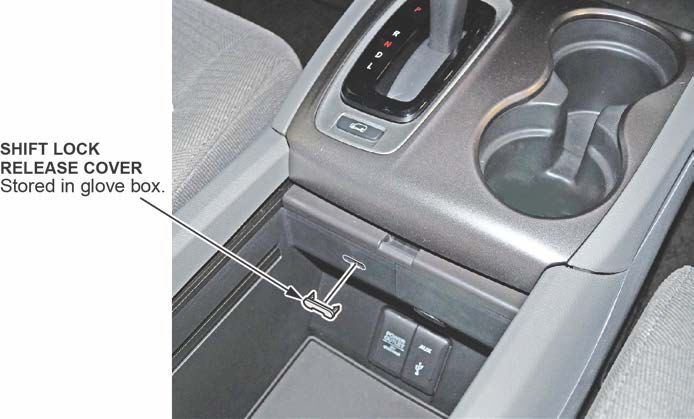
11. Install the Shift Lock Release Cover
Install the shift lock release cover as shown.
SHIFT LEVER MODEL SHOWN
12. Check Remote Engine Start Operation (All Except LX)
Starting the Engine
NOTE: Make sure all doors, the hood, and the tailgate are closed before remotely starting the engine.
Press the Lock button, then, within 5 seconds, press and hold the Remote Engine Start button. When the engine starts to crank, release the Remote Engine Start button. The engine will run for 10 minutes. If the engine did not start, the remote was not able to communicate with the vehicle.
While the remote engine start is on, the climate control system adjusts the cabin temperature, the security system stays on, and the gauges, exterior lights, and accessories stay off. Even though the engine keeps running when you open the driver’s door with the remote, you need to press down on the brake pedal and press the ENGINE START/STOP button to turn on the gauges, exterior lights, and accessories, and to shift out of Park.
Stopping the Engine
The engine will stop running after 10 minutes. If you want to stop the engine before that time is up, press and hold the Remote Engine Start button until the engine shuts off. If the engine does not shut off, the remote was unable to communicate with the vehicle.
13. Check Parking Brake Adjustment
The parking brake pedal should lock within 9 to 11 clicks with 294 N·m (66 lb-ft) of force applied. If it does not lock within this specification, adjust the parking brake cable.
Remember that cable tension is critical. If you adjust the cable too loose, the parking brake might not sufficiently hold the vehicle and the cable may rattle while driving. If you adjust it too tight, the parking brake may drag or overheat. An over-tightened cable can also cause the parking brake shoes to lift off the anchor block and rattle while driving.
14. Initialize the Audio-Navigation Unit Anti-Theft Function and Set the AM/FM Audio Unit Presets
Models Without Navigation
- After installing the No. 26 BACKUP (10 A) fuse, turn the ignition to ON, then press and hold the audio unit power button for at least 2 seconds. This synchronizes the audio unit with the vehicle and initializes the system for use.
NOTE: You may see the factory In Line Diag screen. If so, follow these steps to complete the in-line diagnosis. If not, skip them and go to step 2.
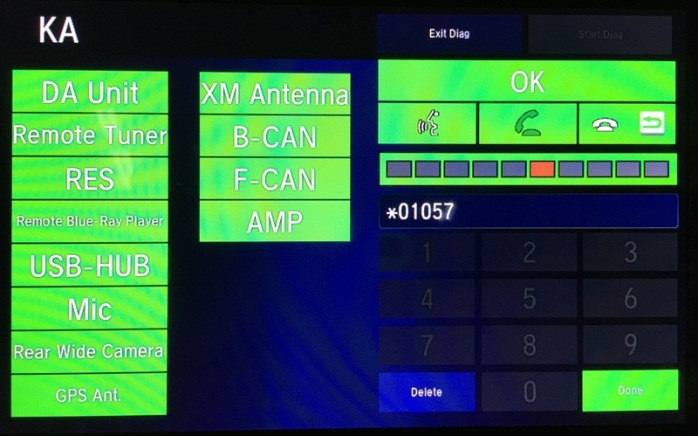
- Select Start Diag.
- Press all of the buttons on the steering wheel that you see on the screen. The icons should turn green.
- Make a loud sound (like snapping your fingers or clapping your hands) next to the microphone to complete the mic test.
- When you have completed all of the tests, the icons will be green. Select Exit Diag to exit the screen.
- Turn the ignition to OFF, then to ON, to make sure the In Line Diag screen does not reappear.
- Enter a local AM or FM station on all of the audio unit presets. To enter a station, tune to it, change the screen to the preset screen, then press and hold the preset number that you want that station stored at.
Models with Navigation
- Do S/B 15-034, 2016 Pilot: PDI of the Navigation System.
- Enter a local AM or FM station on all of the audio unit presets. To enter a station, tune to it, change the screen to the preset screen, then press and hold the preset number that you want that station stored at.
15. Set the Clock (Models Without Navigation)
To set the clock, follow these steps:
- Turn the ignition to ON.
- Press the MENU/CLOCK button.
- Select Adjust Clock.
- Select the hour and adjust as needed.
- Select the minutes and adjust as needed.
- Select Set when done.
16. Set the Compass Zone (Models Without Navigation)
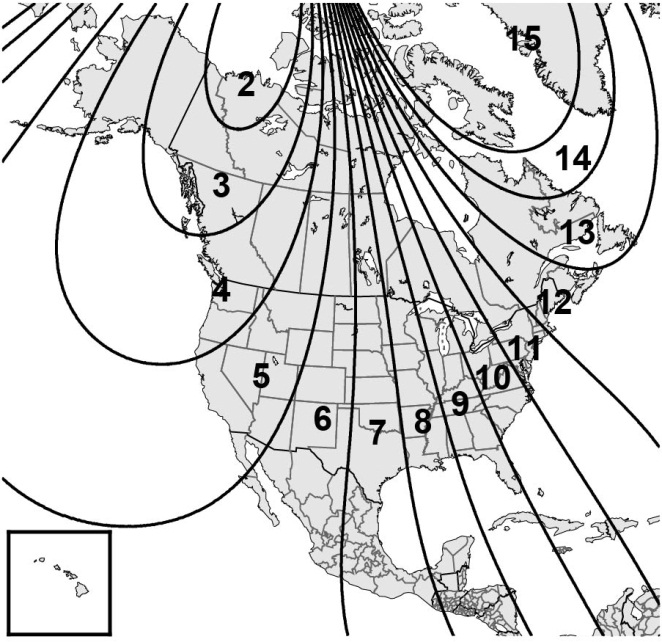
In most areas, there is a variation between magnetic north and true north. At the PDI, the compass zone needs to be set to your geographic zone to compensate for this variation. To set the compass zone, do this:
- Turn the ignition to ON.
- From the top screen of any audio source, press and hold MENU for 5 seconds. The display switches to the Compass settings
- Select Zone Adjust. The display shows the current zone number the system is set to.
- Select the zone number of your area.
- Select BACK to exit the menu.
17. Check the Compass Calibration (Models Without Navigation)
If the compass shows the wrong direction or the CAL indicator blinks, manually calibrate the system with this procedure:
- Turn the ignition to ON.
- On the top screen of any audio source, press and hold MENU for 5 seconds. The display switches to the Compass settings
- Select Calibration, then Calibration Start. The CAL indicator should start blinking above the compass direction box.
- Drive the vehicle slowly in two complete circles. The compass should show a direction and the CAL indicator should go off.
18. Check/Refresh the SiriusXM® Radio Dealer Demo Service (Except in Alaska and Hawaii)
The audio system comes from the factory activated with the SiriusXM® Radio dealer demo service. Once you install the No. 26 BACKUP (10 A) fuse, the system receives the full range of available channels. You can see a full list of channels at www.siriusxm.com.
While watching the display, tune to several channels within the full channel lineup. If you can tune to all of the channels, the dealer demo service is activated.
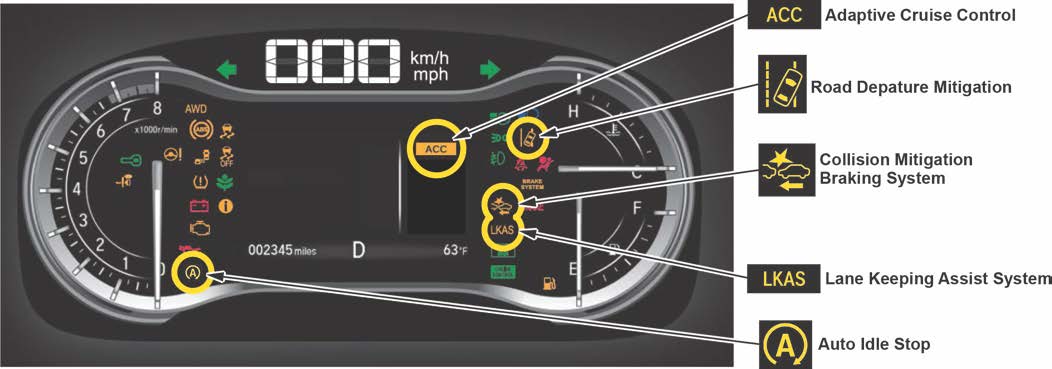
19. Check the ACC, Collision Mitigation Braking System, LKAS, Road Departure Mitigation, and Auto Idle Stop Indicators (If Equipped)
When you first turn the ignition to ON, these indicators should come on for a few seconds and then go off:
- ACC (Adaptive Cruise Control)
- Collision Mitigation Braking System
- LKAS (Lane Keeping Assist System)
- Road Departure Mitigation
- Auto Idle Stop
20. Check Bluetooth® HandsFreeLink® (HFL)
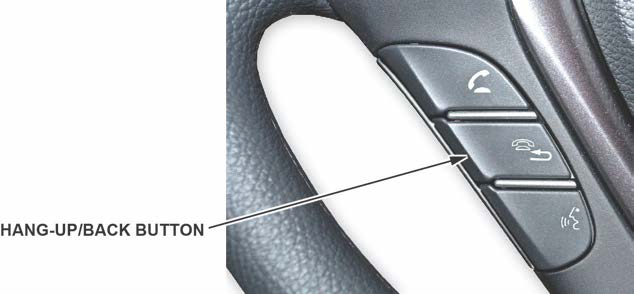
To ensure HFL works and is ready to use, start the engine, then press and hold the Hang-up/Back button on the steering wheel for 10 seconds. You should hear “The TCU is OK.” If you do not hear this message, see the service information for troubleshooting information.
21. Check the Driver’s and Front Passenger’s Window Auto Up/Down Feature
Make sure the driver’s and front passenger’s window auto up/down feature works right. From the main switch control, when you firmly press the window switch and then release it, the window should fully open; when you firmly pull back the switch and release it, the window should fully close.
If it does not work right, initialize the auto up/down feature for each front window (once from the driver’s seat and once from the front passenger’s seat) as follows:
- Make sure the window is fully closed, then press and hold the window switch until the window opens all the way.
- Pull back the window switch and hold it until the window is fully closed. Keep holding the switch for another 2 seconds.
- Check the auto up/down feature. When you firmly press the window switch and release it, the window should fully open; when you firmly pull back the switch and then release it, the window should fully close. If the window does not work this way, repeat the initialization.
NOTE: Initialize the auto up/down feature after replacing any window parts or installing accessory door visors. Initialization is not needed after disconnecting/reconnecting the battery.
22. Check the Moonroof One-Touch Feature (EX-L, Touring, Elite)
Make sure the moonroof one-touch feature works properly:
- When you firmly pull the moonroof switch back and release it, the moonroof should fully open.
- When you firmly push the switch forward and release it, the moonroof should fully close.
- When you push up on the switch and release it, the moonroof should tilt.
If the moonroof does not work properly, do this procedure to reset the control unit:
NOTE: This procedure must be done after replacing any moonroof component or after installing the accessory moonroof visor. It does not need to be done after disconnecting the battery.
- Close the driver’s door and leave it closed until the procedure is finished.
- Push up on the moonroof switch to put the moonroof in the tilt position.
- Turn the ignition to OFF.
- While pushing up and holding the switch, turn the ignition to ON.
- Release the switch and turn the ignition to OFF.
- Repeat steps 3 and 4 four more times.
- Firmly pull the switch back and hold it until the moonroof fully opens.
23. Check the Panoramic Glass Roof Sunshade Auto Feature (Elite)
Make sure the sunshade auto feature works properly:
- When you firmly pull the sunshade switch back and release it, the sunshade should fully open.
- When you firmly push the sunshade switch forward and release it, the sunshade should fully close. If the sunshade auto feature does not work properly, do this procedure to reset the control unit:
NOTE: This procedure must be done after replacing any sunshade component. It does not need to be done after disconnecting the battery.
- Firmly pull the sunshade switch back and hold it.
- Turn the ignition to ON.
- Release the sunshade switch.
- Turn the ignition to OFF.
- Repeat steps 1 thru 4 at least four times. This should clear the sunshade position from the control unit’s memory and allow just manual operation.
- To relearn the position, firmly push the sunshade switch forward until the sunshade fully closes and you hear the motor shut off.
The sunshade auto feature should now work properly.
24. Set Up the Rear Entertainment System (If Equipped)
The rear entertainment system (RES) lets front seat passengers listen to one audio source through the speakers, while the second and third row passengers watch a DVD or listen to a different audio source through wireless headphones. The vehicle comes with two sets of headphones. There are also two audio jacks with individual volume controls at the back of the center console for wired headphones. For more information, see the navigation manual.
To ensure the RES is working right, follow this procedure:
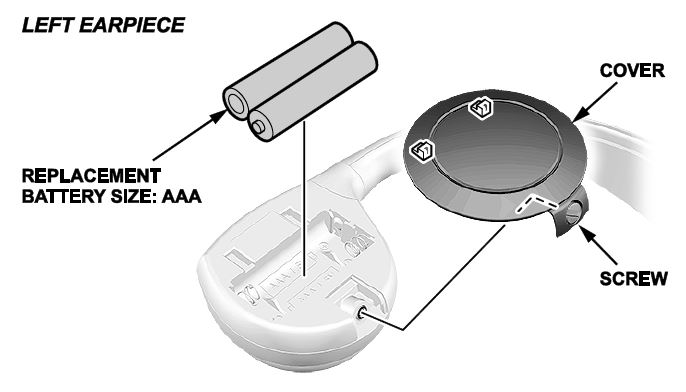
- Install two AAA batteries into the left earpiece of each set of headphones as shown.
- Turn the ignition to ACCESSORY or ON, then insert a DVD into the DVD player. Press the OPEN button on the overhead screen to lower it.
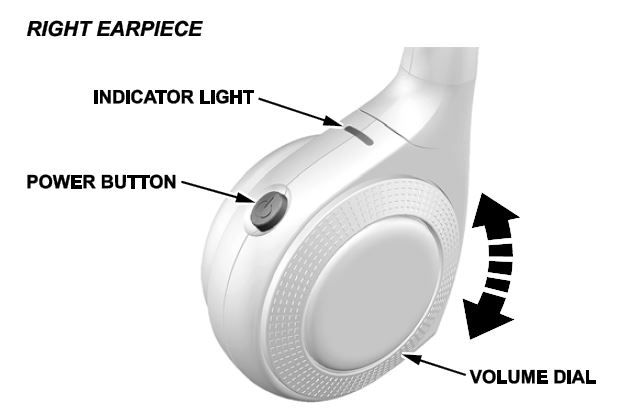
- Press the power button on the right earpiece and adjust the volume with the volume dial.
- Repeat step 3 for the other set of headphones.
NOTE: The wireless headphones work only in the second and third row seats. They do not work in the front seats or outside the vehicle. Customers can order extra headphones from your parts department.
NEW MODEL SERVICE INFORMATION
1. New A/T and ATF (Touring, Elite)
The Touring and Elite models are the first Hondas to come with a 9-speed A/T. Use only ATF Type 3.1 or higher. Do not use ATF Type 2.0 or any other ATF.
There is no need to check the ATF level in this transmission. Just inspect it for external leaks. If you find any, see the service information for troubleshooting information.
2. Auto Park Mode (Touring, Elite)
By design, Park is automatically engaged when the ignition is turned to OFF or when all of these conditions are met:
- The vehicle is stopped.
- The driver’s seat belt is unbuckled.
- The driver’s door is opened.
Always apply the brake pedal and shift to Park when idling or when exiting the vehicle. If you select any gear other than Park with the driver’s door open and the driver’s seat belt unbuckled, Park is reengaged when you release the brake pedal.
3. Car Wash Mode (Touring, Elite)
If you need to run the vehicle through an unattended conveyor-style car wash, make sure the wiper lever is turned to OFF, then follow these steps:
- With the engine running, apply the brake pedal and select Neutral on the electronic gear selector.
- Within 5 seconds, press the ENGINE START/STOP button. The ignition goes to ACCESSORY.
- Look for the message Shift to Park in the MID. This tells you the car wash mode is set. You will then have 15 minutes before the vehicle automatically shifts to Park and shuts off. You may now exit the vehicle.
4. Auto Idle Stop Feature (Touring, Elite)
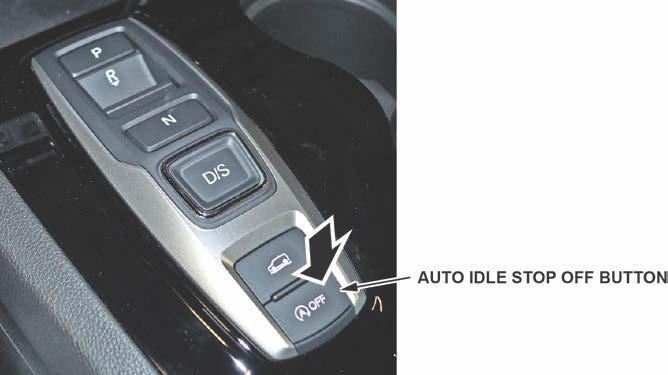
The auto idle stop feature automatically stops and restarts the engine to help maximize fuel economy, depending on environmental and vehicle operating conditions. Press the Auto Idle Stop OFF button on the electronic gear selector to turn the system on or off.
5. Intelligent Traction Management (All Except LX)
This system adjusts vehicle handling and performance to maximize the use of available traction when accelerating from a stop and while driving on different road surfaces.
Press the Intelligent Traction Management button to select the appropriate mode.
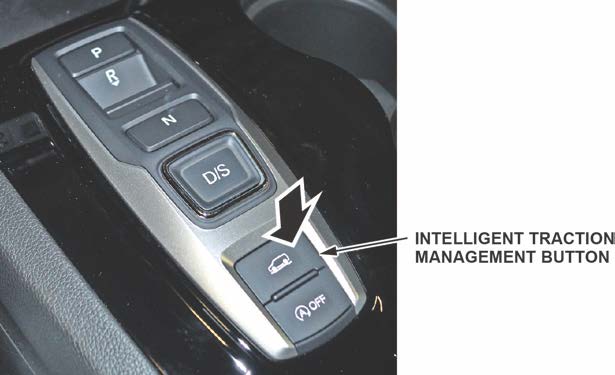
The mode you select appears on the MID:
- Normal (2WD, 4WD): Provides balanced driving performance on most road surfaces.
- Snow (2WD, 4WD): Use when driving on snowy road surfaces.
- Mud (4WD): Use when driving on muddy road or off-road surfaces. • Sand (4WD): Use when driving on soft, sandy road or off-road surfaces.
6. Capless Fueling System
This vehicle does not have a fuel fill cap. The system is sealed with an internal flapper instead.
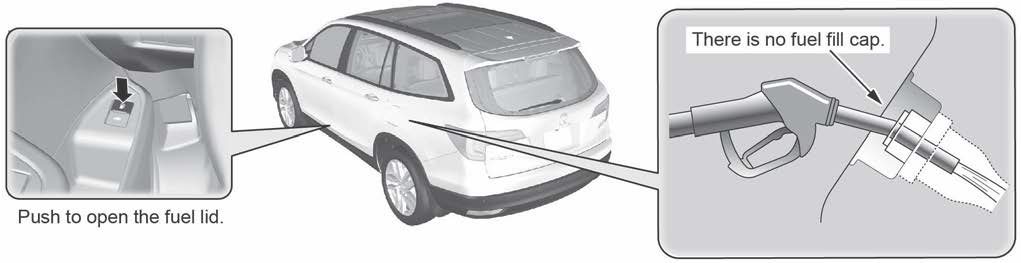
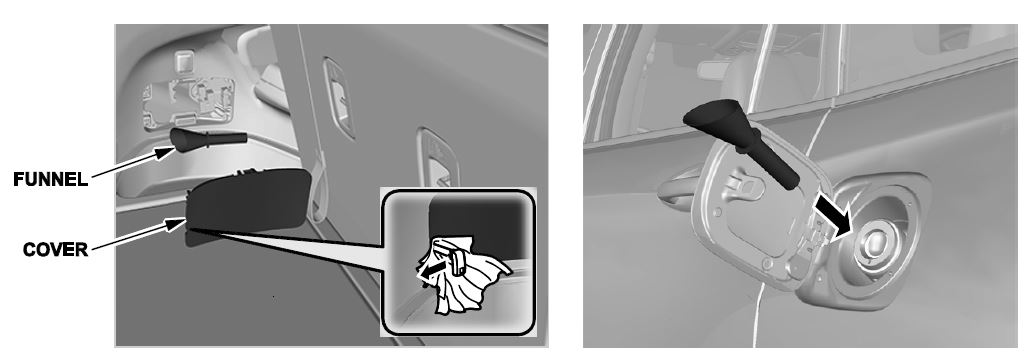
A funnel is included to allow manual refueling from a portable fuel container. It is stored on the inside of the cover for the manual fuel door release. For more information, see the owner’s manual.
7. Blind Spot Information with Cross-Traffic Monitoring (Elite)
This vehicle comes with a blind spot information/cross-traffic monitoring system. For details, see Online University self-study module ECC05, BSI/CTM System.
8. Adaptive Cruise Control (ACC) and Collision Mitigation Braking System (CMBS) (If Equipped)
The ACC and CMBS work using a windshield-mounted camera, a radar unit mounted behind the front grille, and the VSA system.
9. Lane Keeping Assist System (LKAS) and Road Departure Mitigation (RDM) (If Equipped)
The LKAS and RDM use a windshield-mounted camera.
10. Micro-Fiber Cloth
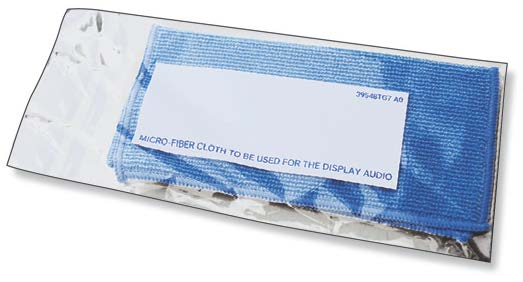
The Display Audio (DA) has a high-gloss, anti-glare touch screen. However, smudges may still occur from use. To help customers care for this screen, the vehicle comes with a micro-fiber cloth in the glove box for cleaning. Insert this cloth in the Owner Information Kit. Do not remove this cloth from the vehicle.

- [Easy to Use—Work Out of the Box] + [FOXWELL 2026 New Version] FOXWELL NT604 Elite scan tool is the 2026 new version from FOXWELL, designed for car owners who want to figure out the cause of issues before fixing car problems by scanning common systems like ABS, SRS, engine, and transmission. The NT604 Elite obd2 scanner diagnostic tool comes with the latest software—no need to waste time downloading software first. Plug the scanner into the OBDII port with OBDII cable to start the diagnosis.
- [Affordable] + [Reliable Car Health Monitor] Will you be confused what happens when the warning light of ABS/SRS/transmission/check engine flashes? Instead of taking your cars to dealership, this FOXWELL scanner will help you do a thorough scanning and detection for your cars and pinpoint the root cause. Note:The device is a diagnostic tool, not a repair tool. To turn off a warning light, you must first physically repair the issue causing it. Only then can the scanner be used to clear the corresponding fault code.
- [5 in 1 Car Diagnostic Scanner] Compared with obd scanners (50-100), NT604 Elite code scanner not only includes their OBDII diagnosis but also serves as ABS/SRS scanner, transmission and check engine code reader. When it’s an odb2 scanner, you can use it to check if your car is ready for annual test through I/M readiness menu. In addition, live data stream, built-in DTC library, data play back and print, all these features are a big plus for it. Note: doesn't support maintenance functions like reset or relearn. For the SRS system, NT604 Elite can read and clear common fault codes not caused by a crash, but crash/collision data cannot be cleared.
- [Fantastic AUTOVIN] + [No extra software fee] Through the AUTOVIN menu, this NT604 Elite car scanner allows you to get your V-IN and vehicle info rapidly, no need to take time to find your V-IN and input one by one. What's more, the NT604 Elite ABS SRS scanner supports 60+ car brands from worldwide (America/Asia/Europe). You don’t need to pay extra software fee. AUTOVIN may not work on some older vehicles or certain vehicle brands. If AUTOVIN fails, please input the vin code manually or go to the Diagnostic Menu to select your vehicle model.
- [Solid protective case KO plastic carrying bag] + [Lifetime update] Almost all same price-level car scanner diagnostic tool only offers plastic bag to hold the scanner.However, NT604 Elite automotive scanner is equipped with solid protective case, preventing your obd2 scanner from damage. Then you don’t need to pay extra money to buy a solid toolbox.
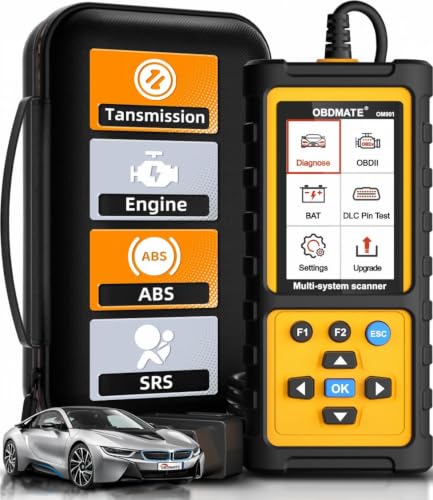
- 【Reset ABS/SRS/Transmission/Engine Lights】 More than an check engine code reader, OBDMATE OM901 obd2 scanner performs comprehensive diagnostics for the 4 most-used systems (ABS/SRS/Engine/Transmission). It quickly clears fault codes, turns off warning lights, read data stream and auto VIN.
- 【3.5" Handheld Scanner with 4 System Diagnose】 3.5" Super large TFT screen equipped displays an intuitive menu and clear readings of various sensors from ABS, SRS, ECM and TCM systems. It arrived with a silicone protective case and hard-shell carrying case, ensuring long-lived durability and drop resistance. The car diagnostic tool is plug-to-play designed, plug it and get diagnosis started without any batteries or updates required.
- 【One-Click I/M Readines&Full OBD2 Functions】 Press F1 to get an intuitive corloured form about whether various emissions-related systems on the vehicle are operating properly. Help you get smog-check ready quickly. OM901 car scanner supports all essential OBD2 functions you need: read & clear codes, view freeze frame, read I/M readiness, retrieve VIN, live data stream (with graphing display), O2 sensor test, onboard monitoring mode, and EVAP leak test.
- 【Battery Voltage Check&DLC Pin Test】 It allows you to monitor battery health by testing current battery voltage. Plus, this obd2 diagnostic tool features DLC 16-PIN test to check current voltage of every pin.
- 【Automotive Scanner Diagnostic Kit】 The package comes with 1 car scanner, 1 USB-type c cable, 1 hard storage bag and 1 user manual(en). Free to update without any hidden fees. 5 languanges available in setting including English, French, Italian, German and Espanish. Valuable and Portable, making it a great tool kit for car owners, DIY enthusiasts, and professional mechanics.

- OBD2 SCANNER FOR ALL SYSTEMS – The INNOVA SD35 is a tablet-based OBD2 scanner designed for advanced diagnostics. Read and clear check engine light, ABS, SRS, and TPMS codes, plus test your car battery and alternator to prevent unexpected failures. Vehicle coverage may vary. Please use Innova’s Coverage Checker to verify compatibility.
- ALL-SYSTEM DIAGNOSTICS & LIVE DATA – Unlike basic code readers, this OBD2 scanner for all vehicles scans engine, transmission, ABS, SRS, and more. Get real-time live data, including RPM, fuel trims, temperature readings, and oxygen sensor performance.
- OBD2 TABLET WITH USER-FRIENDLY INTERFACE – This automotive scan tool features a high-resolution display, making vehicle diagnostics faster and easier.
- ADVANCED TPMS, OIL RESET & SERVICE FUNCTIONS – Perform TPMS sensor checks, oil light reset, and other service resets with ease This professional diagnostic tool provides comprehensive vehicle maintenance capabilities in one device.
- WIDE VEHICLE COVERAGE (1996 & NEWER CARS & TRUCKS) – This OBD2 scanner Bluetooth tablet is compatible with Toyota, Ford, Honda, Chevrolet, Nissan, Dodge, and more. However, feature coverage may vary. Please use Innova's Coverage Checker to verify coverage.
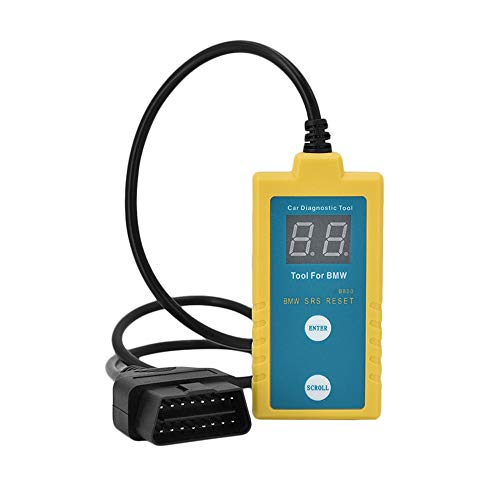
- ✔️【Professional SRS Reset for 1994-2003 BMW】 Designed specifically for classic BMW models (1994-2003). This B800 scanner reads & clears SRS airbag fault codes, turns off the warning light, and saves you a costly dealer visit. Confirmed compatible with: E36, E46 (EXCEPT 2001 330i), E34, E38, E39, Z3, and X5 (E53). NOT compatible with any BMW built before 1994 or after 2003.
- ✔️【Important: Two Different Connection Ports – Read Before Use】 To avoid “not working” issues, please note: For 1994–2000 BMWs (most E36, E34, Z3, early E39), the SRS diagnostic port is a round 20-pin connector under the hood. You MUST use the included 16-pin to 20-pin adapter cable. For 2000–2003 models (late E46, E39, X5), use the standard OBD-II port inside the cabin. Incorrect connection is the #1 reason for “incompatibility” reports.
- ✔️【Read & Clear Fault Codes in Minutes】 Quickly diagnose why your SRS light is on. The scanner accurately reads fault codes from airbag and seatbelt pretensioner systems. With one button press, clear the codes and reset the SRS warning light in seconds. No expensive dealer tools needed.
- ✔️【User-Friendly for DIYers – No Mechanic Required】 Easy operation with an intuitive button layout: ‘Enter’ to confirm, ‘Scroll’ to navigate. The clear LCD screen shows results instantly. Includes a step-by-step manual (revised for clarity) to guide you through the entire reset process.
- ✔️【Reliable Support with 1-Year Warranty】 We stand behind the quality of our B800 scanner. It comes with a 1-Year Hassle-Free Warranty. If you have any questions or need support, please contact us with your Order ID, and our dedicated team will assist you promptly.
- [All System Diagnostics, Professional-Level Scanner] - BLCKTEC 460T is the ultimate OBD2 diagnostic tool for home mechanics and professionals. It supports all 10 OBD2 modes, reads and clears Engine/Transmission/ABS/SRS codes, performs All-System Diagnostics, offers workshop reset tools, and provides real-time live data. It helps you pinpoint issues, assess your car's condition, and prepare for SMOG checks with ease. NOTE: Function availability depends on your vehicle. Before you buy, be sure to use the Compatibility Checker on BLCKTEC website or contact our customer support to verify that the features you need are supported for your vehicle’s specific year, make, and model.
- [12+ Most Popular Reset Functions] - BLCKTEC 460T OBD2 scanner offers 12+ dealer-level service functions, including Oil Maintenance Reset, ABS Bleeding, EPB Reset, SAS(Steering Angle Sensor) Recalibration, DPF(Diesel Particulate Filter) Reset, Throttle Body Relearn, Battery Reset/Initialization, TPMS Relearn, Transmission Reset, Fluid Change Reset, Maintenance Reset and more, enabling you to perform workshop services like a pro. NOTE: Function availability depends on your vehicle. Be sure to use the Compatibility Checker on BLCKTEC website to verify that the features you need are supported for your vehicle.
- [Real-Time OBD2 and OEM Live Data, Freeze Frame Data] - BLCKTEC 460T helps diagnose vehicle issues when warning lights like Check Engine Light or ABS/SRS Light appear. It offers detailed DTC info, ECU Freeze Frame Data, and real-time OBD2 and advanced OEM live data, including Engine, Transmission, ABS, SRS, and more, making it easy to diagnose and resolve vehicle problems. You can view, graph, record, replay, and overlay up to four live data streams in a single graph for better analysis.
- [AutoVIN, AutoReLink, AutoScan, 3X Faster] - Equipped with AutoVIN technology, 460T automatically retrieves the VIN to save you time. Its AutoScan and AutoReLink features scan all of the vehicle's ECUs and detect any fault codes immediately after you plug the scanner into the vehicle's OBD2 port - no button presses required. Additionally, it regathers DTC and I/M readiness information every 30 seconds, simplifying monitor tests. 460T's advanced technology makes it 3X faster than other products.
- [Get RepairSolutions2, the #1 Auto Repair App for Free] - When paired with RepairSolutions2(RS2) App, 460T becomes even more powerful. RS2's Verified Fix Database built by master technicians, provides the parts needed for the repair. Additionally, RS2 gives you access to OEM warranty info, maintenance schedules, TSB, and dealership recall info, making car care easier than ever. RS2 is free with no subscription fees and it stores your car scan reports in the cloud, allowing you to access, share, or print them anytime and anywhere.
This product presentation was made with AAWP plugin.