Service Bulletin
A20-074
October 26, 2020
Version 2
Safety Recall: Driver’s Frontal Airbag Inflator (NADI-Service Part)
Supersedes 20-074, dated October 1, 2020, to revise the information highlighted in yellow
AFFECTED VEHICLES
| Year | Model | Trim Level | VIN Range |
| 2000 | Accord | ALL | Check the iN VIN status for eligibility. |
| 2000 | Civic | ALL | Check the iN VIN status for eligibility. |
| 2000-2001 | CR-V | ALL | Check the iN VIN status for eligibility. |
| 2000-2001 | Odyssey | ALL | Check the iN VIN status for eligibility. |
REPAIR PROCEDURE
Under REPAIR PROCEDURE, the torque specification on step 20 was revised.
BACKGROUND
Certain vehicles may have had the original driver’s airbag module replaced with one that was equipped with a Takata NonAzide Driver’s airbag Inflator (NADI) that may contain an aluminum seal that could allow moisture to enter into the inflator. If the propellant in the inflator absorbs a large amount of moisture, the airbag may deploy slowly. If the propellant degrades due to drying or other factors, excessive internal pressure may be generated in the inflator during deployment, which may cause the inflator container to rupture.
NOTE
If the VIN status inquiry indicates that the vehicle is subject to any open safety recalls, make sure to also complete those recall repairs before returning the vehicle to the customer. If you are unable to complete any open recalls, advise the customer of the recall status and when the recall could be completed.
CUSTOMER NOTIFICATION
Owners of affected vehicles will be sent a notification of this campaign.
Do an iN VIN status inquiry to make sure the vehicle is shown as eligible.
Some vehicles affected by this campaign may be in your used vehicle inventory.
Failure to repair a vehicle subject to a recall or campaign may subject your dealership to claims or lawsuits from the customer or anyone else harmed as a result of such failure. Before selling a vehicle in inventory, always check if it is affected by a safety recall by conducting a VIN status inquiry.
CORRECTIVE ACTION
Inspect the driver’s airbag module and inflator. If you find an affected inflator, replace the driver’s airbag inflator and use the V-SMART tool to document the installation. Then, return the original, undeployed inflator as directed.
PARTS INFORMATION
| Part Name | Part Number | Quantity |
| Inflator Kit | 04770-S01-306 | 1 |
| Torx Bolt (6 x 23) (The inflator kit includes the Torx bolts. Order this if you only did the inspection.) | 90134-S6A-A80 | 2 |
| Lock Nut (Order this only if instructed in step 21 or 22.) | 77854-TL0-E81 | 4 |
NOTES
- Always use new Torx bolts to install the airbag module. The new Torx bolts are coated with threadlock to make sure they do not come loose.
- The inflator kit box must be used to return the old inflator to its supplier. Be careful not to damage the inflator kit box.
- If the defective, undeployed inflator is not returned, the warranty claim for that vehicle will be charged back to your dealership.
- To return the inflator, follow the instructions in PIB A15-0002, Inflator Kit Return Process.
- Parts staff can scan the part number and serial number from the outside of the box into the warranty claim by using the Controlled Part Serial No. screen and scanning the applicable information. Refer to the job aid Ordering and Managing Replacement Inflators for more information.
WARRANTY CLAIM INFORMATION
NOTES
- To avoid a warranty claim being charged back to your dealership, the defective, undeployed inflator must be returned to its supplier. Follow the shipping instructions in PIB A15-0002, Inflator Kit Return Process.
- The replacement inflator part number and serial number must be printed on the RO.
- To avoid non-payment of warranty claims, the new airbag inflator part number and serial number must be included in each claim. For more information, refer to step 12 of REPAIR PROCEDURE.
- The serial number is encoded into the bar code printed on the label inside of the box and on a label attached to the outside of the box. If your dealership uses a scanner, you can scan the serial number from either place into the claim.
- The part number is encoded into a barcode attached to the outside of the box. If your dealership uses a scanner, you can scan the part number into the claim.
- If you confuse the serial number and part number when entering the claim information, your claim will automatically be rejected.
- For more information about scanning and filing airbag inflator recall claims, refer to Ordering and Managing Replacement Airbag Inflators. From the iN, select Service, Service Library, then Claims Reference Guide. Under HOT TIPS/TOPICS, select More info… next to Inflator Claims at Glance.
| Operation Number | Description | Flat Rate Time | Defect Code | Symptom Code | Template ID | Failed Part Number |
| 7521P6 | Replace the inflator, do the V-SMART
procedure, then install the airbag module. | 0.5 hr | 6AP00 | U6R00 | A20074A | 06770-S84-G80ZA |
| 7521P7 | Remove and inspect the inflator, do the VSMART procedure,
then install the airbag module. | 0.3 hr | 6AP00 | U6R00 | A20074B | 06770-S84-G80ZA |
Skill Level: Repair Technician
REPAIR PROCEDURE
NOTES
- If the VIN status inquiry indicates that the vehicle is subject to any open safety recalls, make sure to also complete those recall repairs before returning the vehicle to the customer. If you are unable to complete any open recalls, advise the customer of the recall status and when the recall could be completed.
- Make sure you have the anti-theft code for the audio and navigation system (if applicable), then write down the audio unit presets.
- Be careful not to damage any parts when replacing the inflator, and follow the procedure exactly.
- If, before removing the airbag module, you suspect that it may be the incorrect airbag module for the vehicle or a counterfeit, do not remove the airbag module. Contact your DPSM for assistance.
- Do not open the inflator kit until you have confirmed an affected inflator is installed in the vehicle because if you have to return the inflator kit, the kit must be unopened.
- If the vehicle you are working on has an unaffected airbag module and inflator, do not disassemble the airbag module because the inflator cannot be installed, and you will have to replace the airbag module.
- Make sure you have reviewed the SRS Precautions and Procedures in the service information before doing the REPAIR PROCEDURE.
- Turn the ignition to ON. Then, check if the SRS indicator comes on for about 6 seconds, then turns off.
- If the indicator comes on, then turns off after about 6 seconds, go to step 2.
- If the indicator does not come on, or if it stays on, contact your DPSM for assistance.
- Disconnect the battery negative cable, and wait at least 3 minutes before continuing.
- Remove the driver’s airbag module. Refer to the service information.
- Place the airbag module, face down, on a clean shop towel.
- Visually inspect the airbag module, and the inflator for any unusual writing or markings.
- If there is nothing unusual about the airbag module or the inflator, go to step 6.
- If there are any unusual markings, like an incorrect label or a model year written in marker, the airbag module and inflator may not be the correct airbag module and/or inflator for the vehicle or it may be a counterfeit part. For more information about counterfeit airbag modules , you can refer to gov, enter keywords MANAGING COUNTERFEIT, and select Recommended Dealer Guidance for Managing Counterfeit Air Bags from the list. If you suspect that the airbag module or inflator is counterfeit, do not continue this procedure. Contact your DPSM for assistance.
NOTES
- To successfully complete this inspection and verification procedure, be sure to use the V-SMART tool along with the following steps in this bulletin.
- Before using the tool, review the job aid Using V-SMART for NADI Recalls. Keep in mind there is another job aid called Using V-SMART, but be sure not to use it. It does not include NADI Recall information.
- Check if the airbag module has a plastic inflator cover.
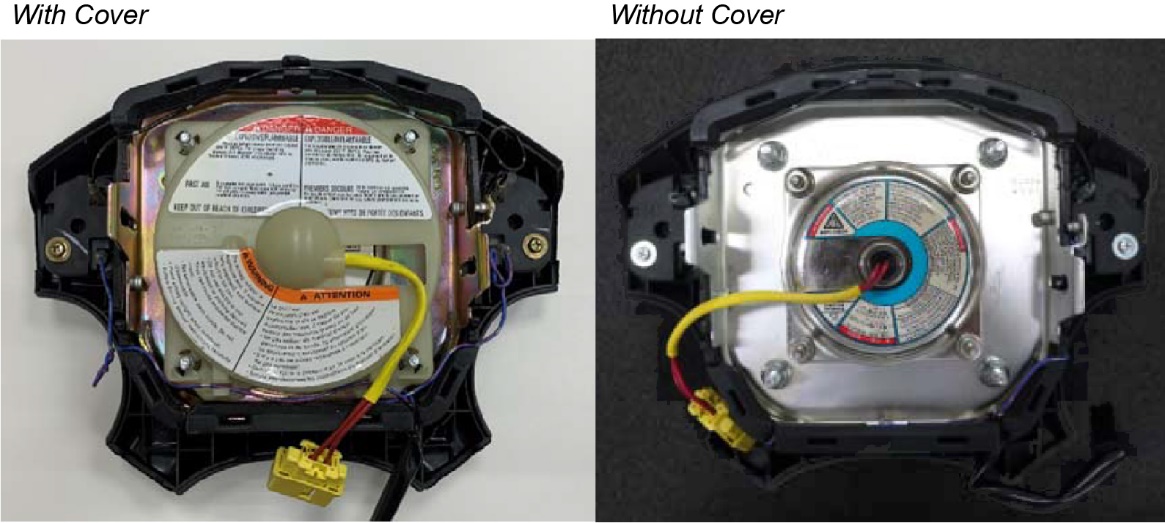
- If it does, go to step 7.
- If it does not, go to step 10.
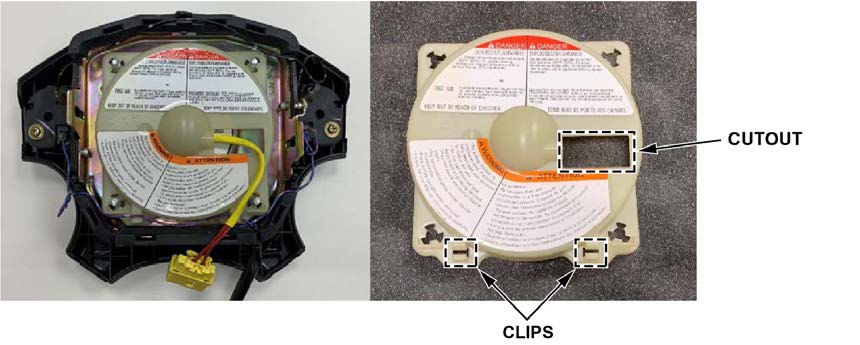
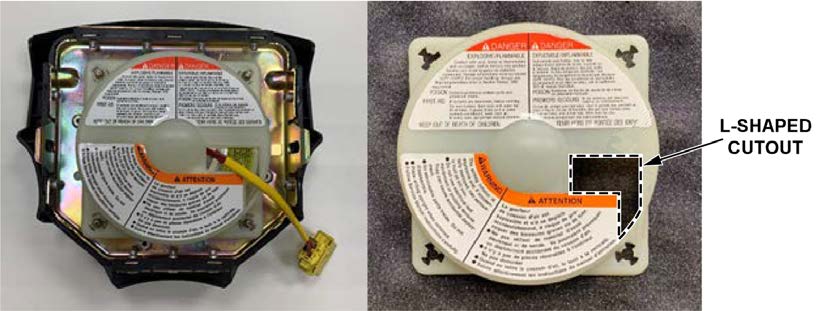
- Determine the type of inflator cover.
- Inflator cover Type 1 has a cutout on the right side of the cover, and two clips at the bottom of the cover that holds the horn wire.
- Inflator cover Type 2 has an L-shaped cutout at the right side of the cover.
- Inflator cover Type 3 has two cutouts. One is at the right side of the cover, the other is at the bottom of the cover for the serial number label.
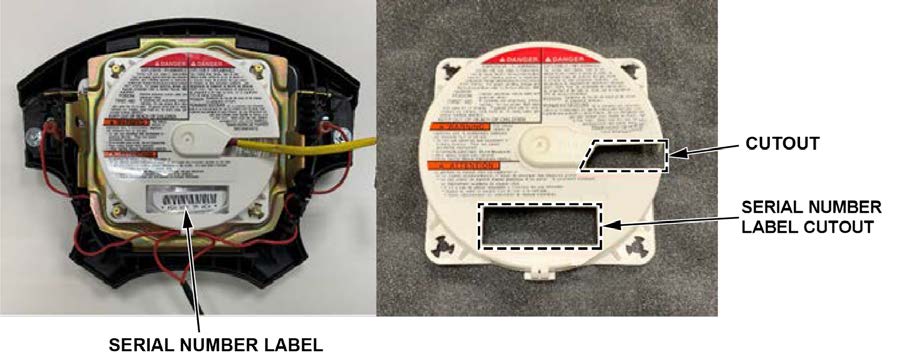
- If the inflator cover is Type 1 or 2, go to step 8.
- If the inflator cover is Type 3, this campaign does not apply. Go to step 23 to complete the V-SMART procedure and install the airbag module.
- Remove the inflator cover (if equipped), and throw it away.
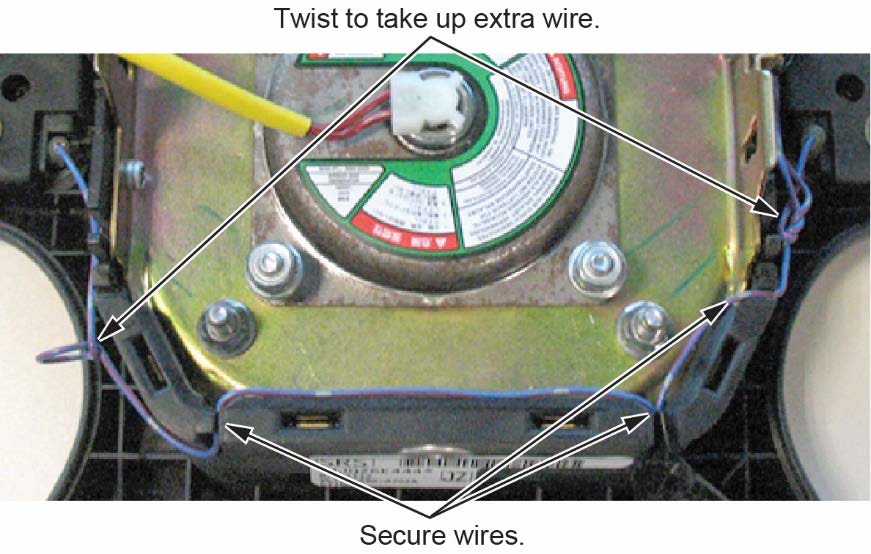
- Type 1 cover only: Route the horn harness through the airbag module slot, and secure it. Then, twist any excess wire, and tuck it out of the way.
- Compare the inflator label to the inflator labels shown below.
NOTE
Some inflator harnesses may be connected to the inflator with a connector and not by epoxy as shown below.
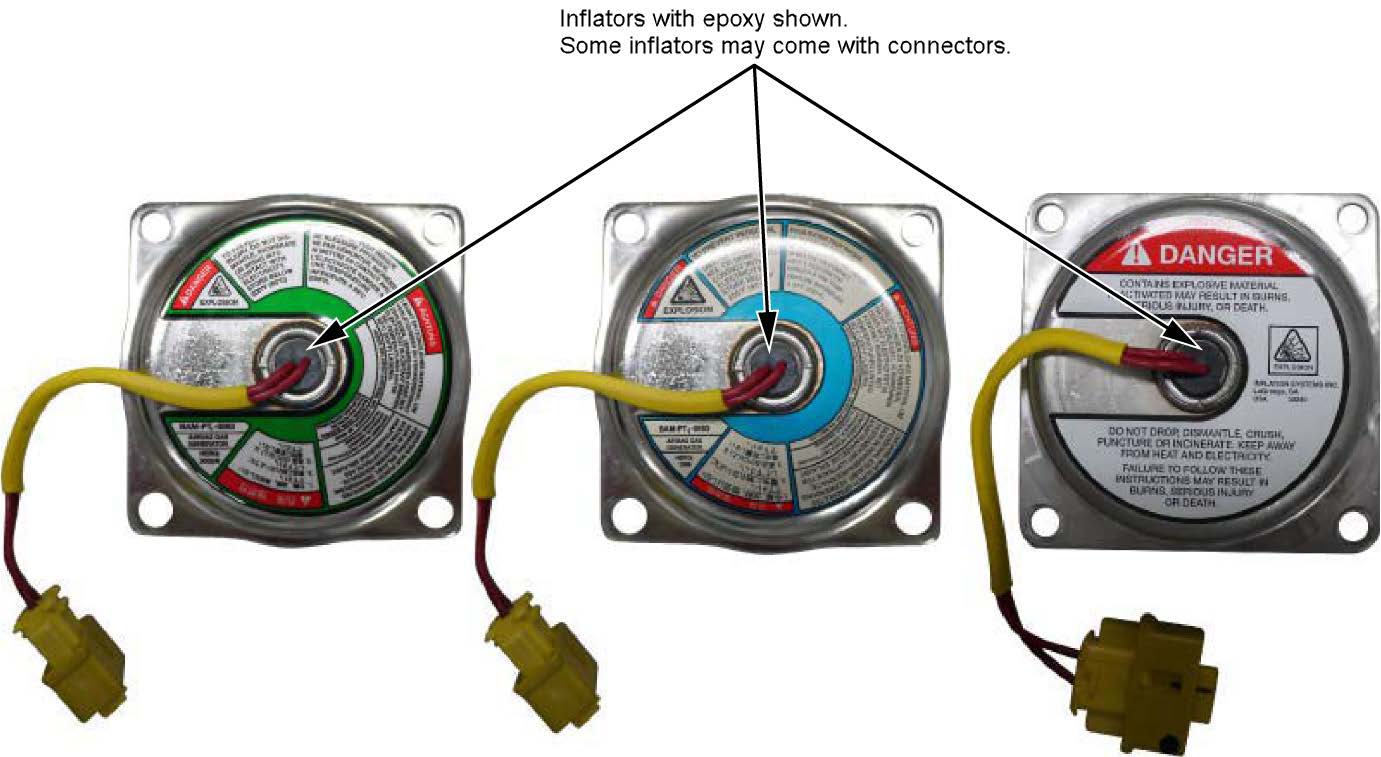
- If the inflator label matches one of the inflators shown, go to step 11.
- If the inflator label does not match any of the inflators shown, this campaign does not apply. Go to step 23 to complete the V-SMART procedure and install the airbag module.
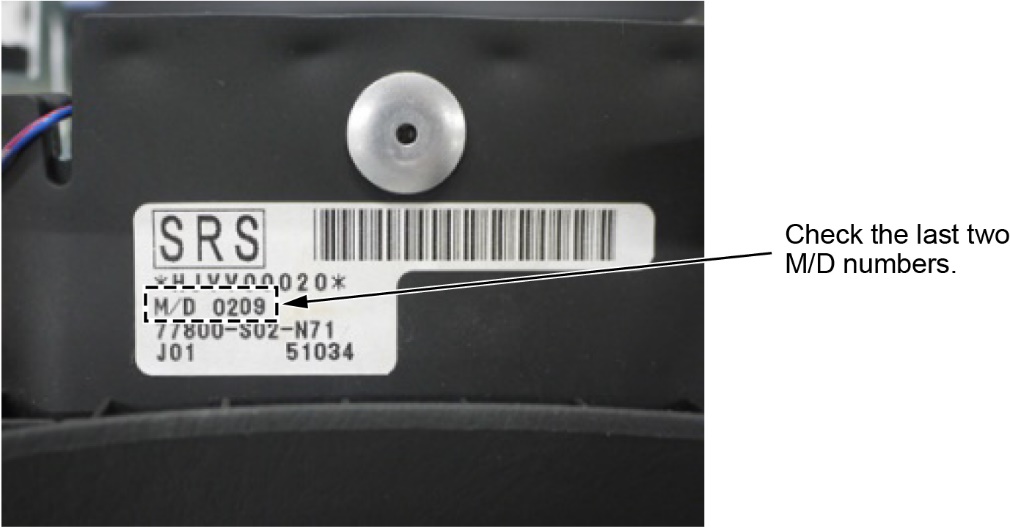
- Check the M/D number on the airbag module serial number label.
- If the last two numbers are 95, 96, 97, 98, or 99, go to step 12.
- If the label is missing, or is unreadable, go to step 12.
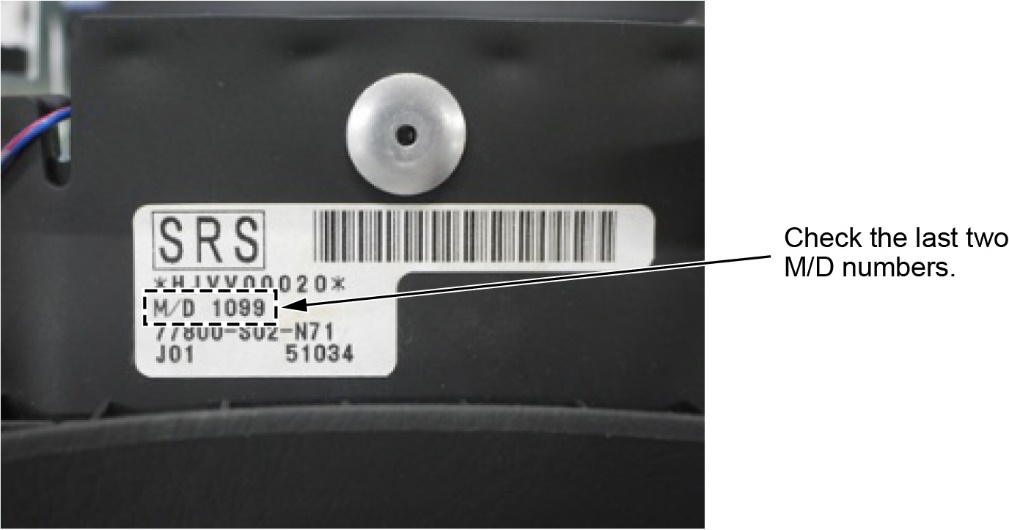
- If the last two numbers are not 95 ,96, 97, 98, or 99, this campaign does not apply. Go to step 23 to complete the V-SMART procedure and install the airbag module.
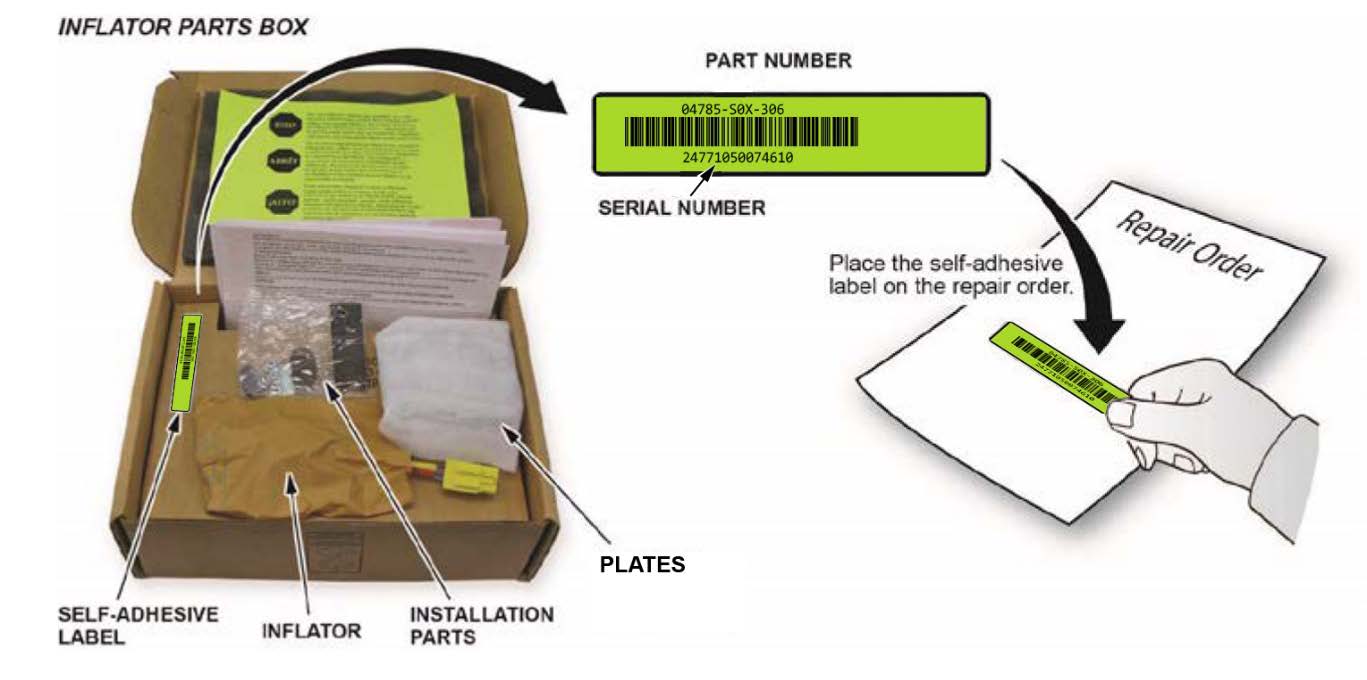
- Peel the label inside the inflator box from its backing, and attach it to the RO. For the warranty claim to be paid, the replacement inflator part number and serial number that you received must be included in the warranty claim.
NOTES
- The replacement part number is printed on the top part of the label and the serial number is printed on the bottom. Make sure you attach the label to the RO and give it to the warranty clerk.
- Not all inflator kits have a label included. In those cases, write the serial number and part number from the side of the inflator box on the RO. The part number always starts with 047.
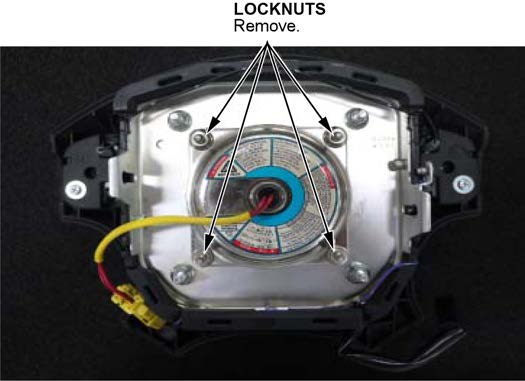
- Using vise grips, remove the four inflator locknuts and throw them away. Do not remove the inflator from the airbag module until you complete step 14.
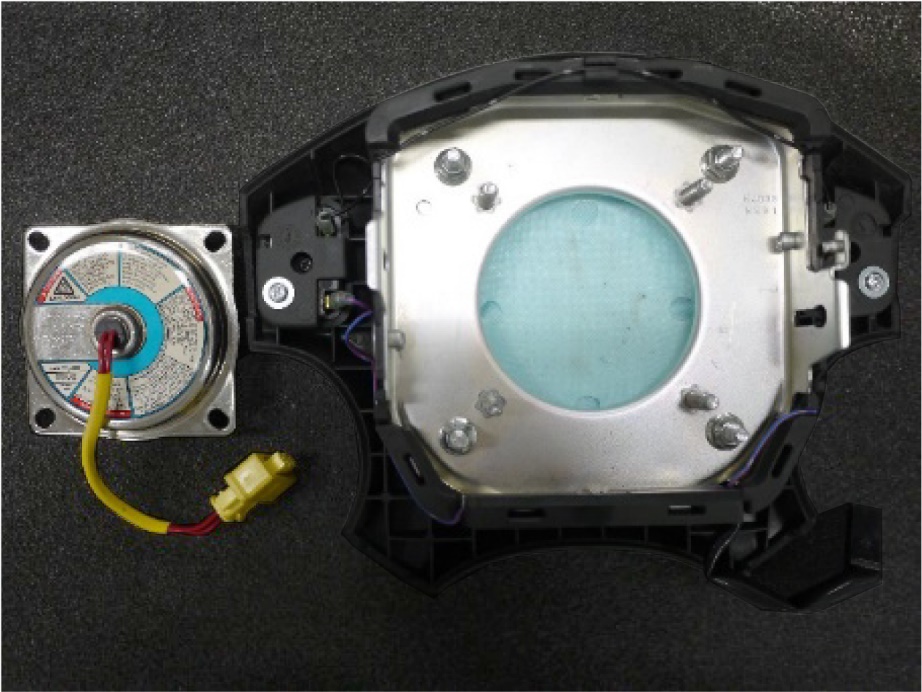
- Use shop air to clean any debris that may be on the inflator, then remove the inflator from the airbag module.
NOTES
- Do not allow any debris to enter the inflator opening in the airbag module.
- Place the removed inflator into the kit box to return it to the supplier.
- Do not deploy the inflator. The inflator must be returned to its supplier in the box the new inflator came in. Follow the shipping instructions outlined in PIB A15-0002 to return the undeployed inflator.
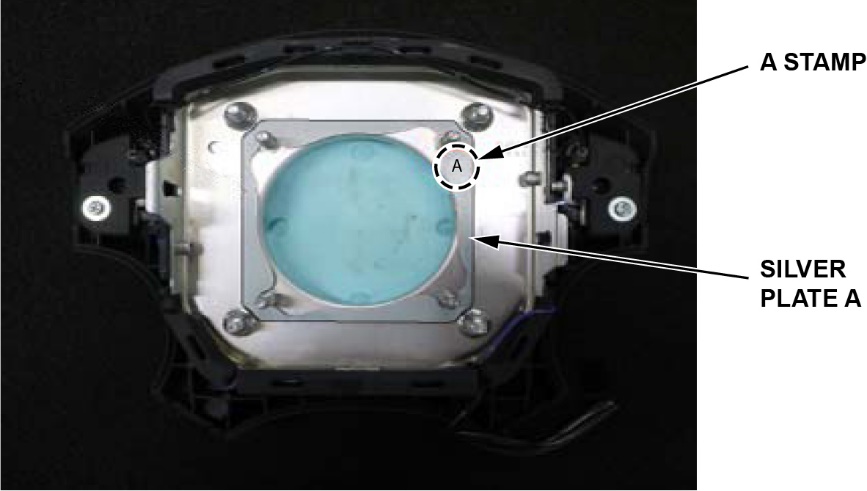
- Make sure the A stamp on silver plate A is positioned on the upper right. Then, install silver plate A to the airbag module.
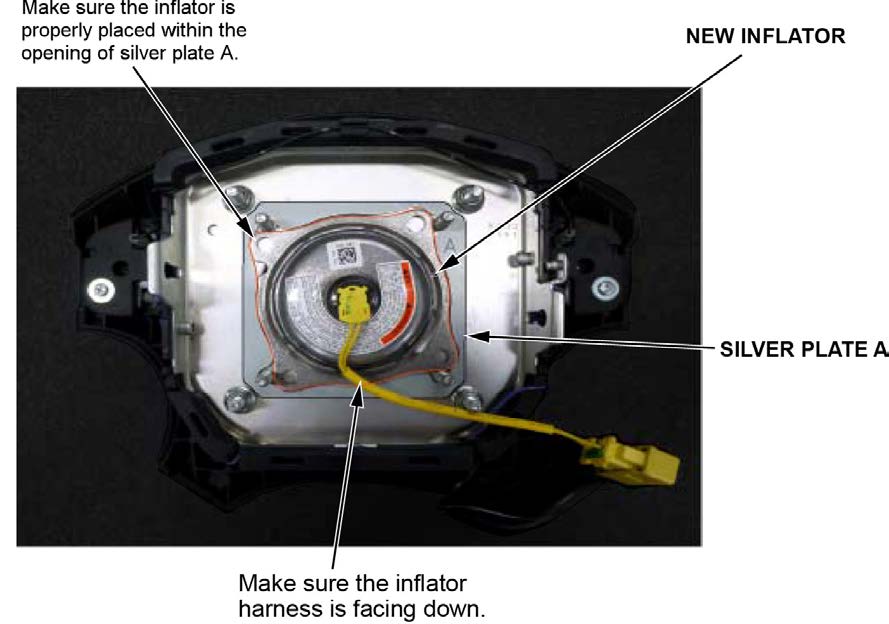
- Install the new inflator within the opening of silver plate A with the inflator harness facing downward as shown.
NOTE
Make sure the inflator is properly placed within the opening of silver plate A, they should not be overlapping.
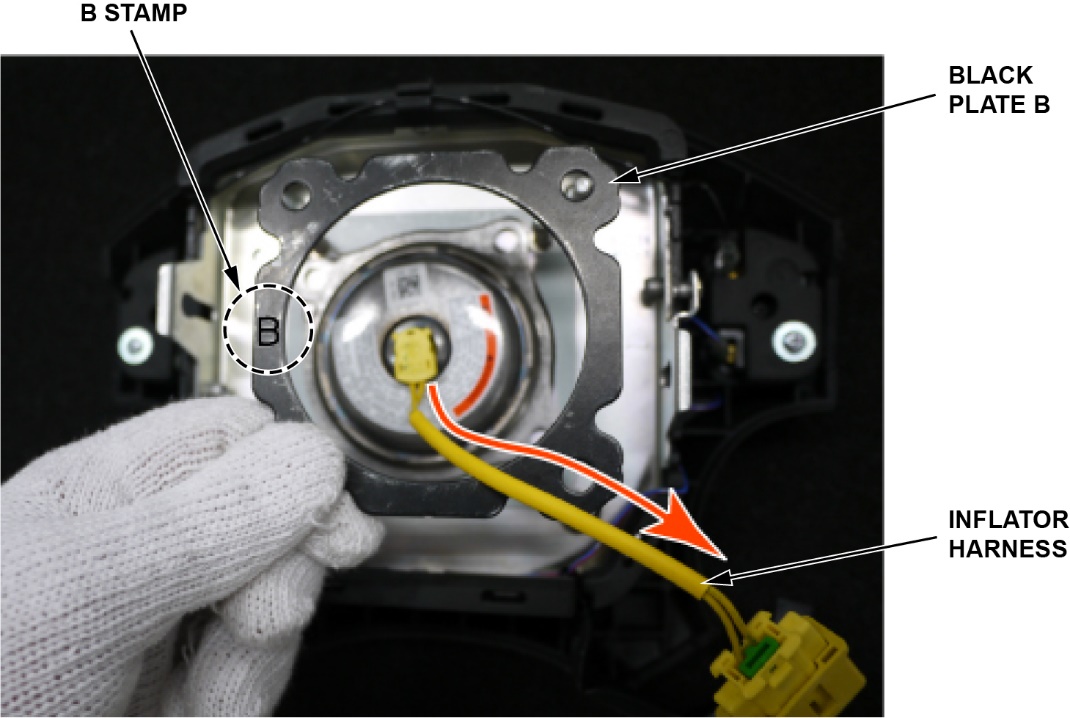
- Make sure the B stamp on black plate B is positioned on the left side. Then, pass the inflator harness through the opening.
NOTE
Black plate B may have scuffs and paint peeling that occurred during packaging. There is nothing wrong with it.
- Install black plate B to the airbag module.
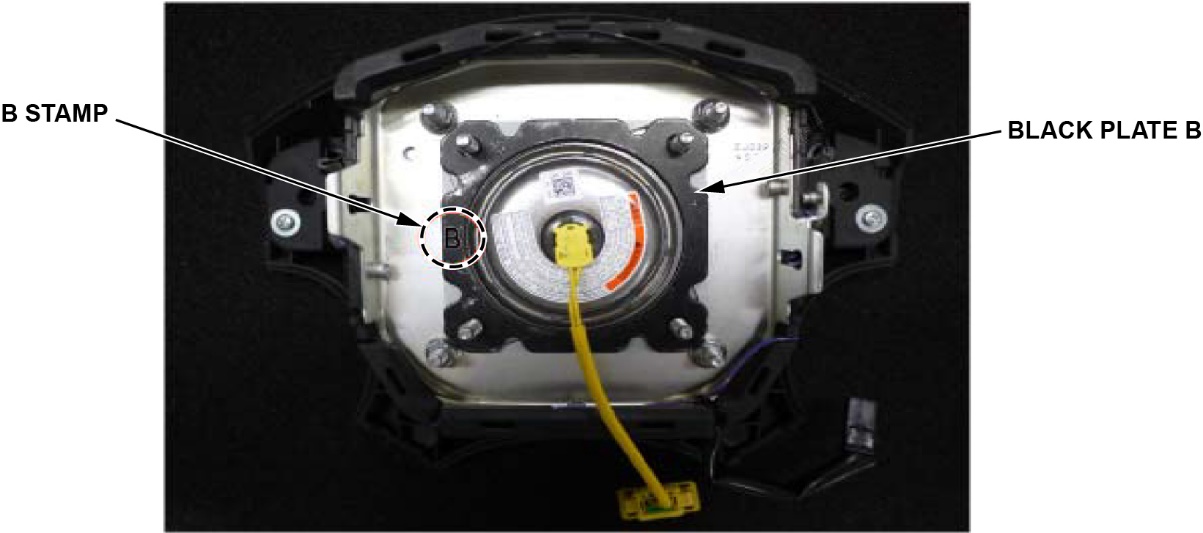
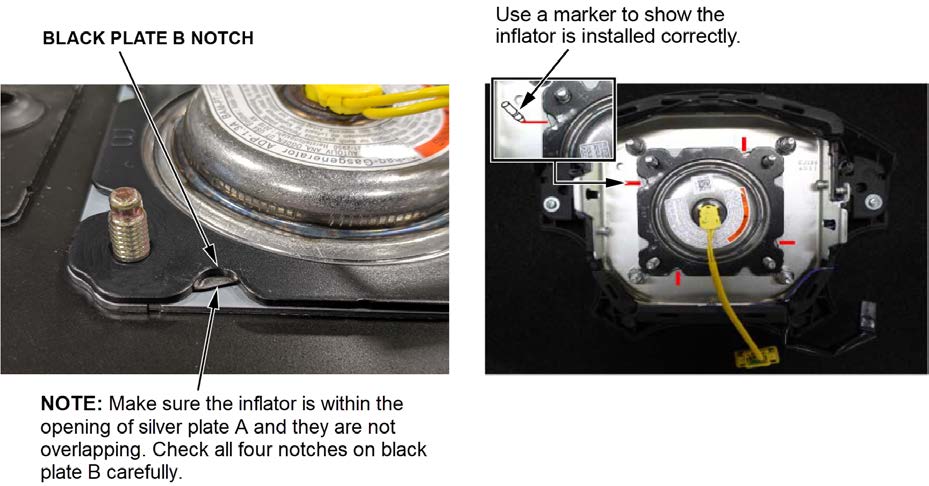
- Make sure the inflator is installed correctly by checking the four notches on black plate B. The inflator should be within the opening of silver plate A, and not overlapping. Using a marker, mark each of the four notches after you made sure it is installed correctly. If the inflator is not installed correctly, go back to step 16.
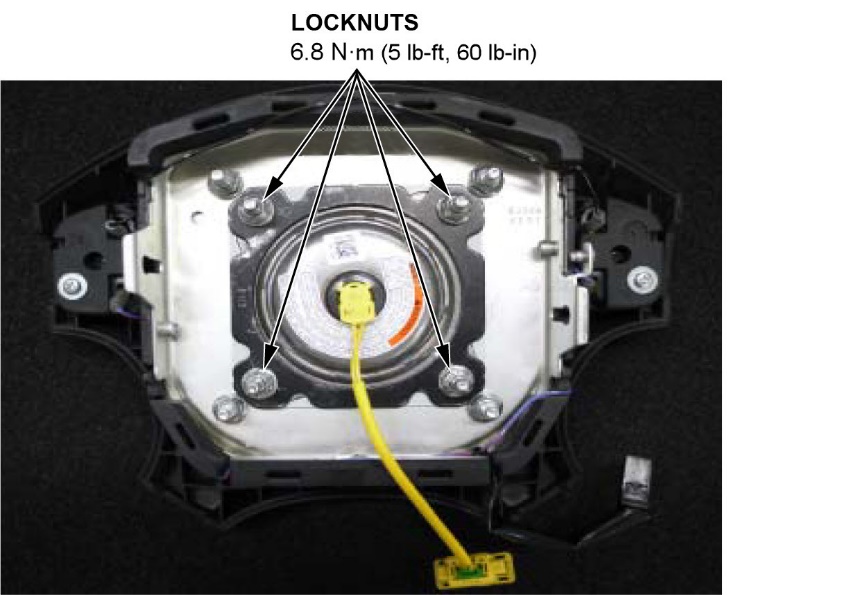
- Make sure the inflator and plates are still in the correct position. Then, install new locknuts, and torque them to 8 N·m (5 lb-ft, 60 lb-in).
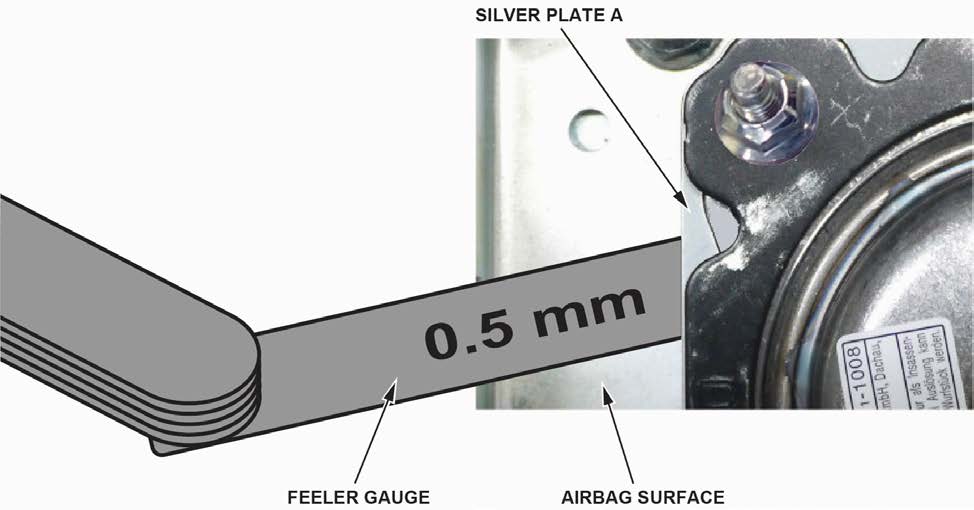
- To ensure the inflator kit is installed properly, use a feeler gauge to make sure the space between silver plate A and the airbag module surface is no greater than 5 mm. If any side is greater than 0.5 mm, remove the inflator and go back to step 16. Be sure to replace the lock nuts (P/N 77854-TL0-E81) if you have to do it again.
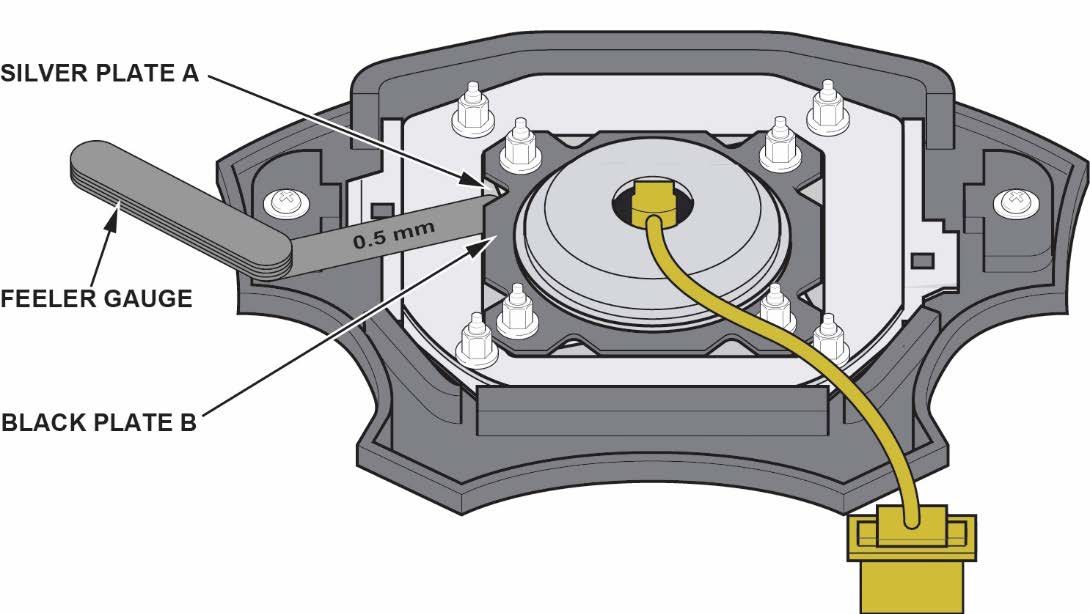
- Use a feeler gauge to make sure the space between silver plate A and black plate B is no greater than 5 mm. If any side is greater than 0.5 mm, remove the inflator and go back to step 16. Be sure to replace the lock nuts (P/N 77854TL0-E81) if you have to do it again.
- Follow the instructions on the V-SMART tool to complete the inspection and/or inflator replacement.
NOTES
- You must document the driver’s airbag module inspection and/or replacement inflator installation using the VSMART tool.
- The supervisor must inspect your work and approve it to make sure the replacement inflator was installed correctly. Your supervisor can be a service manager, shop foreman, team leader, etc. When a supervisor enters his or her information, the supervisor is signing off that the technician’s work was inspected and approved.
- Your warranty claim will not be paid if the V-SMART validation is not completed or the photo is not sent. Make sure you see the Uploaded Completed message to confirm the photo was sent to the warranty department.
- Install the driver’s airbag module using new Torx bolts. Refer to the service information.
- Connect the battery negative cable.
- Enter the anti-theft codes for the audio system and the navigation system (if equipped).
- Set the clock (on vehicles without navigation).
- Do the power window control unit reset procedure.
- Start the vehicle. Make sure the SRS indicator comes on for about 6 seconds, then turns off.
- Make sure the horn works correctly.
- Put the original inflator into the box the new one came in. Make sure there is no other hardware in the box because if the package rattles, it will not be accepted by the courier.
- Follow the shipping instructions outlined in PIB A15-0002 to return the undeployed inflator.
- Give your warranty clerk the RO that includes the replacement inflator serial number and replacement part number. For the warranty claim to be paid, the replacement inflator part number and serial number that you received must be included in the warranty claim.
END
Remedy Instructions and TSB
RCRIT-20V027-9486.pdf 1755.162KB
Remedy Instructions and TSB
RCRIT-20V027-8208.pdf 1662.708KB
Remedy Instructions and TSB
RCRIT-20V027-1911.pdf 92.912KB

- [Easy to Use—Work Out of the Box] + [FOXWELL 2026 New Version] FOXWELL NT604 Elite scan tool is the 2026 new version from FOXWELL, designed for car owners who want to figure out the cause of issues before fixing car problems by scanning common systems like ABS, SRS, engine, and transmission. The NT604 Elite obd2 scanner diagnostic tool comes with the latest software—no need to waste time downloading software first. Plug the scanner into the OBDII port with OBDII cable to start the diagnosis.
- [Affordable] + [Reliable Car Health Monitor] Will you be confused what happens when the warning light of ABS/SRS/transmission/check engine flashes? Instead of taking your cars to dealership, this FOXWELL scanner will help you do a thorough scanning and detection for your cars and pinpoint the root cause. Note:The device is a diagnostic tool, not a repair tool. To turn off a warning light, you must first physically repair the issue causing it. Only then can the scanner be used to clear the corresponding fault code.
- [5 in 1 Car Diagnostic Scanner] Compared with obd scanners (50-100), NT604 Elite code scanner not only includes their OBDII diagnosis but also serves as ABS/SRS scanner, transmission and check engine code reader. When it’s an odb2 scanner, you can use it to check if your car is ready for annual test through I/M readiness menu. In addition, live data stream, built-in DTC library, data play back and print, all these features are a big plus for it. Note: doesn't support maintenance functions like reset or relearn. For the SRS system, NT604 Elite can read and clear common fault codes not caused by a crash, but crash/collision data cannot be cleared.
- [Fantastic AUTOVIN] + [No extra software fee] Through the AUTOVIN menu, this NT604 Elite car scanner allows you to get your V-IN and vehicle info rapidly, no need to take time to find your V-IN and input one by one. What's more, the NT604 Elite ABS SRS scanner supports 60+ car brands from worldwide (America/Asia/Europe). You don’t need to pay extra software fee. AUTOVIN may not work on some older vehicles or certain vehicle brands. If AUTOVIN fails, please input the vin code manually or go to the Diagnostic Menu to select your vehicle model.
- [Solid protective case KO plastic carrying bag] + [Lifetime update] Almost all same price-level car scanner diagnostic tool only offers plastic bag to hold the scanner.However, NT604 Elite automotive scanner is equipped with solid protective case, preventing your obd2 scanner from damage. Then you don’t need to pay extra money to buy a solid toolbox.
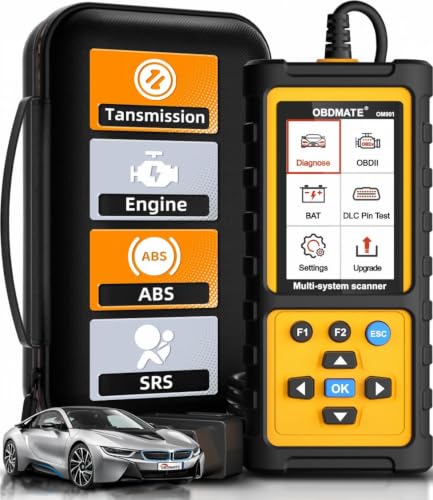
- 【Reset ABS/SRS/Transmission/Engine Lights】 More than an check engine code reader, OBDMATE OM901 obd2 scanner performs comprehensive diagnostics for the 4 most-used systems (ABS/SRS/Engine/Transmission). It quickly clears fault codes, turns off warning lights, read data stream and auto VIN.
- 【3.5" Handheld Scanner with 4 System Diagnose】 3.5" Super large TFT screen equipped displays an intuitive menu and clear readings of various sensors from ABS, SRS, ECM and TCM systems. It arrived with a silicone protective case and hard-shell carrying case, ensuring long-lived durability and drop resistance. The car diagnostic tool is plug-to-play designed, plug it and get diagnosis started without any batteries or updates required.
- 【One-Click I/M Readines&Full OBD2 Functions】 Press F1 to get an intuitive corloured form about whether various emissions-related systems on the vehicle are operating properly. Help you get smog-check ready quickly. OM901 car scanner supports all essential OBD2 functions you need: read & clear codes, view freeze frame, read I/M readiness, retrieve VIN, live data stream (with graphing display), O2 sensor test, onboard monitoring mode, and EVAP leak test.
- 【Battery Voltage Check&DLC Pin Test】 It allows you to monitor battery health by testing current battery voltage. Plus, this obd2 diagnostic tool features DLC 16-PIN test to check current voltage of every pin.
- 【Automotive Scanner Diagnostic Kit】 The package comes with 1 car scanner, 1 USB-type c cable, 1 hard storage bag and 1 user manual(en). Free to update without any hidden fees. 5 languanges available in setting including English, French, Italian, German and Espanish. Valuable and Portable, making it a great tool kit for car owners, DIY enthusiasts, and professional mechanics.

- OBD2 SCANNER FOR ALL SYSTEMS – The INNOVA SD35 is a tablet-based OBD2 scanner designed for advanced diagnostics. Read and clear check engine light, ABS, SRS, and TPMS codes, plus test your car battery and alternator to prevent unexpected failures. Vehicle coverage may vary. Please use Innova’s Coverage Checker to verify compatibility.
- ALL-SYSTEM DIAGNOSTICS & LIVE DATA – Unlike basic code readers, this OBD2 scanner for all vehicles scans engine, transmission, ABS, SRS, and more. Get real-time live data, including RPM, fuel trims, temperature readings, and oxygen sensor performance.
- OBD2 TABLET WITH USER-FRIENDLY INTERFACE – This automotive scan tool features a high-resolution display, making vehicle diagnostics faster and easier.
- ADVANCED TPMS, OIL RESET & SERVICE FUNCTIONS – Perform TPMS sensor checks, oil light reset, and other service resets with ease This professional diagnostic tool provides comprehensive vehicle maintenance capabilities in one device.
- WIDE VEHICLE COVERAGE (1996 & NEWER CARS & TRUCKS) – This OBD2 scanner Bluetooth tablet is compatible with Toyota, Ford, Honda, Chevrolet, Nissan, Dodge, and more. However, feature coverage may vary. Please use Innova's Coverage Checker to verify coverage.
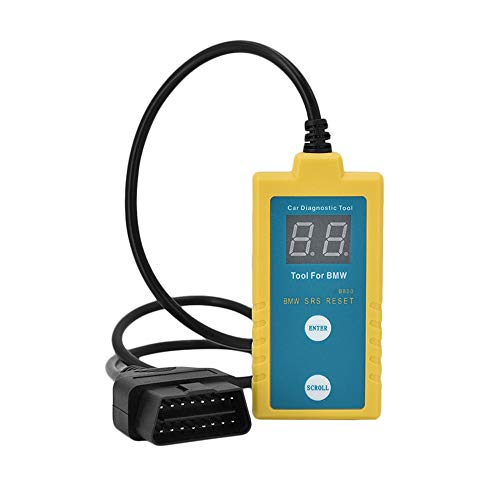
- ✔️【Professional SRS Reset for 1994-2003 BMW】 Designed specifically for classic BMW models (1994-2003). This B800 scanner reads & clears SRS airbag fault codes, turns off the warning light, and saves you a costly dealer visit. Confirmed compatible with: E36, E46 (EXCEPT 2001 330i), E34, E38, E39, Z3, and X5 (E53). NOT compatible with any BMW built before 1994 or after 2003.
- ✔️【Important: Two Different Connection Ports – Read Before Use】 To avoid “not working” issues, please note: For 1994–2000 BMWs (most E36, E34, Z3, early E39), the SRS diagnostic port is a round 20-pin connector under the hood. You MUST use the included 16-pin to 20-pin adapter cable. For 2000–2003 models (late E46, E39, X5), use the standard OBD-II port inside the cabin. Incorrect connection is the #1 reason for “incompatibility” reports.
- ✔️【Read & Clear Fault Codes in Minutes】 Quickly diagnose why your SRS light is on. The scanner accurately reads fault codes from airbag and seatbelt pretensioner systems. With one button press, clear the codes and reset the SRS warning light in seconds. No expensive dealer tools needed.
- ✔️【User-Friendly for DIYers – No Mechanic Required】 Easy operation with an intuitive button layout: ‘Enter’ to confirm, ‘Scroll’ to navigate. The clear LCD screen shows results instantly. Includes a step-by-step manual (revised for clarity) to guide you through the entire reset process.
- ✔️【Reliable Support with 1-Year Warranty】 We stand behind the quality of our B800 scanner. It comes with a 1-Year Hassle-Free Warranty. If you have any questions or need support, please contact us with your Order ID, and our dedicated team will assist you promptly.
- [All System Diagnostics, Professional-Level Scanner] - BLCKTEC 460T is the ultimate OBD2 diagnostic tool for home mechanics and professionals. It supports all 10 OBD2 modes, reads and clears Engine/Transmission/ABS/SRS codes, performs All-System Diagnostics, offers workshop reset tools, and provides real-time live data. It helps you pinpoint issues, assess your car's condition, and prepare for SMOG checks with ease. NOTE: Function availability depends on your vehicle. Before you buy, be sure to use the Compatibility Checker on BLCKTEC website or contact our customer support to verify that the features you need are supported for your vehicle’s specific year, make, and model.
- [12+ Most Popular Reset Functions] - BLCKTEC 460T OBD2 scanner offers 12+ dealer-level service functions, including Oil Maintenance Reset, ABS Bleeding, EPB Reset, SAS(Steering Angle Sensor) Recalibration, DPF(Diesel Particulate Filter) Reset, Throttle Body Relearn, Battery Reset/Initialization, TPMS Relearn, Transmission Reset, Fluid Change Reset, Maintenance Reset and more, enabling you to perform workshop services like a pro. NOTE: Function availability depends on your vehicle. Be sure to use the Compatibility Checker on BLCKTEC website to verify that the features you need are supported for your vehicle.
- [Real-Time OBD2 and OEM Live Data, Freeze Frame Data] - BLCKTEC 460T helps diagnose vehicle issues when warning lights like Check Engine Light or ABS/SRS Light appear. It offers detailed DTC info, ECU Freeze Frame Data, and real-time OBD2 and advanced OEM live data, including Engine, Transmission, ABS, SRS, and more, making it easy to diagnose and resolve vehicle problems. You can view, graph, record, replay, and overlay up to four live data streams in a single graph for better analysis.
- [AutoVIN, AutoReLink, AutoScan, 3X Faster] - Equipped with AutoVIN technology, 460T automatically retrieves the VIN to save you time. Its AutoScan and AutoReLink features scan all of the vehicle's ECUs and detect any fault codes immediately after you plug the scanner into the vehicle's OBD2 port - no button presses required. Additionally, it regathers DTC and I/M readiness information every 30 seconds, simplifying monitor tests. 460T's advanced technology makes it 3X faster than other products.
- [Get RepairSolutions2, the #1 Auto Repair App for Free] - When paired with RepairSolutions2(RS2) App, 460T becomes even more powerful. RS2's Verified Fix Database built by master technicians, provides the parts needed for the repair. Additionally, RS2 gives you access to OEM warranty info, maintenance schedules, TSB, and dealership recall info, making car care easier than ever. RS2 is free with no subscription fees and it stores your car scan reports in the cloud, allowing you to access, share, or print them anytime and anywhere.
This product presentation was made with AAWP plugin.